Changelog
A collection of new features, updates, and bug fixes to the SKUSavvy platform in chronological order. SKUSavvy releases multiple updates per week, enjoy!
Updates 6/21/2026
Best Feature Yet?
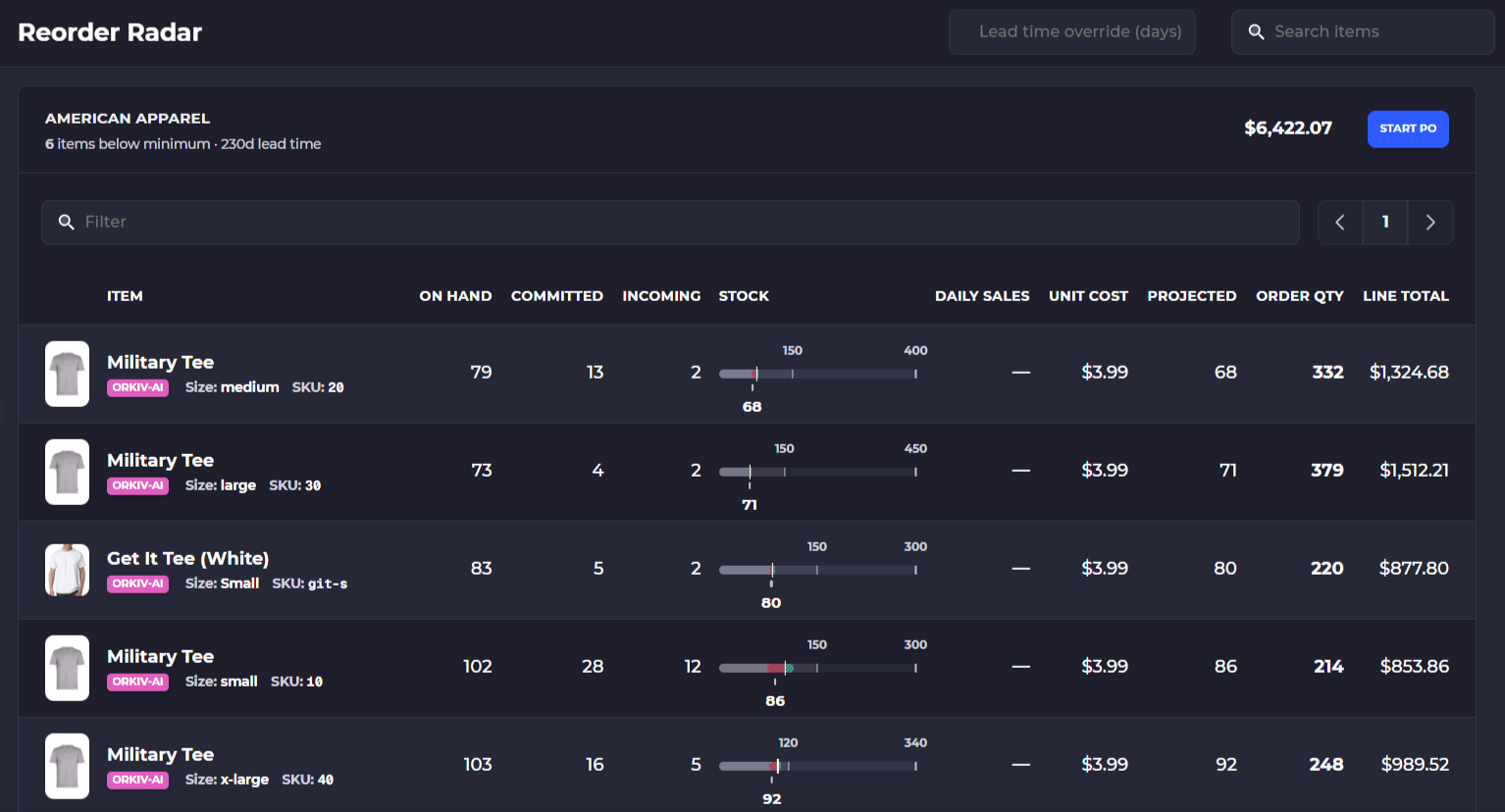
📊 Reorder Radar: Your AI assistant, SavvyBot, can now generate interactive Bar, Line, and Pie charts to help you visualize warehouse and order data right in the chat window. Additionally, you can instantly export any data tables generated by SavvyBot to CSV for seamless use in external programs like Excel or Google Sheets.
🛠️ Complete CSV Import Overhaul: The rebuilt data importer features a step-by-step visual workflow, smart column mapping, automatic formatting for dates/currency, and intelligent error handling that allows you to skip error rows and import the rest of your data successfully.
⚡ Auto-Advance to Next Shipment: You can have SKUSavvy move packers through fulfillments automatically after completing an order fulfillment
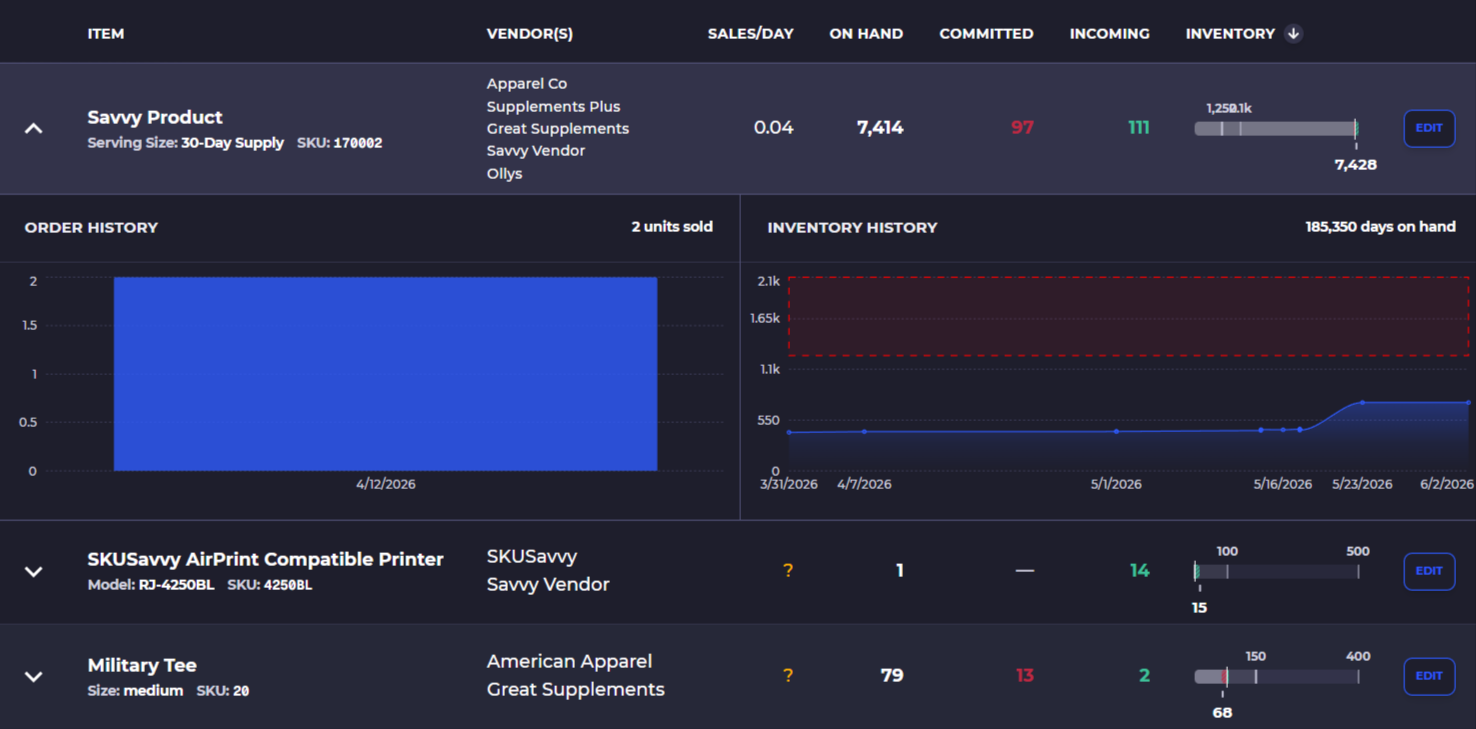
📊 Unified Inventory States: A brand new, normalized inventory table on the replenishment page that cleanly displays your on-hand, committed, and expected inventory all in one place.
✉️ Automated Support Email Alerts: To ensure you never miss an update on your support challenges, any ticket replies from the SKUSavvy team will automatically be emailed to you if they remain unviewed for 5 minutes.
🔍 Fine-Tuned Scan Requirements: New granular scan settings give you full control over exactly when an item barcode scan is required during warehouse workflows.
🔄 Flexible Data Source of Truth: Newly introduced settings allow you to choose whether Shopify or SKUSavvy acts as your primary source of truth for item costs, weights, and barcodes.
🌐 International Customs Declarations: You can now include custom declaration statements directly on international shipments to streamline cross-border logistics.
🏷️ Multi-Unit Barcode Multipliers: You can now assign a specific unit count to an individual variant barcode. For example, scanning a unique barcode can automatically register as picking 10 units of that single SKU at once.
💼 Advanced QuickBooks Account Mapping: New multi-account mapping rules based on Purchase Order (PO) or vendor metafields, allowing you to route syncs to different QuickBooks account classes seamlessly. Message [email protected] if you need help getting started.
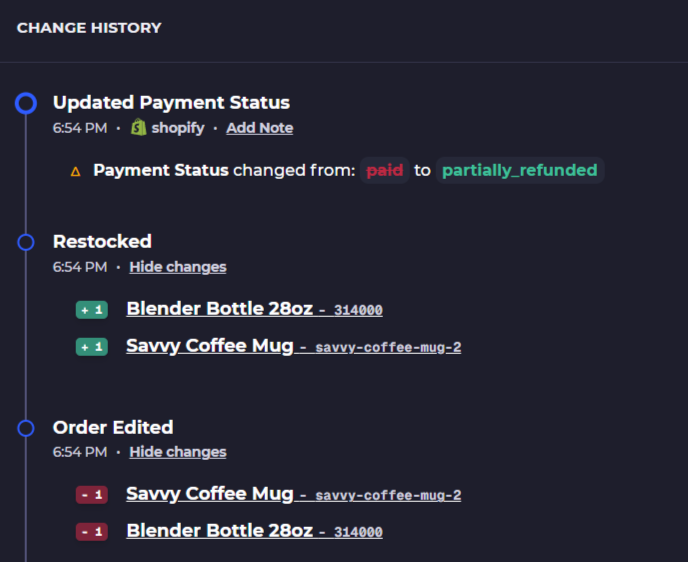
↩️ Enhanced Returns & Restock Visibility: SKUSavvy now tracks exact return and exchange events. When an order has a return event, a brand-new dedicated section appears directly within the order view to show you the details.
📦 Upgraded Fulfillment Interface: Enjoy a cleaner, more intuitive layout during the fulfillment stage, paired with an array of enhanced shipping options.
🗂️ Pick Side Batching Controls: New options within the batch shipment settings allow you to group your picks by their designated "pick side"—a massive help if certain shelving sides are temporarily inaccessible.
🗒️Expanded Order Log Details: You can now see more details within the logs of any order detail including exact items and the changes, refund, exchanges, and personnel involved.
Updates 6/3/2026
Performance Degraded
Updates 5/14/2026
Speed of AI
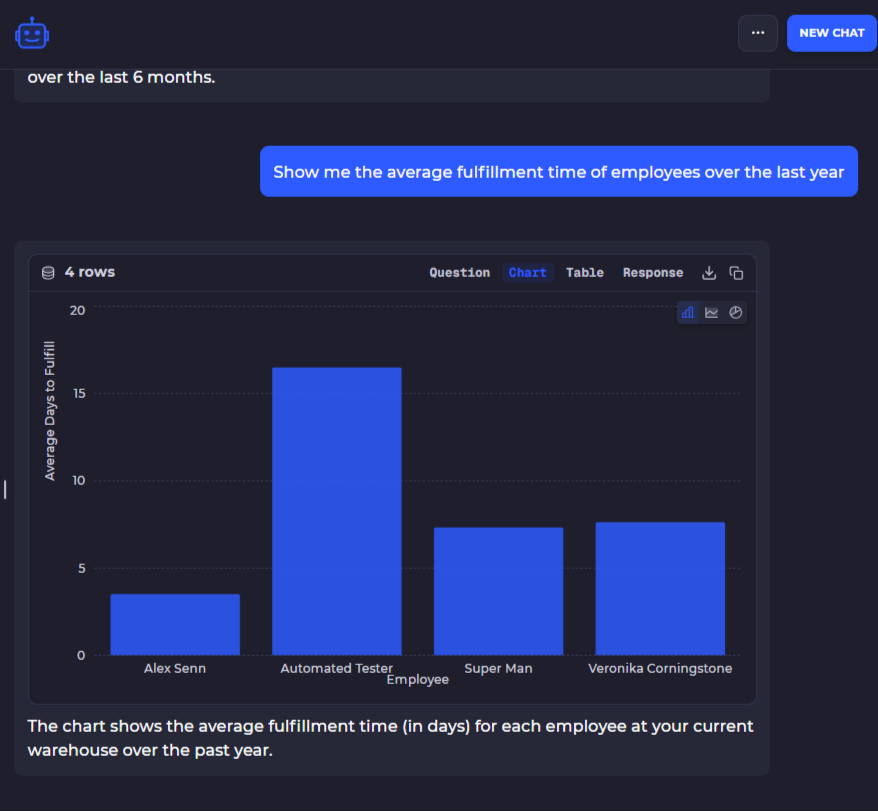
📊 Advanced SavvyBot Visualization & Data Exporting: Your AI assistant, SavvyBot, can now generate interactive Bar, Line, and Pie charts to help you visualize warehouse and order data right in the chat window. Additionally, you can instantly export any data tables generated by SavvyBot to CSV for seamless use in external programs like Excel or Google Sheets.
🧠 Context-Aware SavvyBot Assistance: SavvyBot now provides smarter prompt suggestions tailored specifically to where you are in your journey—offering foundational setup help for newer users and deeper historical analytics for mature accounts.
📥 Expanded Bulk Import Capabilities: Due to popular demand, we have added several new import types to streamline your data entry, including dedicated imports for Vendors, Kits, and Bin Barcodes.
🔍 Global SKU Mismatch Tracking: If you are running global inventory operations, you can now view any SKU mismatches between the variant and the inventory via a dedicated table located at
.png)
.
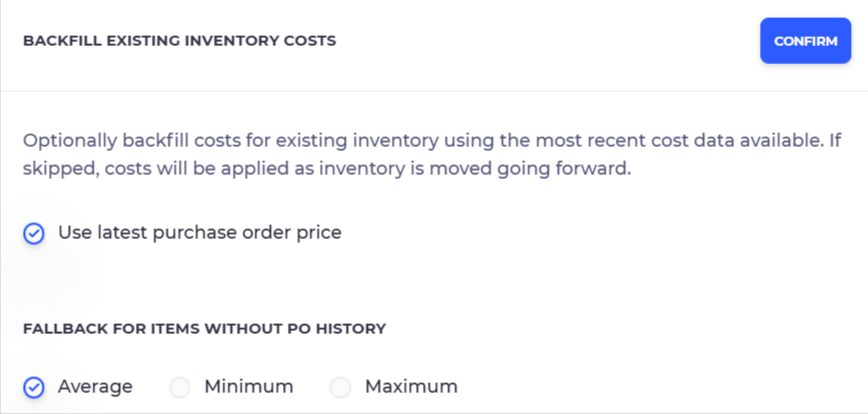
💰 Multi-Layered Cost Tracking: We have introduced new cost layers featuring a dedicated landed cost value that can be applied to each item, as well as a dedicated cost field for every inventory adjustment to ensure higher financial accuracy.
🚶 Natural Pick Routing: This new routing mode clusters bins by their shelf face and sorts them naturally (top-to-bottom, left-to-right), closely matching how pickers physically move through an aisle for faster, more intuitive pick paths.
📅 Expiration-Based Picking (FIFO & LIFO): You can now configure batch picking logic to prioritize lot expiration dates, allowing the system to automatically direct pickers to grab the earliest-expiring (First-In-First-Out) or latest-expiring (Last-In-First-Out) inventory.
🏗️ Rapid Bin Generation & Layout Mirroring: Save time mapping your warehouse with reusable Bin Naming Presets; once you have perfectly mapped one shelf level, you can use the new bulk tool to instantly copy that exact layout to other levels on the rack.
📝 Enhanced Shopify Draft Order Integration: Draft orders now seamlessly sync with a clear "Draft" status badge and can be configured to automatically reserve inventory or change assigned warehouses to allocate stock exactly where you intend to fulfill it.
🔄 Crystal Clear Return Tracking: The return history log now explicitly details if a returned item was restocked, kept by the merchant, or is an unverified return, with unverified items being automatically routed into a dedicated holding stock.
📜 Visual Advanced Order Logs: When order or customer notes are updated, the change history now highlights exactly what words were added (in green) or removed (in red), eliminating the need to re-read entire notes to find changes.
⏳ Manual Lead Time Overrides: When generating Purchase Orders, you can now bypass historical delivery averages and manually input a specific lead time in days to instantly calculate the exact stock needed for that specific timeframe.
🛠️ Complete CSV Import Overhaul: The rebuilt data importer features a step-by-step visual workflow, smart column mapping, automatic formatting for dates/currency, and intelligent error handling that allows you to skip error rows and import the rest of your data successfully.
🧹 Automated Inventory Deduplication: The system now works in the background to detect and merge duplicate items sharing the same SKU and cleans up duplicate lot records to maintain a clean and accurate inventory database.
⚡ Quick Inventory Filters & Cost Prefills: The Lots directory now includes an "In Stock" toggle to instantly hide depleted lots, and the system now automatically suggests the most recent landed cost when manually adding inventory to reduce manual entry and typos.
🎯 Precise ABC Analysis Insights: Hovering over an ABC inventory badge will now display the exact sales percentile for that item (e.g., "95.5th percentile"), providing sharper insights into product velocity and stock importance.
🚀 Lightning-Fast Data Tables: Our data tables have been upgraded to load instantly and scroll flawlessly regardless of whether you are viewing 50 or 50,000 records, ensuring your browser never lags or freezes.
📈 Upgraded Visual Dashboards: We’ve rolled out a sleek new charting engine for faster-loading dashboards and item history views that clearly highlight your minimum and maximum seasonal replenishment thresholds.
✏️ In-Fulfillment Note Editing: You can now edit order notes directly within the fulfillment screen, allowing you to update critical information without leaving the picking or packing workflow.
⚡ Auto-Advance to Next Shipment: You can have SKUSavvy move packers through fulfillments automatically after completing an order fulfillment.
Updates 4/6/2026
SavvyBot is the SKUSavvy version of Sidekick
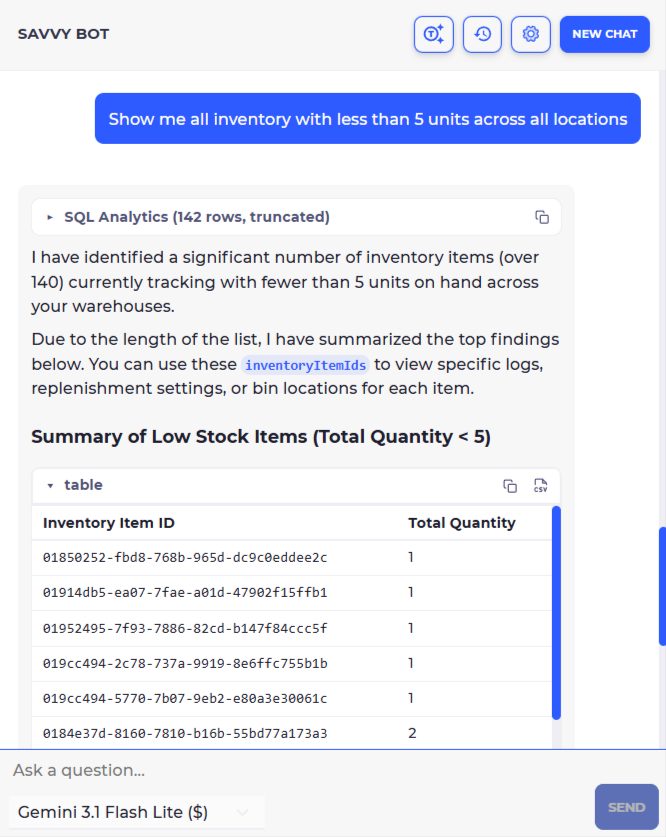
Inventory & Replenishment: "Show me all inventory items that have fallen below their minimum stock levels in the North Warehouse."
"List my top 10 best-selling variants over the last quarter by revenue."
"Show me every product below 5 units across all locations"
"Create a PO for products that have no stock"
Updates 4/5/2026
Shopify Inventory Resync Improvements
We improved how SKUSavvy calculates on-hand inventory when resyncing to Shopify. Previously, the resync could include stale picked and packed quantities from old, unfulfilled shipments, causing the number sent to Shopify to be higher than your actual available stock. This was particularly noticeable after performing a manual inventory recount.
What Changed
The resync now only includes batch picks from the last 30 days when calculating on-hand inventory to send to Shopify. Batches older than 30 days are excluded because the physical items have almost certainly been returned to shelves or were already counted during a recount.
The resync now only includes packed-but-not-fulfilled shipments from the last 30 days. Shipments sitting unfulfilled for longer than 30 days are excluded for the same reason.
These changes apply both to the full inventory resync (triggered from **Settings** > **Shopify** > **Resync**) and to the real-time per-change sync that updates Shopify when you move inventory in SKUSavvy.
Packed Shipments View
We also added an expandable row to the **Packed Shipments** page in each warehouse. You can now click any packed shipment to see exactly which items and quantities are packed inside it. Shipments older than 30 days are highlighted so you can identify and clean up stale shipments that may be holding inventory.
If you notice discrepancies between SKUSavvy and Shopify after a resync, check your **Packed Shipments** page for old unfulfilled shipments. Cancelling or fulfilling these shipments will release the held inventory.
Updates 4/2/2026
Introducing SavvyBot
SavvyBot is a built-in AI assistant that can answer questions about your account, look up orders and inventory, run analytics, navigate you to the right page, and even make changes on your behalf. It lives in a resizable sidebar on the right side of the app.
To open SavvyBot, click the robot icon in the top navigation bar. The sidebar is resizable by dragging its left edge.
What SavvyBot Can Do
SavvyBot has access to several tools it uses automatically based on your question:
**Navigate** — Ask SavvyBot to take you to any page. For example, "go to my warehouses" or "show me order #1234". It will provide a clickable link to the correct page.
**Query Data** — Ask questions about your orders, inventory, shipments, or products. SavvyBot reads your data in real time via GraphQL. For example, "how many orders shipped this week?" or "show me the inventory for SKU ABC-123".
**SQL Analytics** — For complex analytical questions, SavvyBot translates your question into a database query. For example, "what are my top 10 selling products this month?" or "average fulfillment time by warehouse". Results are returned as tables.
**Documentation** — Ask how-to questions about platform features. For example, "how do I set up a pick-to-tote workflow?" or "how does replenishment work?". SavvyBot searches the documentation and returns relevant answers.
**Onboarding** — If you are new to SKUSavvy, SavvyBot can walk you through account setup, warehouse configuration, and product imports step by step.
**Mutations** — When enabled, SavvyBot can create, update, and delete data on your behalf. For example, "update the quantity of SKU-100 in bin A1 to 50". Mutations always require your explicit approval before they execute.
Mutation Approval
When SavvyBot needs to create, update, or delete data, it shows you the exact action it plans to take and waits for your approval. You can review the details, then click **Allow** to proceed or **Deny** to cancel. If you deny, you can optionally provide a reason so SavvyBot can adjust its approach. Mutations are disabled by default and must be turned on in **Settings**.
Conversation History
SavvyBot saves your conversations locally in your browser. Click the history icon in the chat header to view past conversations, resume where you left off, or delete old ones. Click **New Chat** to start a fresh conversation.
Settings
Click the gear icon in the chat header to configure SavvyBot. You can:
**Choose your AI model** — Select from Gemini 3.1 Flash Lite (default, cheapest), Gemini 2.5 Flash, GPT-4o Mini, Claude Haiku 4.5, or Claude Sonnet 4.6. Models with more dollar signs are more capable but cost more credits per message.
**Toggle tools on or off** — Enable or disable mutations, analytics, documentation search, and onboarding assistance individually.
**Add a custom system prompt** — Provide your own instructions that SavvyBot will follow in every conversation. For example, "always respond in French" or "focus on warehouse operations".
Credits
SavvyBot usage is metered by AI credits. Your remaining balance is shown in the chat header — green means you have credits, yellow means you are running low, and red means you are out. When credits run out, the input is disabled until you purchase more.
Click the credits indicator in the chat header to view your balance and purchase additional credits. Larger purchases include a bonus: $10 gets +5%, $25 gets +10%, $50 gets +20%, and $100 gets +25%.
Tips
Be specific. "How many units of SKU-100 are in warehouse Main?" works better than "show me inventory".
You can edit any message you sent by clicking on it. SavvyBot will re-run from that point.
You can retry any SavvyBot response if you want a different answer.
SavvyBot knows which page you are on. If you ask "what is this order?" while viewing an order page, it will use that context.
Use the cheapest model (Gemini 3.1 Flash Lite) for simple lookups and navigation. Switch to a more capable model for complex analytics or multi-step tasks.
Updates 3/28/2026
Global Inventory Launching Today!
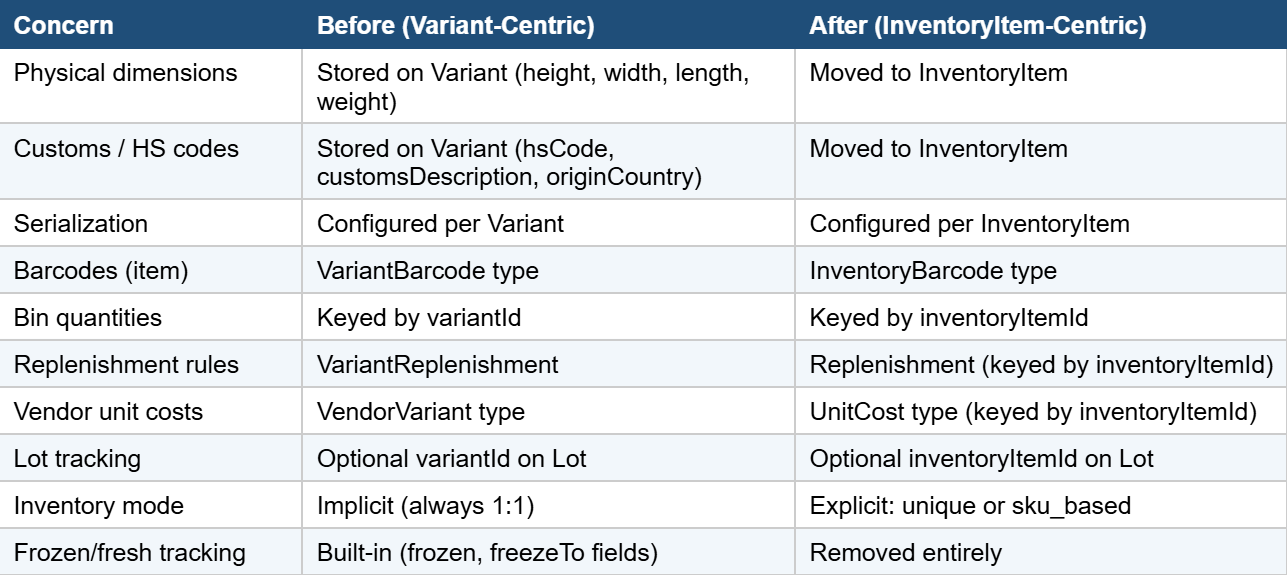
Enables multiple stores with the same SKU to share inventory on one pool
Should go pretty smooth, but given the huge amount of changes we will be monitoring and may have to make some hot fixes on the fly, we thank you for your patience in advance
Any API connection referencing variants will likely need to be updated
Use this Gemini Gem to automatically migrate your existing GraphQL queries over to the new API
Here is the full migration guide
Here are the actual breaking changes
Once enabled you will notice that any product sharing a SKU across your account will be merged
Inventory will be merged into one pool
Inventory quantities will update simultaneously across the stores that have the same SKU
This is completely opt-in, so you can keep operating as you have been if you do not want merged inventory
Updates 3/16/2026
Global Inventory Breaking Changes [API]
Please share this email with your team as it is very important to understand new changes coming to SKUSavvy which will break any existing API connections you may have in place.

This release introduces a fundamental change to how inventory is modeled across the entire platform. The previous design tied physical inventory tracking directly to sales-channel Variants. The new architecture introduces a dedicated InventoryItem entity that sits between Variants and physical warehouse quantities. Multiple Variants can now reference the same InventoryItem, enabling shared inventory pools across sales channels, SKU-based inventory consolidation, and cleaner separation of product catalog concerns from warehouse operations.

This makes it possible to have the same product on multiple stores share one inventory pool. Please update your API connections with these new changes. Note that the interface will not change significantly, and you can still keep variant based inventory (non pooled inventory).

Resources to manage your migration

Log into your account to view the billing portal for your account
Use this Gemini Gem to automatically migrate your existing GraphQL queries over to the new API
Here is the full migration guide
Here are the actual breaking changes within the API
Updates 3/10/2026
Changes Coming to SKUSavvy Pricing April 15th
.png)
Stores paying >$500 will experience no significant change
Stores with contracts that guarantee pricing for contract terms will stay as is through the contract period
New base fee of $179/month minimum across all accounts, 250 orders included now
Updates 3/5/2026
Small Improvements, Big Changes Coming!
🔐 Reporting Permissions: We’ve added a dedicated permission set for employees, allowing you to specifically control who has the authority to view, create, or edit reports within your organization.
🔐 Reporting Permissions: We’ve added a dedicated permission set for employees, allowing you to specifically control who has the authority to view, create, or edit reports within your organization.
🏪 Multi-Store Filtering: Managing multiple storefronts? You can now filter products and inventory views by specific stores, making it much easier to segment stock and manage multi-channel operations without the visual clutter.
✏️ Edit PO Costs After Check-In: Now you can edit the costs of items on a PO after completing a check-in
📊 COGS Calculation Tool: SKUSavvy has introduced a powerful Cost of Goods Sold (COGS) calculation tool that provides the exact value of your inventory based on cost prices. This feature is also available as a dedicated report to help you maintain precise financial records of your operations.
📦 Bulk Pack Action Barcodes: Speed up your fulfillment by creating an action barcode that, when scanned during the packing process, will automatically pack all remaining items at once. This is a major time-saver for high-volume, consistent shipments.
👤 Account Ownership & Deletion: Account owners now have the ability to reassign ownership of the company account. Additionally, owners can now permanently remove an account directly from the settings if the business needs change.
⚡ Automated Batch Progression: A new batch setting allows you to automatically move to the next step in a batch. To enable this, click on the 3-dot menu within a batch and select "pick" to turn on the automated workflow.
🏢 Multi-Tenancy Capability: If you manage multiple SKUSavvy accounts for different companies, you can now easily switch between them within the same interface. To enable simply invite the staff email to both accounts and SKUSavvy will recognize the email to link them then you can tap on the company name to switch.
🚩 Flagging & Batch Management: You can now flag an order fulfillment directly from the fulfillment screen or remove an order from a batch entirely. All flagged orders can be viewed in one centralized location from the fulfillment home for easier resolution.
🧠 AI Package Training: During the fulfillment process, SKUSavvy will now begin to "learn" from the package sizes used for specific item combinations. Over time, this trains the system to provide more accurate automated packaging suggestions.
🏷️ Store Tags Integration: Store tags have been added in various locations throughout the platform. This helps you quickly identify which product is attached to which specific store, which is especially useful when running multiple Shopify integrations simultaneously.
Updates 1/29/2026
On to the New Year!
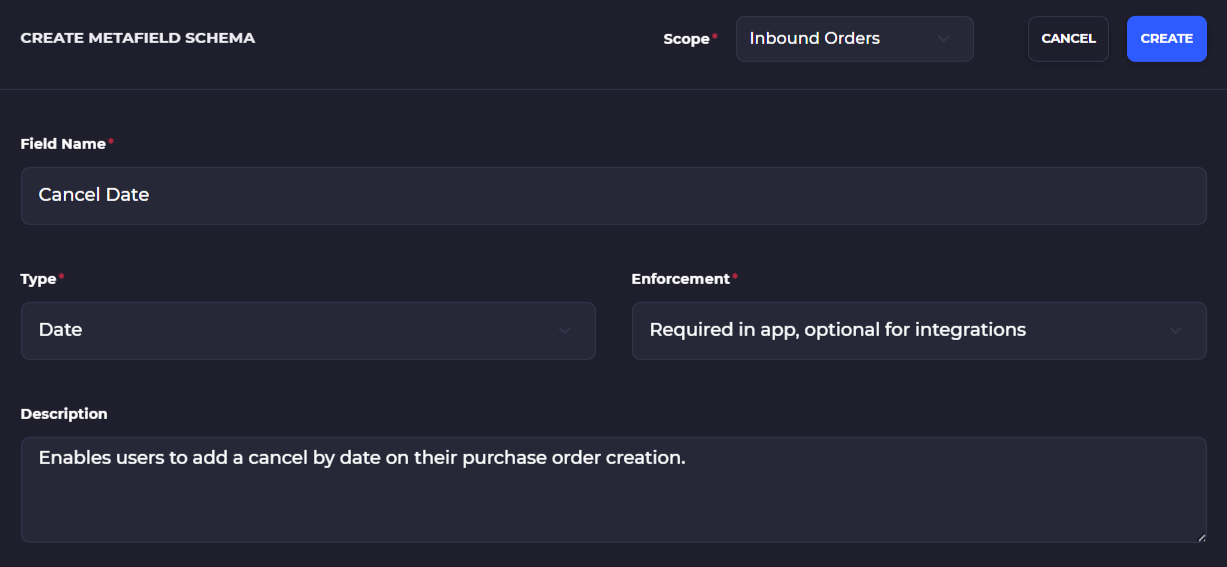
🔄 QuickBooks Metafields & Billing Sync: You can now map custom fields on Purchase Orders directly to QuickBooks using metafields. Additionally, QuickBooks now supports billing updates, which automatically syncs the financial status of a PO back into SKUSavvy for seamless accounting. Inquiry if you'd like to get QuickBooks sync for SKUSavvy at $50/month
📑 Required Account Metafields: Customization just got a boost! You can now create account-wide metafields and set them as "required" in specific areas, starting with Purchase Orders. This is perfect for ensuring essential data, like a "Cancel By Date," is captured every time.
⚡ Detailed Developer Webhooks: We’ve significantly expanded our webhook payloads. Developers can now access much more granular, real-time data updates, making it easier than ever to keep your external systems in perfect sync with your warehouse operations.
📦 Enhanced Bin-to-Bin Replenishment: We’ve rebuilt the bin-to-bin replenishment workflow to be more automated and stable. This update ensures your picking bins stay stocked with less manual intervention, keeping your fulfillment floor moving at top speed.
🖱️ Bulk Select Dropdown Tool: Navigate your data faster with shift-click functionality on any dropdown. Simply click the first option, then shift+click the second to instantly select those two options and everything in between.
🔍 Rebuilt GraphiQL Explorer: For our technical users, the API explorer has been completely redesigned. It now features better query generation and intuitive dropdown selections for inputting data, making it easier to build and test your GraphQL integrations.
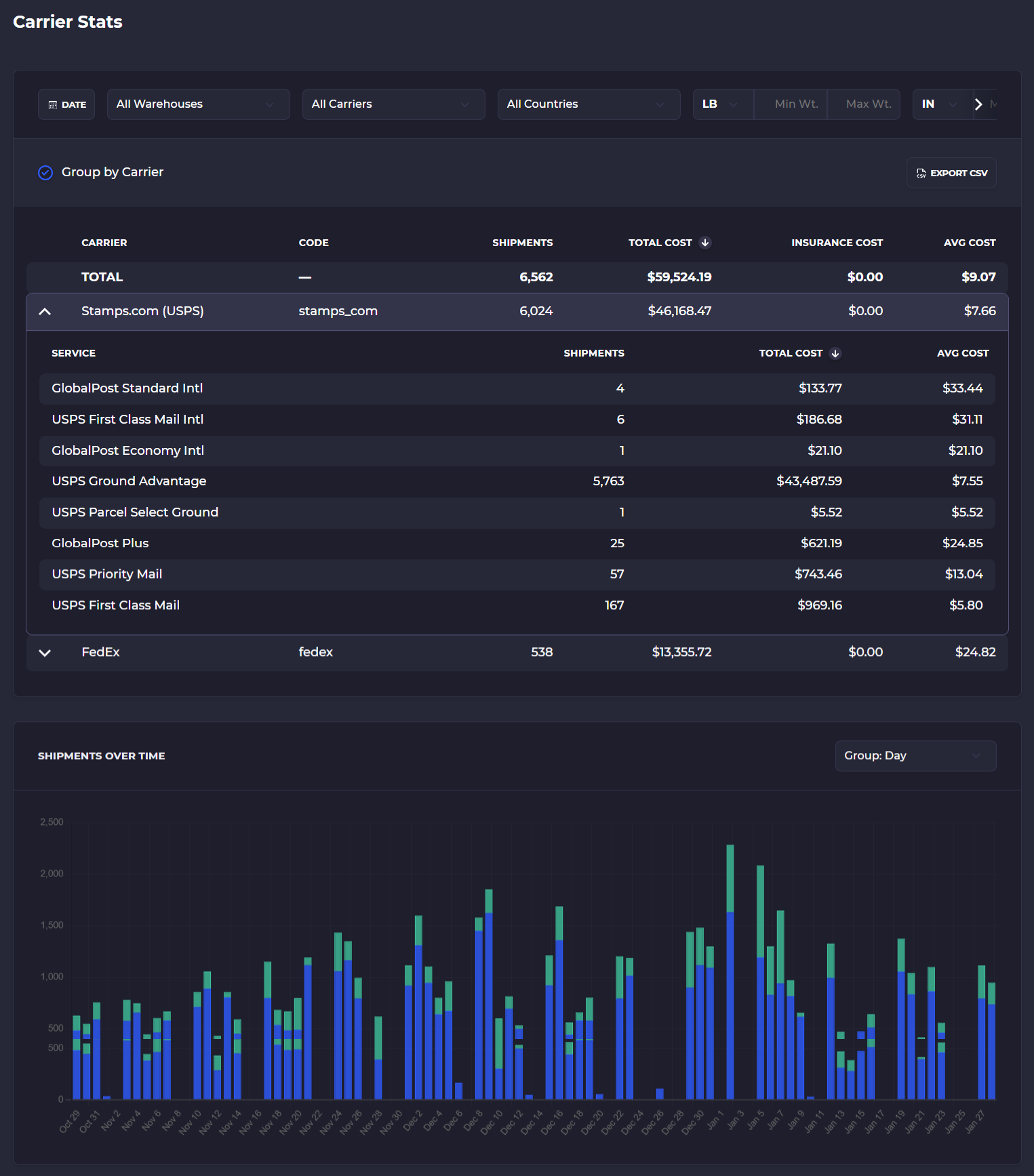
📊 Carrier Stats Report: Gain deep insights into your shipping spend with our new Carrier Stats report. View shipping costs by carrier and use powerful filters for warehouse, country, date range, and even min/max weight or volume to optimize your carrier mix.
📥 Bulk Import Replenishment Settings: Managing stock levels is now a breeze. You can now import min/max levels and default lead times via CSV. Just head to Warehouse > Stock Replenishment; all you need is the SKU or UPC and your desired quantities.
🏷️ Pack All Action Barcode: Speed up fulfillment with a new action barcode type. By enabling this setting and creating an "ACTION: PACK ALL ITEMS" template, you can instantly pack all shipment quantities for an order with a single scan.
🔐 Reporting Permissions: We’ve added a dedicated permission set for employees, allowing you to specifically control who has the authority to view, create, or edit reports within your organization.
🤝 Vendor Brand Mapping: You can now better organize your supply chain by associating specific brands with your vendors. Simply navigate to a vendor’s detail page and add the brands they carry, separated by commas.
🗺️ Visual Pick Paths: See exactly where you are going before you start walking. You can now overlay the pick path directly onto your 3D warehouse map. simply head to your batch settings to toggle this visualization on.
🏪 Multi-Store Filtering: Managing multiple storefronts? You can now filter products and inventory views by specific stores, making it much easier to segment stock and manage multi-channel operations without the visual clutter.
✏️ Edit PO Costs After Check-In: Now you can edit the costs of items on a PO after completing a check-in
Updates 12/8/2025
Oh Sweet Christmas Shopping
📊 QuickBooks Integration with Landed Costs — SKUSavvy’s QuickBooks integration now supports landed costs, syncing full product cost data—including freight, duties, and fees—into your financial system for more accurate COGS and inventory valuation. Inquire if you'd like to enable QuickBooks sync for $50/month
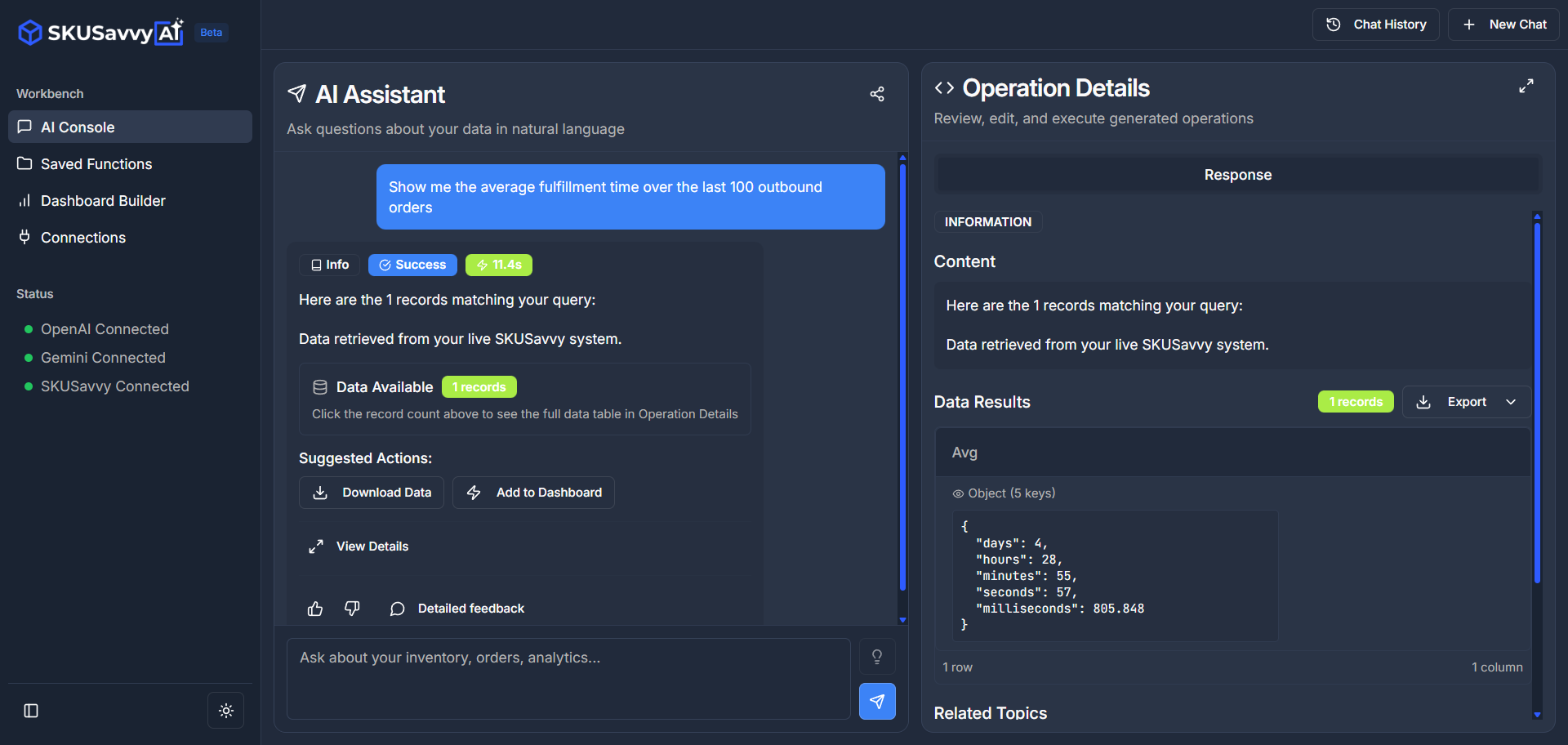
🤖 AI Workbench: Harness the power of Gemini or OpenAI directly within your warehouse. This new workbench lets you query your SKUSavvy data using natural language to uncover insights, instantly generate custom charts, save dynamic dashboard widgets, and download datasets for deeper analysis without needing a data scientist.
📦 One-Scan Bulk Packing: Efficiency just leveled up. You can now pack every single item in a shipment with just one barcode scan. This is a game-changer for uniform orders or trusted picking workflows where speed is the priority. Print the bulk packing QR code or enable in your account then go to your templates to print it out (its an Action barcode type).
📚 The Logistics Wiki: We are building the ultimate glossary for the trade. Check out our growing knowledge base at wiki.skusavvy.com to master every term related to logistics, supply chain, and warehouse management
⚡ Turbocharged Pick Routing (like 20x faster): We’ve overhauled our routing engine for serious speed. You will notice significantly faster calculation times for large order batches and a smoother, more responsive experience on mobile devices—perfect for high-volume operations that can't afford lag.
✈️ Autopilot Evolution: Automation just got smoother. We have updated Autopilot to seamlessly handle shipping label purchasing and printing based on your specific criteria. Give the new workflow a spin at
🗺️ Visual Pick Paths: See exactly where you are going before you start walking. You can now overlay the pick path directly onto your 3D warehouse map. simply head to your batch settings to toggle this visualization on.
🏪 Multi-Store Filtering: Managing multiple storefronts? You can now filter products and inventory views by specific stores, making it much easier to segment stock and manage multi-channel operations without the visual clutter.
Updates 11/5/2025
Robot Revolution
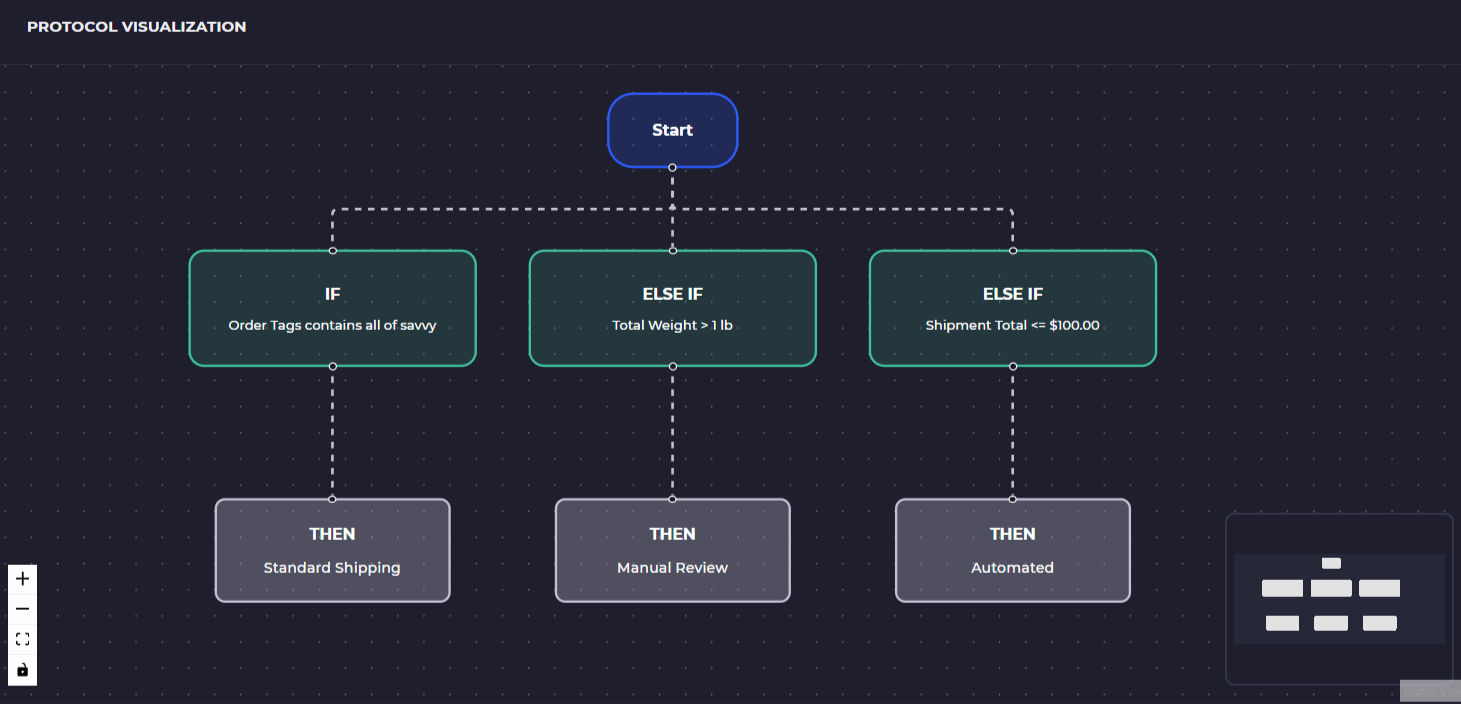
🚀 Autopilot AI for Shipping Automation — SKUSavvy's new Autopilot intelligently filters and purchases shipping labels based on your rules, balancing cost vs. speed. Define strategies by carrier, service, destination, or order tags, and auto-approve shipments that meet your conditions—or route them for manual review.
📦 Bulk Packing During Fulfillment — Automatically pack full order quantities with one action. This new bulk pack mode eliminates the need to scan each item, accelerating your fulfillment process during busy periods. Enable on your account
🏷️ License Plate Labels for Conveyance — Print unique license plate barcodes for each box moving through your conveyor system. This enables better box-level tracking, automated routing, and scan-based handoffs throughout your warehouse.
🤖 Cubiscan Integration for Automated Dimensioning (Rolls out this month) — Connect Cubiscan devices to SKUSavvy to auto-capture item and package dimensions. This data is instantly applied to packaging logic, shipping calculations, and warehouse slotting—reducing manual entry and errors.
🧮 Bulk Counting on PO Check-in — Quickly enter item counts during purchase order receiving without scanning each unit. This feature simplifies bulk receiving workflows while still maintaining full quantity accuracy and traceability.
🛒 Simplified Pick-to-Tote with Unique Totes — The new pick-to-tote flow removes the need for cart barcodes by treating each tote as a uniquely scannable container. This speeds up batching, reduces setup, and allows teams to pick independently with more flexibility. Read the guide
📊 QuickBooks Integration with Landed Costs — SKUSavvy’s QuickBooks integration now supports landed costs, syncing full product cost data—including freight, duties, and fees—into your financial system for more accurate COGS and inventory valuation. Inquire if you'd like to enable QuickBooks sync for $50/month
Updates 9/29/2025
Big Changes
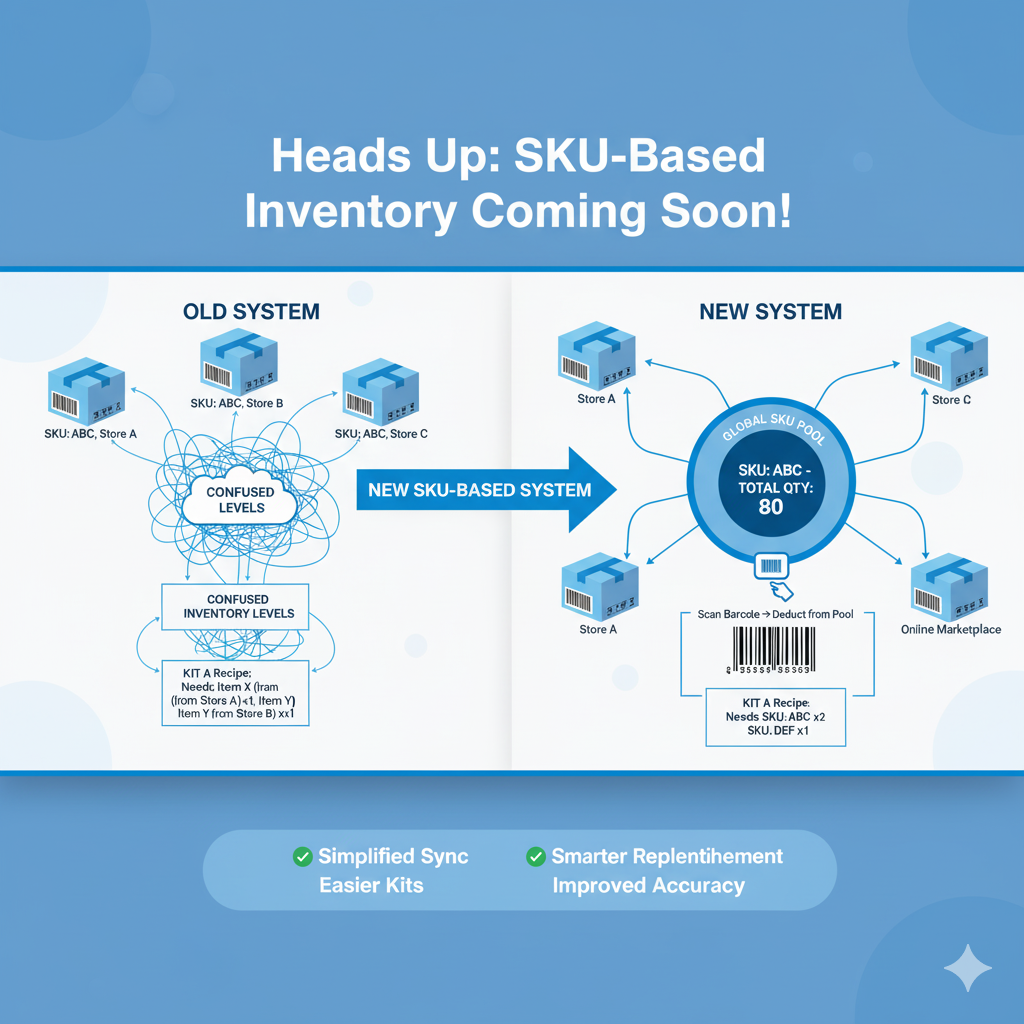
Bin to Bin Replenishment Imports: If you are using min and max for bin replenishments, this feature will enable you to easily upload spreadsheets with min, max, bin name to resupply pick bins from holding stock bins
More Bin Replenishment Filters: Now you can sort bin replenishment tables, indicate from/to bins, indicate if there is an origin bin or not.
Shipping Insurance: If you haven't turned on shipping insurance, you can go into the advanced shipping options during fulfillment, select from the insurance menu. Note, you need to have this turned on within the ShipEngine portal within your account carriers > modify carriers and go to Shipping > Insurance
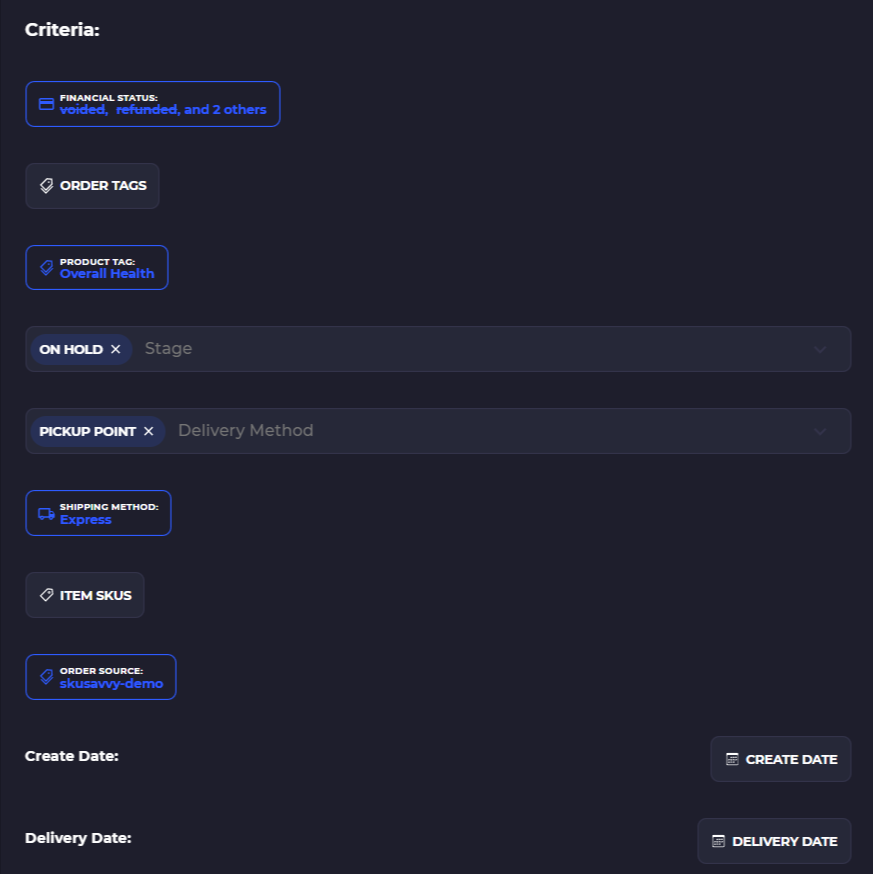
Distributed Landed Costs: this is an early beta, we plan to release this into production soon. This will enable you to add a custom item and distribute the costs across items by value, units, or weight. New Batch Criteria Filters: new batching criteria will give you even more flexibility over the control of which products get assigned for pick-pack-ship. Filter by stage of the order (on-hold, processing, scheduled, etc.)
Bulk counting on PO receiving: turn this on from your PO settings to count all items on a PO during check-in making for a single count step. You will still need to allocate stock to a bin, however you can allocate all items to one bin if you'd like.
Updates 9/24/2025
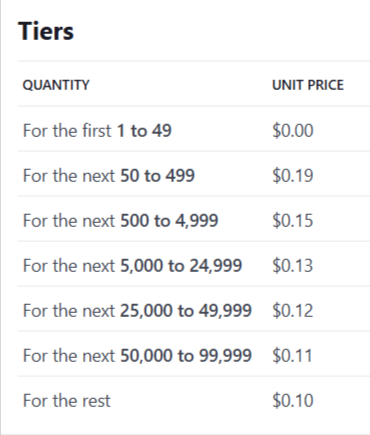
Price Change - The Day is Almost Here
Updates 9/15/2025
Underreported Billing for the prior month. You may experience a higher bill this month since we updated the billing but missed a period of roughly 20 days.
Updates 9/1/2025
Thanks for being one of the first!
Updates 8/16/2025
Faster Loading Means Faster Fulfillment
🏃♀️ Vastly Improved Bin Load Times: Much faster bin input for large layouts, making the process significantly more efficient.
🐞 Bug Fixes: Fixed issues with cycle count completion and unresponsive buttons for a smoother user experience.
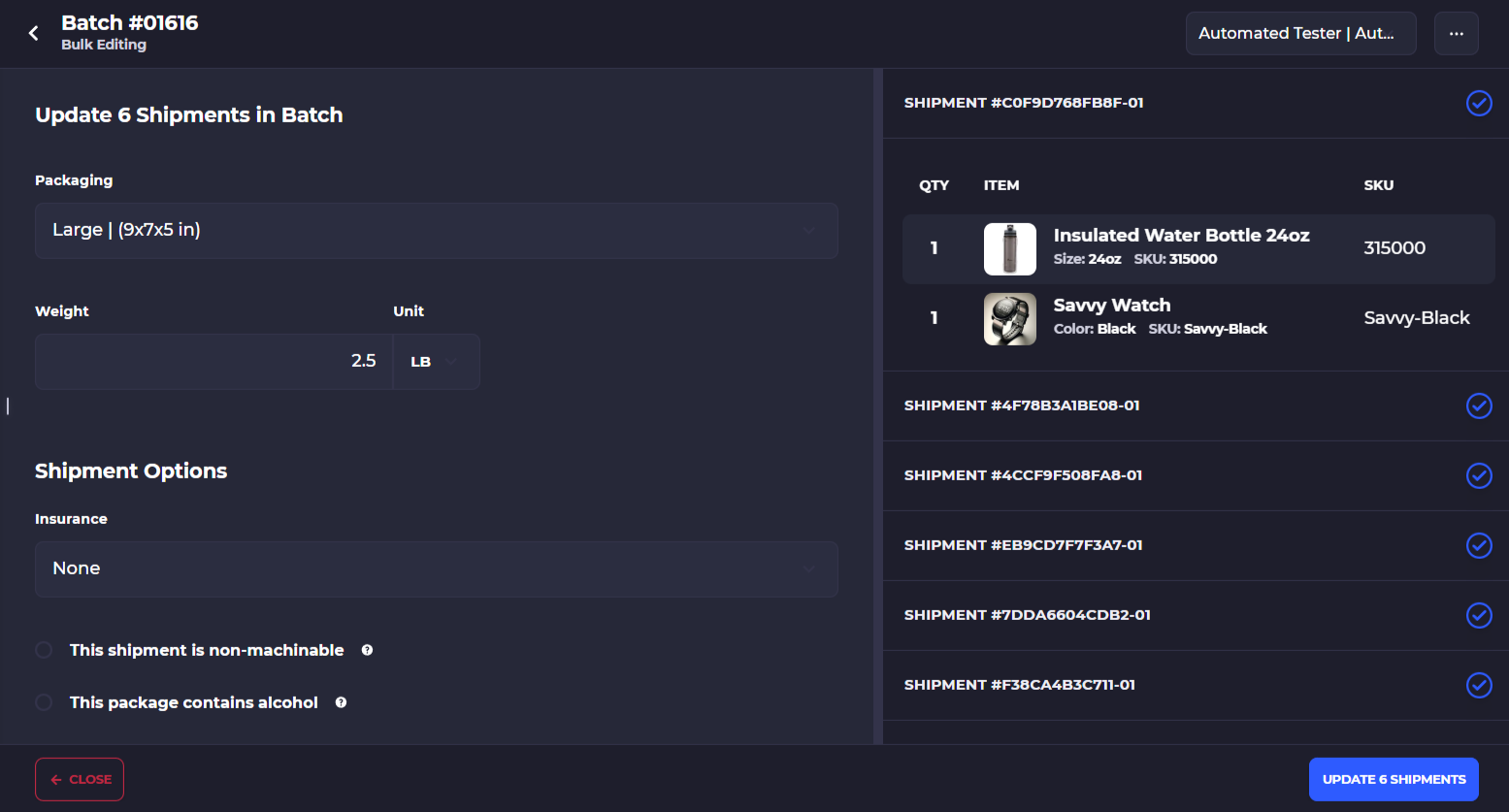
⚙️ New Batch Settings Menu: A new menu is now available directly from the pick screen on any batch, allowing you to bulk assign package size, shipment weight, and delivery options. Go into
🔑 Shopify Reauthentication: Reauthenticate with Shopify to ensure your account has the correct and updated permissions
📦 Improved Bin Replenishments: Bin replenishments can now utilize any 'from' bin, eliminating the need to assign a specific one. View
🔍 Bin Replenishment Filters: New filters allow you to narrow down bin replenishments by 'from' or 'to' bin/shelf, sort the table, and automatically select the required quantity for transfer.
🚚 New Batch Creation Criteria: Create new batches based on delivery methods like POS, shipping, pickup, or local delivery.
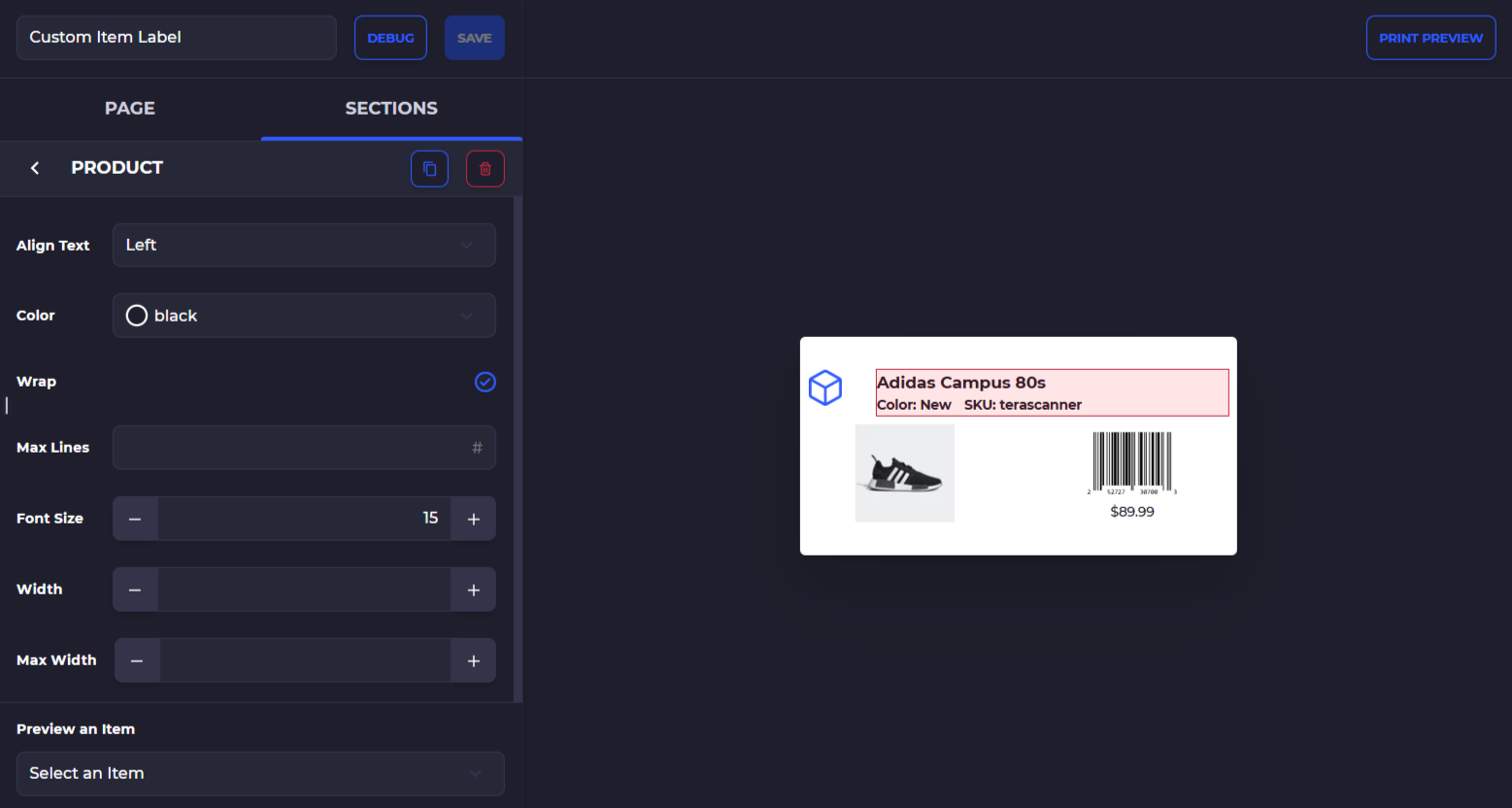
📝 Much Improved Template Builder: The template builder offers more control over spacing, text sizes, and other details, with the ability to turn features on/off and test how a product will look on a label.
Updates 7/28/2025
Major Infrastructure Updates
🚀 Improved Warehouse Map PerformanceNavigating your warehouse just got smoother. The upgraded map engine handles more complex and intricate layouts without performance slowdowns, so you can plan and manage with precision.
🧭 Warehouse Layout DashboardInstantly visualize your layout stats. A new dashboard gives you a breakdown of shelf counts, bin totals, bins per level, and more—providing a high-level snapshot of your facility structure.
👁️🗨️ Set a Global Pick Starting Position: Improve your pick routing with a global pick start position applied to all users on your account to cut down on pick times and improve pick routing. Simply go to your layout, tap 'Edit' and click the bullseye icon to set the starting point
⚙️ Core Technology Version Upgrades: SKUSavvy’s backbone just got stronger. We’ve implemented crucial upgrades across core platform technologies to improve reliability, speed, and future feature support.
📊 More Efficient Data Tables: Query performance is better than ever. We’ve migrated key data tables to a more efficient system, allowing faster, more scalable access to your operational data.
📥 Data Imports Made Easy: Get up and running in record time. Import inventory, costs, and min/max levels directly from within the platform where you need them—no extra tools or waiting required.
📦 Exact Match Order Batching: Group orders like a pro. You can now create batches based on identical item contents and quantities, with upcoming support for bulk printing all using the same box size and shipping label.
🏷️ POS Reconciliation Bin Targeting: Fine-tune your inventory accuracy. POS orders now deduct only from designated reconciliation bins, giving you full control over stock allocation and tracking.
🔍 Enhanced Shipment View in Orders: See what’s really shipping. The new alternate view for orders shows individual shipments and provides greater visibility into shipment statuses and tracking details.
Updates 7/12/2025
Import Everything
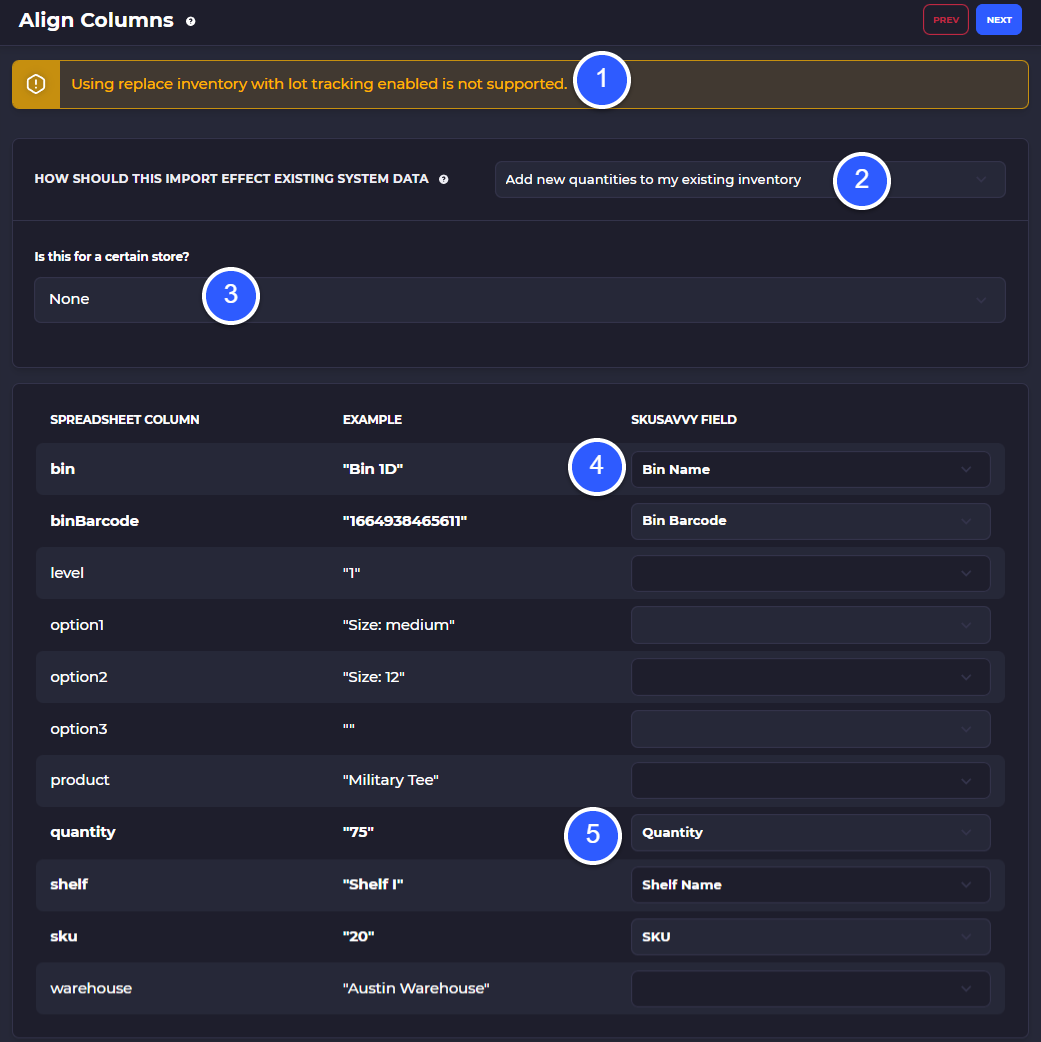
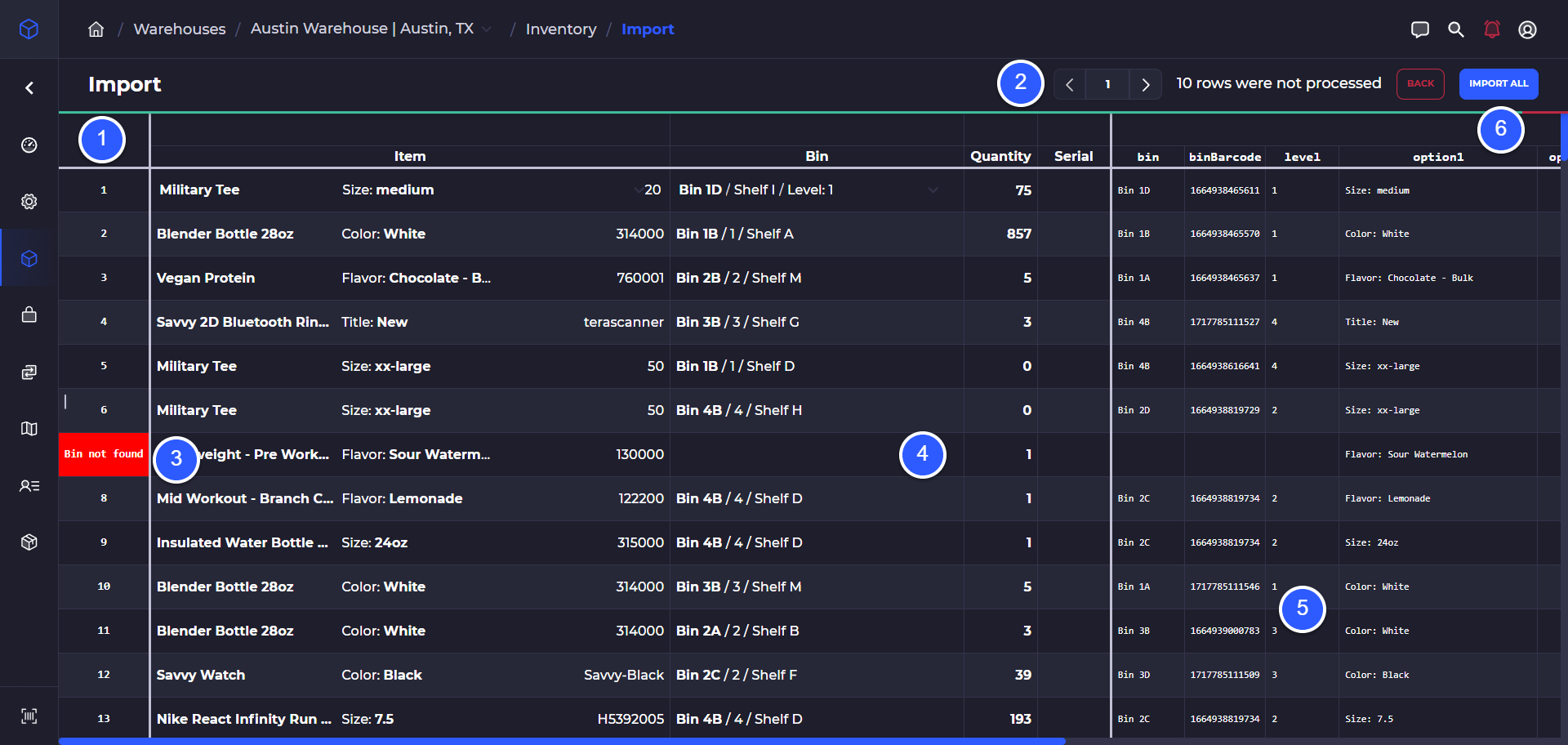
✨ Smarter Imports for Inventory & More: You can now effortlessly upload and update crucial data for your inventory, including product costs and your desired minimum and maximum stock levels. This powerful new import system is designed to drastically cut down on manual data entry, providing you with more accurate and timely information to make smarter inventory decisions. This includes dedicated import functionalities for inventory, minimum and maximum par values, and costs, with robust control over how your data maps to SKUSavvy fields and the ability to manually adjust any discrepancies during the import process.
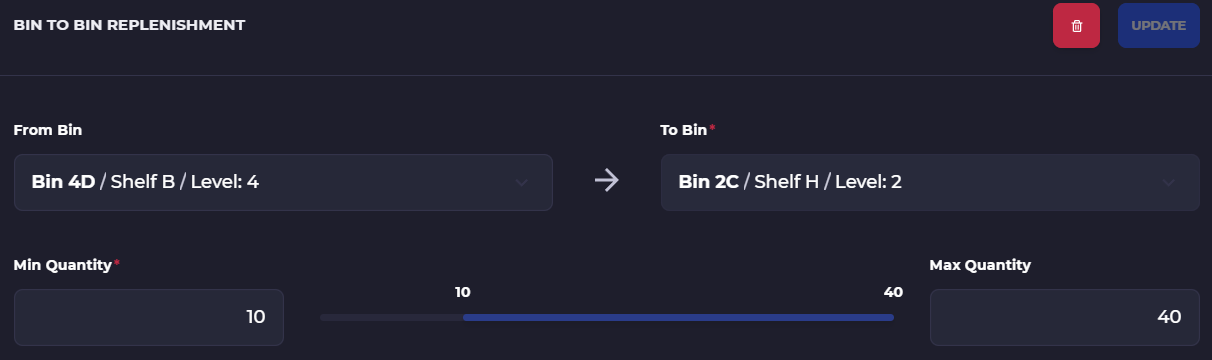
🔄 Flexible Bin Replenishments: Gone are the days of rigid bin-to-bin transfers! Our enhanced bin replenishment feature means you no longer need to specify an exact "from" bin. SKUSavvy's intelligent system will now automatically identify the most optimal available location to pull inventory from, leading to a much smoother and more efficient warehouse flow. This significant improvement allows for more dynamic replenishment strategies, letting the system decide the best source bin when one isn't specifically named.
🎨 Enhanced Visuals for Clarity: We've completely revitalized our internal "Badge" component system. This means that all the helpful visual indicators you rely on throughout the platform – from order statuses to financial tags – are now more consistent, easier to read, and aesthetically pleasing. This seemingly subtle change dramatically improves your overall user experience and makes navigating SKUSavvy even more intuitive, with better color coding for specific tag structures across the platform.
🤝 Smarter Terms of Trade Codes: We've made significant updates to how Terms of Trade Codes (TOTC) are handled. SKUSavvy now uses a tiered approach to ensure greater accuracy and compliance in your trade declarations: if a shipment has a specific TOTC, it will be prioritized; otherwise, the country-specific TOTC will be applied; and as a final fallback, the default TOTC will be used.
💲 Order Financial Status Filtering: SKUSavvy now imports the financial status of an order directly from your connected platforms. This powerful addition allows you to filter order batches by their financial status, giving you granular control over your fulfillment processes based on payment and financial clearance.
📊 New Warehouse Layout Dashboard: Gain clearer insights into your warehouse structure with the new layout dashboard! This view now prominently displays the total number of bins, shelves, areas, and borders within your warehouse, along with the number of bins per level shown directly on your layout view. This provides a quick and comprehensive overview of your physical space utilization.
🛣️ Pick Sides for Shelves: To enhance picking efficiency and streamline your internal routing, we've added the ability to specify "pick sides" for shelves. This helps guide your team to the correct side of your bins, optimizing pick paths and reducing search time. Set these by clicking on a shelf in the layout builder
🔗 Shopify Meta Data Sync: For our Shopify users, SKUSavvy now seamlessly syncs metadata for your orders and products. You can now search and sort by these meta fields directly in your tables and even incorporate them into your custom templates, providing richer data insights and customization options. Currently a premium feature, ask our team to enable on your account
🔒 Shopify Reauthentication: Required To ensure SKUSavvy continues to operate effectively and leverage our latest features, a reauthentication with Shopify is required. This update will refresh your Shopify app permissions. Please go to your Shopify connection in SKUSavvy to complete this important step. VERY IMPORTANT TO REAUTHENTICATE
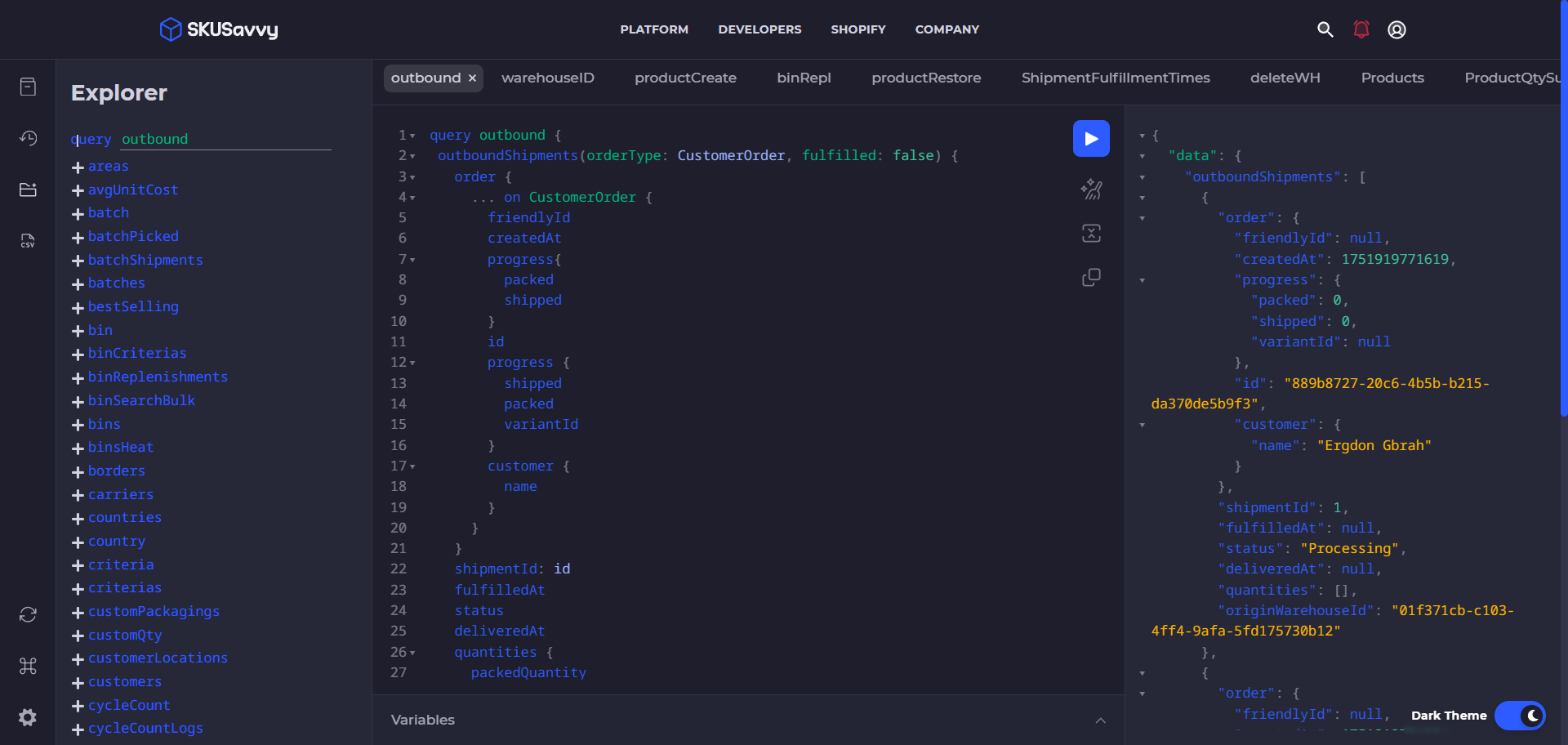
⚙️ Updated GraphiQL Query Builder: For our advanced users, we've updated the GraphiQL query builder, making it even more intuitive for creating custom reports. You can now easily build powerful, tailored reports and export them with the new CSV button on the left-side menu. Go to the
📧 Improved Ticketing System & Notifications: Our ticketing system has received a significant upgrade! You can now see replies directly from the SKUSavvy team on your tickets, and our notification system for these updates has been enhanced. While we receive many feature requests and appreciate your input, we cannot accommodate them all. We thank you for your patience as we prioritize and build the most impactful features for the majority of our users.
📦 New Orders View for Shipments: The "Orders" view has been revamped to focus on shipment-related information instead of just order-level data. You can easily switch to this detailed shipment view by tapping the paragraph-looking icon in the top right of the orders tables, giving you a clearer picture of your fulfillment progress.
💡 Understanding Reconciliations: We've added resources to help you better understand reconciliations and their critical importance for your store's financial health and inventory accuracy. Keep an eye out for updated guidance within the platform.
🏪 More Store-Level Filters: To provide you with greater data granularity, we've introduced more store-level filters. You can now easily narrow down your data to a specific store, giving you more precise insights and control over multi-store operations.
Updates 5/27/2025
Metas are Here

🧹 Cleaner Inventory View: Declutter your workspace with a new setting that allows you to delete zero inventory levels from your main inventory table. This helps you focus on active stock and streamlines your view.

🚀 Enhanced GraphQL Explorer: Building custom queries and exporting data is now easier than ever. Our updated GraphQL Explorer offers improved options to help you construct your queries efficiently and export the exact data you need for reports or integrations
🔗 Shopify Meta field Sync & Customization: Unlock deeper product insights by automatically syncing meta fields from Shopify directly into SKUSavvy. You can add these meta fields to your inventory tables and even incorporate them into different label templates by setting custom namespaces from the Shopify connection page in SKUSavvy (currently this is a paid feature only, please let us know if you'd like to enable this on your account)
🏷️ Shipping Label Additional Fields: Tailor your shipping labels with specific details such as the order number, external ID, or box number using a built in additional fields on some carriers. Manage these custom fields easily from your
🛡️ Automated Customer Data Deletion: Maintain data privacy and compliance effortlessly with a new setting to automatically delete customer data after a specified period. This helps you manage customer information responsibly and in line with data protection regulations.
🖨️ One-Tap Serial Number Printing: Need to print a specific serial number? Now you can simply tap on any serial number directly from your inventory table to initiate printing, saving you time and clicks.
↩️ Simplified Kitted Item Unpicking: Easily adjust your kitted inventory. You can now unpick a partially kitted item by tapping the 'Pick' button and entering a negative number corresponding to the quantity you wish to return to stock.
Updates 5/4/2025
Always Be Counting

Updates 3/23/2025
We're in the Shopify App Store 🎉🍻

Updates 3/23/2025
Bin There, Done That: Capacity Control & Directed Put-Away Arrive Alongside Test Mode

🧪 Test Mode Environment: A dedicated sandbox environment allowing users to experiment with workflows, configurations, and data manipulations without affecting live production data. This ensures a safe space for training, testing new strategies, and exploring advanced features before implementation. How to turn on test mode
📦 New Bin Capacity Management: Enhanced control over bin capacity, enabling users to define specific weight, volume, or unit limits for individual bins. This feature provides granular control over storage optimization and prevents overstocking. Turn this on in your configs
➡️ Directed Put-Away Criteria: Customizable rules for directing new inventory to optimal bin locations based on product attributes, storage requirements, or historical data. This streamlines the receiving process, minimizes errors, and improves inventory organization.
🖥️ UI Improvements: Optimized user interface with increased table space, improved readability, and clear visibility of deleted products. This enhances overall user experience and facilitates efficient data management.
💾 Saved Filters: Ability to save frequently used filter configurations on most tables, eliminating the need to reapply filters repeatedly. This feature saves time and streamlines data analysis.
🏷️ Kit Names and Descriptions: Enhanced kit management with the ability to assign descriptive names and detailed descriptions to kits. This improves clarity, organization, and facilitates efficient kit assembly and tracking.
🚀 Improved System Infrastructure: Significant infrastructure enhancements resulting in faster processing of events and queries, improved system stability, and enhanced performance. This ensures a seamless and responsive user experience.
🔒 Multi-Factor Authentication (MFA): Enhanced security through multi-factor authentication, requiring users to provide multiple forms of verification before accessing their accounts. This protects sensitive data and minimizes the risk of unauthorized access. Turn on MFA company-wide or turn it on for your account
📡 Honeywell Hardware Scanner Support: Expanded hardware compatibility with support for Honeywell barcode scanners, enabling seamless integration and efficient data capture.
📝 Enhanced Bulk Bin Generation: Improved bulk bin generation with customizable bin naming patterns, allowing users to create structured and organized bin layouts efficiently.
🌡️ Detailed Heatmaps: Enhanced heatmap functionality with specific bin heat strength indicators, providing detailed insights into inventory turnover and storage optimization.
🔄 New Batch Creation Criteria: Enhanced criteria for batch creation, allowing for more specific and customizable batching of orders. This allows for greater flexibility in picking and packing.
🤝 Order Pick Batch Merging: The ability to merge order pick batches together. This allows for increased efficiency when a user needs to combine smaller batches.
🔢 Inventory Quantity Click to Edit: Users can now click on an inventory quantity directly within the user interface to quickly and easily make adjustments. This removes the need to navigate to a separate edit screen.
📦 Enhanced Shipping Insurance: Improved shipping insurance options through the ShipEngine portal, providing comprehensive coverage and peace of mind for shipped orders.
📜 Order Timeline: You may have seen a new timeline available on any order within SKUSavvy that shows all changes to the order including new tags, shipments, fulfillments and new activities from Shopify
🔍 Global Search: You can now search across all relevant areas of the app with deep links that will bring you directly to that piece of data. Also, search with natural language questions to bring up docs that are most related. Access by pressing on the magnifying glass in the top nav bar, or Ctrl + F on your keyboard
Updates 1/21/2025
How did Christmas End Up? 📈📉

Saved Table Views 💾: Your saved table views now appear at the top of most tables, making it easier to access your preferred data layouts.
Negative Filters ➖: Exclude specific criteria when filtering data. This powerful feature is especially useful for batching
Shipping Insurance Update 🛡️: Enhancements to shipping insurance calculations provide more accurate coverage for your shipments.
Commercial Invoice Printing 🖨️: Generate and print commercial invoices directly from SKUSavvy for international shipments.
Improved Imports ⬆️: Importing Purchase Orders (POs), transfers, and outbound orders is now vastly improved, with streamlined workflows and better error handling.
Enhanced Check-In ✅: Checking in POs with lots, expiration dates, and serialization is now more efficient and user-friendly.
Action Barcode Labels 🏷️: Automate tasks during fulfillment with action barcode labels. Scan a label to perform actions like picking, packing, and shipping. You can also assign a specific package to an action barcode for automated scan-based packaging.
Updated UI Elements ✨: UI elements have been updated to display more data and improve overall usability.
Updated Docs & Guides 📖: Our documentation and guides have been refreshed with new images and up-to-date content

Shipping Manifest Tab 🚢: A dedicated tab now stores all your prior shipping manifests for easy access and reference.
Batch Merging 🔄: Merge multiple batches seamlessly for improved warehouse organization.
Batch Dropdown & Labels 🔽: Easily view orders within a batch and print batch labels with the new dropdown functionality.
Automated Custom Bin Name Generation 🗄️: Set a predefined bin naming structure during layout creation for better warehouse organization and consistency with your own naming pattern. Accessible from the layout creator on the shelf or bulk in generator.
Updates 11/27/2024
Black Friday is Upon Us 💳

Action Barcodes: The are available in your account print templates, they take minutes to setup and enable your team to make actions within SKUSavvy simply by scanning a barcode. Move through the batch, select box sizes, print shipping labels, just by scanning a barcode.
Removed Complexity: If you're never deleting features it only ever get's more complex, so we removed units of measure due to lack of usage and high complexity. This is in favor of step counts during the purchase
Search with AI: There are two new AI enhancements. First, the embedded search now supports complex questions and will return the most relevant docs. While in platform press Ctrl + F to search anything. Also, we have built out a custom GPT powered by chatGPT that is pre-trained with all of the docs, guides, API, and website content.
🕵️♂️ Improved Search Across All ContentEasily find any data you need across SKUSavvy with enhanced search functionality that spans all content types, ensuring no critical information is missed.
📦 Action Barcodes for Fulfillment StepsScan action barcodes to swiftly move through picking, packing, and shipping steps, reducing manual inputs and speeding up workflows.
🌍 Terms of Trade Selection for International OrdersChoose specific trade terms like duties paid or other options for international shipments, enabling smoother cross-border transactions.
🚫 Disable Specific Shipping Rate TypesGain control over shipping rates during fulfillment by turning off unnecessary or irrelevant rate types to streamline operations and avoid confusion.
🔄 View Batch Shipments and Item StatusPull down batch information to see shipments in progress, item statuses, and even print a batch label before opening the batch for ultimate efficiency.
🔗 Merge Incomplete Pick BatchesCombine incomplete pick batches to ensure no items are left behind and orders are fulfilled seamlessly, optimizing resource allocation.
💰 Aggregate Margin Visibility for VendorsView aggregate margins for each item on the variant vendor detail page, providing valuable insights into profitability at a glance.
✍️ Edit Lot Numbers and Assign BarcodesManage inventory with precision by editing lot numbers and assigning barcodes directly, enabling better traceability and tracking.
🔄 Enhanced Cycle Count FunctionalityAdd products to bins during cycle counts, utilize continuous scanning for faster counting, and generate detailed post-cycle count reports to keep inventory accurate.
📄 New Manifests TabAccess a comprehensive history of all shipping manifests in the new manifests tab, ensuring easy recordkeeping and retrieval for auditing or operational needs.
💸 3PL Billing Portal Early AccessWe have been working on a 3PL billing portal and are slowly rolling this out in Alpha phase. If you would like to try the 3PL billing portal please let our team know and we will share access for free
Updates 10/9/2024
Syncing to Scale🔔

Faster Processing Times: Webhook events are now processed more swiftly, ensuring that your inventory and order information is updated in near real-time.
Enhanced Reliability: We've increased the robustness of our webhook handling to minimize disruptions and ensure consistent data flow between Shopify and SKUSavvy.
Scalability Improvements: The system is now better equipped to handle higher volumes of data, which is especially beneficial during peak sales periods.
🔢 Serialization Updates to Support Different InputsYou can now upload serial numbers from the PO creation on the import
🔄 Updated Shopify Product Barcode Sync: We've enhanced the barcode synchronization with Shopify products. This update detects and updates barcodes to ensure the most accurate data for scanning, reducing errors and improving efficiency in your inventory management.
🚀 Improved Shopify Event Handling: Our system now separates product and order events from Shopify, allowing for faster processing. This means quicker updates and a more responsive experience when managing your products and orders.
🛠️ Various Fixes for Shopify API Improvements: We've implemented several fixes related to Shopify API interactions, including improved resyncing capabilities to and from Shopify. These enhancements ensure smoother data synchronization and reduce potential issues.
📊 Margin History Chart: We've introduced a new chart that shows you margin over time for a given product. This is located within your product variant > vendors
📍 Ability to Resync a Single Location: You can now resync data for just a single location to or from Shopify. This gives you greater control over your data synchronization processes, making it easier to manage specific warehouses or stores without affecting others.
🚫 Limit Items Suggested for Transfer: We've added functionality to prevent items that shouldn't be transferred from being suggested for transfer from specific locations. This helps maintain accurate inventory levels and prevents unintended stock movements.
📏 Step Counting Limitations for Purchase Orders: We've introduced step counting limitations that enforce a specific unit of measure type that must be purchased during purchase order creation. This setting can be adjusted by navigating to the

🏁New Timeline for order events: If you haven't seen the last update on timeline history for orders, purchases, and transfers be sure to check it out at the bottom of any order detail page
Updates 10/9/2024
Syncing to Scale🔔
Faster Processing Times: Webhook events are now processed more swiftly, ensuring that your inventory and order information is updated in near real-time.
Enhanced Reliability: We've increased the robustness of our webhook handling to minimize disruptions and ensure consistent data flow between Shopify and SKUSavvy.
Scalability Improvements: The system is now better equipped to handle higher volumes of data, which is especially beneficial during peak sales periods.
🔢 Serialization Updates to Support Different InputsYou can now upload serial numbers from the PO creation on the import
🔄 Updated Shopify Product Barcode Sync: We've enhanced the barcode synchronization with Shopify products. This update detects and updates barcodes to ensure the most accurate data for scanning, reducing errors and improving efficiency in your inventory management.
🚀 Improved Shopify Event Handling: Our system now separates product and order events from Shopify, allowing for faster processing. This means quicker updates and a more responsive experience when managing your products and orders.
🛠️ Various Fixes for Shopify API Improvements: We've implemented several fixes related to Shopify API interactions, including improved resyncing capabilities to and from Shopify. These enhancements ensure smoother data synchronization and reduce potential issues.
📊 Margin History Chart: We've introduced a new chart that shows you margin over time for a given product. This is located within your product variant > vendors
📍 Ability to Resync a Single Location: You can now resync data for just a single location to or from Shopify. This gives you greater control over your data synchronization processes, making it easier to manage specific warehouses or stores without affecting others.
🚫 Limit Items Suggested for Transfer: We've added functionality to prevent items that shouldn't be transferred from being suggested for transfer from specific locations. This helps maintain accurate inventory levels and prevents unintended stock movements.
📏 Step Counting Limitations for Purchase Orders: We've introduced step counting limitations that enforce a specific unit of measure type that must be purchased during purchase order creation. This setting can be adjusted by navigating to the
This ensures consistency and accuracy in your purchasing process.
🏁New Timeline for order events: If you haven't seen the last update on timeline history for orders, purchases, and transfers be sure to check it out at the bottom of any order detail page
Updates 9/15/2024
Almost Time to Rock!🔔

🔢 New Serialization System: We’ve introduced advanced serialization support! You can now manage individual items through serialized tracking, helping you track products by their unique serial numbers. Turn this on within the

🥶 Fresh & Frozen Goods Management: We’ve added better controls for managing temperature-sensitive goods. Now you can convert fresh and frozen goods more efficiently by assigning a frozen product and different expiration date
⏱️Fulfill Button: Now we introduced a new button on top of the order detail page to quickly take you right into fulfillment for the order
📱 Continued Mobile View Enhancements: Our ongoing improvements to the mobile interface ensure smoother workflows and better usability while you manage orders, inventory, and picking directly from your mobile device
📤 New Export Suite: Exporting data is now easier than ever! The new export suite allows you to extract inventory, order, and shipment data into multiple formats, helping you with reporting and analysis, check out the new
📦 Order Logging with Shipment Address Updates: You will soon see a log of order actions with improved shipment address updates, ensuring accurate delivery details every time and preventing costly errors
🚚 Pick & Pack Sync for External Shipping: When you pick and pack orders within SKUSavvy but ship externally, our new sync feature will automatically update both your inventory and order status. This ensures your records are always accurate across both platforms. Be sure to both pick and pack to avoid unpick situations
⚙️ Improved Configuration Navigation: We’ve revamped the configuration navigation and added search to more easily find settings you might want to adjust
⚡ New Cache Mechanism: Enjoy better data handling and smoother operation with our updated caching mechanism, making your experience receiving and seeing new updates seamless
Updates 9/15/2024
Almost Time to Rock!🔔
🔢 New Serialization SystemWe’ve introduced advanced serialization support! You can now manage individual items through serialized tracking, helping you track products by their unique serial numbers. Turn this on within the
🥶 Fresh & Frozen Goods ManagementWe’ve added better controls for managing temperature-sensitive goods. Now you can convert fresh and frozen goods more efficiently by assigning a frozen product and different expiration date
⏱️Fulfill ButtonNow we introduced a new button on top of the order detail page to quickly take you right into fulfillment for the order
📱 Continued Mobile View EnhancementsOur ongoing improvements to the mobile interface ensure smoother workflows and better usability while you manage orders, inventory, and picking directly from your mobile device
📤 New Export SuiteExporting data is now easier than ever! The new export suite allows you to extract inventory, order, and shipment data into multiple formats, helping you with reporting and analysis, check out the new
📦 Order Logging with Shipment Address UpdatesYou will soon see a log of order actions with improved shipment address updates, ensuring accurate delivery details every time and preventing costly errors
🚚 Pick & Pack Sync for External ShippingWhen you pick and pack orders within SKUSavvy but ship externally, our new sync feature will automatically update both your inventory and order status. This ensures your records are always accurate across both platforms. Be sure to both pick and pack to avoid unpick situations
⚙️ Improved Configuration NavigationWe’ve revamped the configuration navigation and added search to more easily find settings you might want to adjust
⚡ New Cache MechanismEnjoy better data handling and smoother operation with our updated caching mechanism, making your experience receiving and seeing new updates seamless
Updates 8/15/2024
Continued Mobile Updates⚡

Automated Reordering of Backstock Inventory: SKUSavvy now automatically tracks inventory levels and triggers reorders when stock reaches predefined thresholds, ensuring you're never out of essential items.
Mobile Usability Improvements: Enhanced mobile experience with mobile menus and filtering options that allow for faster navigation and better access to key features.
Full-Screen Options: Popups have been replaced with full-screen options on mobile devices, providing a more seamless user experience.
Improved Button Placement and Simplified Controls: Buttons and controls have been repositioned for easier access and use on smaller screens, making navigation more intuitive on mobile devices.
Device Screen Break Improvements: SKUSavvy now adjusts to various screen sizes with responsive design, ensuring the right information is displayed clearly no matter the device.
Fresh and Frozen Item Management: Added support for managing fresh and frozen products, including features for tracking variable expiration dates and lot numbers, ensuring compliance and quality control.
Group Rate Insurance through ShipEngine: Introduced a new group rate insurance option via ShipEngine, allowing for cost-effective coverage on shipments.
Enhanced Log Filtering and Exporting: You can now filter down and export logs from anywhere within the platform, offering greater flexibility in tracking and analyzing operational data.

Updates 8/15/2024
Continued Mobile Updates⚡
Automated Reordering of Backstock Inventory: SKUSavvy now automatically tracks inventory levels and triggers reorders when stock reaches predefined thresholds, ensuring you're never out of essential items.
Mobile Usability Improvements: Enhanced mobile experience with mobile menus and filtering options that allow for faster navigation and better access to key features.
Full-Screen Options: Popups have been replaced with full-screen options on mobile devices, providing a more seamless user experience.
Improved Button Placement and Simplified Controls: Buttons and controls have been repositioned for easier access and use on smaller screens, making navigation more intuitive on mobile devices.
Device Screen Break Improvements: SKUSavvy now adjusts to various screen sizes with responsive design, ensuring the right information is displayed clearly no matter the device.
Fresh and Frozen Item Management: Added support for managing fresh and frozen products, including features for tracking variable expiration dates and lot numbers, ensuring compliance and quality control.
Group Rate Insurance through ShipEngine: Introduced a new group rate insurance option via ShipEngine, allowing for cost-effective coverage on shipments.
Enhanced Log Filtering and Exporting: You can now filter down and export logs from anywhere within the platform, offering greater flexibility in tracking and analyzing operational data.
Updates 8/5/2024
Action Required!!
This is a urgent reminder that you will need to reauthorize your UPS account within the SKUSavvy <> ShipEngine portal today, August 5th.

If you are not using UPS you can safely ignore this email.

Why Reauthenticate?
UPS is implementing a new security method (Auth 2.0). To continue using your UPS account for label creation, rate comparisons, and other functionalities within SKUSavvy, reauthorization is necessary.

Please note that this applies to any of those who have direct UPS accounts.

How to Reauthenticate:
Go here https://app.skusavvy.com/company/carriers and click the button in the top right Modify Carriers to access.
On your Carriers tab, locate your UPS account under “My Carrier Accounts”
Click on the dots menu on the right side, and select “Reconnect”
Follow the UPS authorization page prompts
Confirmation of Reconnection will be displayed
Take Action by August 5th:To avoid any disruption in your shipping processes, please reauthenticate your UPS account by August 5th.
Updates 8/5/2024
Action Required!!
Updates 7/12/2024
Cleaning up the Interface⚡

Heatmaps are now live: View areas of the warehouse that get higher throughput than others and rearrange stock accordingly. Head into the warehouse layout view and click the temperature icon to
Cleaner lot display during check-in: Enjoy a summarized view for different lots of the same product, making check-in processes smoother and more organized.
Bulk reconcile view: Handle stock reconciliations from external fulfillments in one easy place, streamlining your inventory management.
Added barcode scanning capacity: Resolve the error some users experienced with camera scanning ('Unable to load scanner') by utilizing enhanced barcode scanning features.
More carrier package type codes: Enable more carriers to work out of the box with the packaging in your SKUSavvy account, improving your shipping efficiency.
Save filters and default views: Save your commonly used filters and set default filter views so you always have the right filters applied, enhancing your workflow efficiency.
Detection of overcounted items on transfer check-in: If during check-in of a transfer staff adds more than what was packed SKUSavvy will make a new outbound shipment for the remaining items to be picked and shipped to complete the transfer. You can also make edits to the transfer directly
Updates 7/12/2024
Cleaning up the Interface⚡
Heatmaps are now live: View areas of the warehouse that get higher throughput than others and rearrange stock accordingly. Head into the warehouse layout view and click the temperature icon to
.
Cleaner lot display during check-in: Enjoy a summarized view for different lots of the same product, making check-in processes smoother and more organized.
Bulk reconcile view: Handle stock reconciliations from external fulfillments in one easy place, streamlining your inventory management.
Added barcode scanning capacity: Resolve the error some users experienced with camera scanning ('Unable to load scanner') by utilizing enhanced barcode scanning features.
More carrier package type codes: Enable more carriers to work out of the box with the packaging in your SKUSavvy account, improving your shipping efficiency.
Save filters and default views: Save your commonly used filters and set default filter views so you always have the right filters applied, enhancing your workflow efficiency.
Detection of overcounted items on transfer check-in: If during check-in of a transfer staff adds more than what was packed SKUSavvy will make a new outbound shipment for the remaining items to be picked and shipped to complete the transfer. You can also make edits to the transfer directly
Updates 6/20/2024
Faster Loading, Events, and Searches⚡

Pickup Orders Handling: We've introduced a new feature to streamline the pickup orders process. You can now mark orders as ready and scan them to mark the order as picked up, improving efficiency and accuracy in order fulfillment.
Updated Guides: Check out our updated docs and guides covering a quick start method, troubleshooting, and several updates to workflows that have changed.
Major Switch to Fastify: We've made a significant switch to using Fastify for event handling and loading large tables. This change enhances load times and overall performance, especially when dealing with extensive datasets and high volumes of Shopify events
Improvement to Transfer Check-In: We've improved the transfer check-in process to handle quantities that don't align on the transfer more effectively, ensuring better accuracy and smoother operations.
New Pickup Label Template: A new pickup label template is now available, making it easier to organize and manage pickup orders with clear, concise labeling.
Expand All Pick Cards: You can now expand all pick cards for pick list printing, allowing for a more comprehensive and detailed view of pick lists.
Employee Permission Scope: We've added the ability to scope employee permissions to specific warehouses. This enhancement provides better control and security over warehouse operations. -
Export Logs for Easy Audits: You can now export inventory, order, and employee logs, making audits simpler and more efficient.
Save Batch and Inventory Search Filters: Save your batch and inventory search filters for one-click batching. This feature allows you to apply preset filters to tables quickly, streamlining the batching process. Look for the filter button on any table with filters -
Print all Product Barcodes: You can print all product barcodes by going to your product list and selecting from the 3-dot menu. Create an item template to use that instead of a default product template
Shipping method and SKU-based Batching: You can batch by specific shipping methods or SKUs to increase pick batch efficiency which is handy for subscription boxes, product drops, and high volume movers
Updates 6/20/2024
Faster Loading, Events, and Searches⚡
Pickup Orders Handling: We've introduced a new feature to streamline the pickup orders process. You can now mark orders as ready and scan them to mark the order as picked up, improving efficiency and accuracy in order fulfillment.
Updated Guides: Check out our
covering a quick start method, troubleshooting and several updates to workflows that have changed.
Updated Guides: Check out our updated docs and guides covering a
, troubleshooting and several updates to workflows that have changed.
Updated Guides: Check out our updated docs and guides covering a quick start method,
and several updates to workflows that have changed.
Major Switch to Fastify: We've made a significant switch to using Fastify for event handling and loading large tables. This change enhances load times and overall performance, especially when dealing with extensive datasets and high volumes of Shopify events
Improvement to Transfer Check-In: We've improved the transfer check-in process to handle quantities that don't align on the transfer more effectively, ensuring better accuracy and smoother operations.
New Pickup Label Template: A new pickup label template is now available, making it easier to organize and manage pickup orders with clear, concise labeling.
Expand All Pick Cards: You can now expand all pick cards for pick list printing, allowing for a more comprehensive and detailed view of pick lists.
Employee Permission Scope: We've added the ability to scope employee permissions to specific warehouses. This enhancement provides better control and security over warehouse operations. -
Export Logs for Easy Audits: You can now export inventory, order, and employee logs, making audits simpler and more efficient.
Save Batch and Inventory Search Filters: Save your batch and inventory search filters for one-click batching. This feature allows you to apply preset filters to tables quickly, streamlining the batching process. Look for the filter button on any table with filters -
Print all Product Barcodes: You can print all product barcodes by going to your
and selecting from the 3-dot menu. Create an item template to use that instead of a default
Shipping method and SKU-based Batching: You can batch by specific shipping methods or SKUs to increase pick batch efficiency which is handy for subscription boxes, product drops, and high volume movers
Updates 5/30/2024
More Control, Easier Actions 😱

Cost Handling: We've improved the way costs are handled and synced with Shopify so that whenever a product is updated in Shopify the cost will resync to SKUSavvy
Export Cost with Inventory: Now when you take an inventory export you can select which cost value to use between min cost, max cost, and average cost so that you can get an inventory valuation
Export Logs: You can now export any logs from SKUSavvy and utilize filters to get the log exports you need. Get the necessary data you need to make operational decisions easy -
Multiple Lot Numbers: You can now assign lots to barcodes and utilize these for various states along a perishable items sell by or freeze by date. This is limited for now, but serialized barcodes will be tied with this
Required Adjustment Reasons: Turn on a companywide setting that will require a reason for any stock adjustment made to keep better tabs on inventory
Restock Returns: We recently released the restocking features which will take returned stock and place it back in the bin, or create an inventory assignment. Check to see that you have
12hr Inventory Resync: Now you can resync from or to Shopify every 12 hours instead of 24. When you need to manually resync data between Shopify and SKUSavvy
Print all Product Barcodes: You can print all product barcodes by going to your product list and selecting from the 3-dot menu to 'print all barcodes'. Create a custom product item template to print that instead of the default
Kitting Inventory: Go into any inventory item with a kit attached and see all inventory for each component part in a list -
Shipping method and SKU-based Batching: You can batch by specific shipping methods or SKUs to increase pick batch efficiency which is handy for subscription boxes, product drops, and high volume movers
Updates 5/30/2024
More Control, Easier Actions 😱
and improvements
Cost Handling: We've improved the way costs are handled and synced with Shopify so that whenever a product is updated in Shopify the cost will resync to SKUSavvy
Export Cost with Inventory: Now when you take an
you can select which cost value to use between min cost, max cost, and avg. cost so that you can get an inventory valuation - go to inventory export
Export Logs: You can now export any logs from SKUSavvy and utilize filters to get the log exports you need. Get the necessary data you need to make operational decisions easy -
Multiple Lot Numbers: You can now assign lots to barcodes and utilize these for various states along a perishable items sell by or freeze by date. This is limited for now, but serialized barcodes will be tied with this
Required Adjustment Reasons: Turn on a companywide setting that will require a reason for any stock adjustment made to keep better tabs on inventory
Restock Returns: We recently released the restocking features which will take returned stock and place it back in the bin, or create an inventory assignment. Check to see that you have
12hr Inventory Resync: Now you can resync from or to Shopify every 12 hours instead of 24. When you need to manually resync data between Shopify and SKUSavvy
Print all Product Barcodes: You can print all product barcodes by going to your
and selecting from the 3-dot menu. Create an item template to use that instead of a default
Kitting Inventory: Go into any inventory item with a kit attached and see all inventory for each component part in a list -
Shipping method and SKU-based Batching: You can batch by specific shipping methods or SKUs to increase pick batch efficiency which is handy for subscription boxes, product drops, and high volume movers
Updates 5/14/2024
Build Your Layout FAST 🛠️

Batching Queries: Enhanced the system by reworking the batching queries to significantly improve the performance speed of inventory and data processing tasks.
Bulk Movement: Added a new feature allowing users to move large quantities of inventory from one bin to another in a single, streamlined operation.
Bin Name Adjustment: Introduced an intuitive interface within the layout builder that makes it simple to rename bins, helping to maintain an organized and clear inventory system.
Transfer Edit Fix: Fixed a critical bug affecting transfer edits, ensuring that inventory adjustments are correctly reflected in the system.
Custom Label Formats: Expanded the labeling options by introducing new custom label formats, providing more flexibility and customization for labeling needs.
Stock Adjustment Reasons: Enabled users to create and use custom reasons for stock adjustments, offering better tracking and documentation of inventory changes.
Require Reasons: Implemented a new requirement for users to provide a reason when making stock adjustments, improving accountability and record-keeping.
Restock Log: Developed a comprehensive inventory restock log feature to accurately track and manage restocks resulting from order returns.
Label Builder Updates: Updated the custom label builder with new features to enhance barcode formatting options, ensuring compatibility and readability.
Contextual Scanning: Introduced contextual scanning capabilities that allow for specific actions within SKUSavvy to be triggered and managed through barcode scanning.
Infrastructure Updates: Made substantial infrastructure updates aimed at enhancing the overall platform stability, ensuring a more reliable and robust user experience.
Adjust Columns Shown and Position of those Columns: On any table view you can click into the 3-dot menu, and turn on/off the column, or select the 6-dots next to the column name to drag the column to a new position
Adjust the pick routing strength: If you are seeing routes that are off, try adjusting the pick route setting from the 3-dot menu in any order batch
Automatically Restock Inventory to Bins: You will need to enable to permission scope for returns, and this will automatically restock the inventory for returns made in Shopify

Updates 5/14/2024
Build Your Layout FAST 🛠️
Batching Queries: Enhanced the system by reworking the batching queries to significantly improve the performance speed of inventory and data processing tasks.
Bulk Movement: Added a new feature allowing users to move large quantities of inventory from one bin to another in a single, streamlined operation.
Bin Name Adjustment: Introduced an intuitive interface within the layout builder that makes it simple to rename bins, helping to maintain an organized and clear inventory system.
Transfer Edit Fix: Fixed a critical bug affecting transfer edits, ensuring that inventory adjustments are correctly reflected in the system.
Custom Label Formats: Expanded the labeling options by introducing new custom label formats, providing more flexibility and customization for labeling needs.
Stock Adjustment Reasons: Enabled users to create and use custom reasons for stock adjustments, offering better tracking and documentation of inventory changes.
Require Reasons: Implemented a new requirement for users to provide a reason when making stock adjustments, improving accountability and record-keeping.
Restock Log: Developed a comprehensive inventory restock log feature to accurately track and manage restocks resulting from order returns.
Label Builder Updates: Updated the custom label builder with new features to enhance barcode formatting options, ensuring compatibility and readability.
Contextual Scanning: Introduced contextual scanning capabilities that allow for specific actions within SKUSavvy to be triggered and managed through barcode scanning.
Infrastructure Updates: Made substantial infrastructure updates aimed at enhancing the overall platform stability, ensuring a more reliable and robust user experience.
Adjust Columns Shown and Position of those Columns: On any table view you can click into the 3-dot menu, and turn on/off the column, or select the 6-dots next to the column name to drag the column to a new position
Adjust the pick routing strength: If you are seeing routes that are off, try adjusting the pick route setting from the 3-dot menu in any order batch
Automatically Restock Inventory to Bins: You will need to enable to permission scope for returns, and this will automatically restock the inventory for returns made in Shopify
Updates 4/30/2024
Making Onboarding and Returns Easy 📈

Restock Returns: When a return is made you will see the returned stock added back into your inventory. For most retail locations using one bin, this will happen automatically - important you must add the 'read_returns' permission scope to the SKUSavvy custom app on your Shopify store
Number Format Adjustment: Updated to handle larger numerical values, enhancing data accuracy for high-volume operations
New Packing Slip Template: Added to the label creator, offering more customization options for branding and logistics
Barcode Management on Shopify: SKUSavvy now supports updating existing barcodes on Shopify, indicating which barcodes are linked, and enabling the replacement of old barcodes instead of adding new ones
New Barcode Label Paper Sizes: Additional sizes available, accommodating a wider range of labeling needs
Drag and Drop Table Columns: Allows users to reposition columns within tables via drag and drop, improving data visibility and accessibility
Inventory Quantity Clickable Adjustments: Enables direct adjustments from any inventory quantity display, soon to include custom reasons for adjustments with enhanced reporting features
Customs Declaration of Product Based on Discounts: Adjust what is declared as customs value based on any discounts you might be using with products, or full value -

Use 3rd Party Shipping Accounts: Many clients ship on behalf of other companies, now you can add a 3rd party shipping account and select this during fulfillment - click into a
to set 3rd party accounts
Hold Shift + Click and Drag to grab many objects at once within the warehouse builder
Pick-to-tote is the most efficient way to pick many orders at once while keeping track of all items in the orders based on their tote
Customized Label Creator so you can build whatever barcode label you can imagine, with predefined fields and customized spacing, you'll be able to print all your labels with custom designs -
Updates 4/30/2024
Making Onboarding and Returns Easy 📈
Restock Returns: When a return is made you will see the returned stock added back into your inventory. For most retail locations using one bin, this will happen automatically - important you must add the 'read_returns' permission scope to the SKUSavvy custom app on your Shopify store
Number Format Adjustment: Updated to handle larger numerical values, enhancing data accuracy for high-volume operations
New Packing Slip Template: Added to the label creator, offering more customization options for branding and logistics
Barcode Management on Shopify: SKUSavvy now supports updating existing barcodes on Shopify, indicating which barcodes are linked, and enabling the replacement of old barcodes instead of adding new ones
New Barcode Label Paper Sizes: Additional sizes available, accommodating a wider range of labeling needs
Drag and Drop Table Columns: Allows users to reposition columns within tables via drag and drop, improving data visibility and accessibility
Inventory Quantity Clickable Adjustments: Enables direct adjustments from any inventory quantity display, soon to include custom reasons for adjustments with enhanced reporting features
Customs Declaration of Product Based on Discounts: Adjust what is declared as customs value based on any discounts you might be using with products, or full value -
Use 3rd Party Shipping Accounts: Many clients ship on behalf of other companies, now you can add a 3rd party shipping account and select this during fulfillment - click into a
to set 3rd party accounts
Hold Shift + Click and Drag to grab many objects at once within the warehouse builder
Pick-to-tote is the most efficient way to pick many orders at once while keeping track of all items in the orders based on their tote
Customized Label Creator so you can build whatever barcode label you can imagine, with predefined fields and customized spacing, you'll be able to print all your labels with custom designs -
Updates 4/4/2024
Inventory Made Easy 📈

Click to edit transfer order quantities: while picking an outbound transfer order click on the quantity of one of the pick list items to make edits to the order during picking -

View expected quantity of items: directly in the inventory list you can turn on the column for expected quantity
Adjust customs declared value: when shipping internationally the value of the customs declared can be changed depending on how you want to represent discounts on the items -
Updates to Costs Sync: Now, whenever an update event happens to a product in Shopify, this update will also be received into SKUSavvy, meaning your costs will update as the product updates, there is also handling for changing of vendor names
Hold Shift + Click then drag on the layout view: to select many warehouse layout elements at once on the warehouse builder -
New way to batch orders: You can now specify the carrier specific batching format -
Updates 4/4/2024
Inventory Made Easy 📈
Click to edit transfer order quantities: while picking an outbound transfer order click on the quantity of one of the pick list items to make edits to the order during picking -
View expected quantity of items: directly in the inventory list you can turn on the column for expected quantity
Adjust customs declared value: when shipping internationally the value of the customs declared can be changed depending on how you want to represent discounts on the items -
Updates to Costs Sync: Now, whenever an update event happens to a product in Shopify, this update will also be received into SKUSavvy, meaning your costs will update as the product updates, there is also handling for changing of vendor names
Hold Shift + Click then drag on the layout view: to select many warehouse layout elements at once on the warehouse builder -
New way to batch orders: You can now specify the carrier specific batching format -
Updates 3/19/2024
Bulking Up for High Volume 📈

Newly organized batch settings panel for streamlined management and access
Visibility into the data SKUSavvy uses for making quantity suggestions on purchase orders (POs) and transfers
Improved pick path routing for optimized warehouse navigation and efficiency
Updated variable adjustments in batch settings, offering greater control and customization
Bulk movement feature for transferring bin inventory contents to another bin effortlessly
Enhanced table customization enables you to adjust visible columns and rearrange them using drag-and-drop functionality as needed
Direct inventory addition to bins from within the warehouse layout by clicking on a bin, opening the information panel, and selecting 'add inventory'

Updates 3/19/2024
Bulking Up for High Volume 📈
Newly organized batch settings panel for streamlined management and access
Visibility into the data SKUSavvy uses for making quantity suggestions on purchase orders (POs) and transfers
Improved pick path routing for optimized warehouse navigation and efficiency
Updated variable adjustments in batch settings, offering greater control and customization
Bulk movement feature for transferring bin inventory contents to another bin effortlessly
Enhanced table customization enables you to adjust visible columns and rearrange them using drag-and-drop functionality as needed
Direct inventory addition to bins from within the warehouse layout by clicking on a bin, opening the information panel, and selecting 'add inventory'
Updates 2/20/2024
Count Your Way to Accuracy 📈

Enhanced Cycle Count Management with New Scan Options: This feature introduces advanced scanning capabilities during cycle counts, enabling more efficient identification and processing of inventory items. It streamlines the counting process, reducing errors and saving time.

Discrepancy Discard Option in Cycle Counts: Users now have the ability to discard discrepancies found during cycle counts, allowing for more accurate inventory management. This feature helps in maintaining precise inventory levels by enabling users to correct or ignore errors on the spot.
Visibility Control for Expected Quantities During Cycle Counts: This update provides users with the flexibility to either hide or show expected quantities while conducting cycle counts. It allows for a customizable approach to counting, catering to different user preferences and needs.
Bulk Count for Transfer Items: Simplify the transfer process with the ability to bulk count all items on a transfer. This feature enhances efficiency by allowing users to handle large volumes of items more quickly and accurately during the transfer process.
Editable Transfer Orders Post-Delivery: A significant update that allows users to edit transfer orders even after they have been marked as delivered on the inbound side. This flexibility is crucial for adjusting any discrepancies or making necessary updates to orders post-delivery.
Expanded Inventory Data on Vendor Items and Tables: Users can now access more comprehensive data on vendor items and within inventory tables. This enhancement provides deeper insights into inventory levels, item specifics, and vendor performance, aiding in better decision-making.
Reliability Improvements in Webhooks Workers: The backend logic for webhooks workers has been optimized to make these integrations more reliable. This improvement ensures smoother, more consistent performance of external integrations, enhancing overall system reliability.
Flexibility in Adding Items to Purchase Orders: This new feature allows users to add items to a purchase order that have never previously been assigned to that vendor. It offers greater flexibility in purchase order management, enabling users to adapt quickly to inventory needs and vendor changes.
Confirmation Dialog for Long Line Item Orders in Fulfillment: A new fulfillment setting introduces a dialog box to confirm pack quantities and the items being packaged, specifically designed for long line item orders. This feature helps prevent packing errors and ensures accuracy in order fulfillment, providing an extra layer of verification for users.
Updates 2/20/2024
Count Your Way to Accuracy 📈
Enhanced Cycle Count Management with New Scan Options: This feature introduces advanced scanning capabilities during cycle counts, enabling more efficient identification and processing of inventory items. It streamlines the counting process, reducing errors and saving time.
Discrepancy Discard Option in Cycle Counts: Users now have the ability to discard discrepancies found during cycle counts, allowing for more accurate inventory management. This feature helps in maintaining precise inventory levels by enabling users to correct or ignore errors on the spot.
Visibility Control for Expected Quantities During Cycle Counts: This update provides users with the flexibility to either hide or show expected quantities while conducting cycle counts. It allows for a customizable approach to counting, catering to different user preferences and needs.
Bulk Count for Transfer Items: Simplify the transfer process with the ability to bulk count all items on a transfer. This feature enhances efficiency by allowing users to handle large volumes of items more quickly and accurately during the transfer process.
Editable Transfer Orders Post-Delivery: A significant update that allows users to edit transfer orders even after they have been marked as delivered on the inbound side. This flexibility is crucial for adjusting any discrepancies or making necessary updates to orders post-delivery.
Expanded Inventory Data on Vendor Items and Tables: Users can now access more comprehensive data on vendor items and within inventory tables. This enhancement provides deeper insights into inventory levels, item specifics, and vendor performance, aiding in better decision-making.
Reliability Improvements in Webhooks Workers: The backend logic for webhooks workers has been optimized to make these integrations more reliable. This improvement ensures smoother, more consistent performance of external integrations, enhancing overall system reliability.
Flexibility in Adding Items to Purchase Orders: This new feature allows users to add items to a purchase order that have never previously been assigned to that vendor. It offers greater flexibility in purchase order management, enabling users to adapt quickly to inventory needs and vendor changes.
Confirmation Dialog for Long Line Item Orders in Fulfillment: A new fulfillment setting introduces a dialog box to confirm pack quantities and the items being packaged, specifically designed for long line item orders. This feature helps prevent packing errors and ensures accuracy in order fulfillment, providing an extra layer of verification for users.
Updates 2/1/2024
Reimagined Purchasing 📈
Currency Selector: Leaving this in for all the international clients out there. Navigate to the configuration settings and you'll find new currencies for AUD, CAD, Euro, Pound, and NZD

Supported currencies: US Dollars, Canadian Dollars, Australian Dollars, Euros, British Pound, New Zealand Dollars
Print all Product Barcodes:
if you like, then print all product barcodes at one time by going to your product list and clicking in the 3-dot menu. Create a custom label and Go to your products to print
Print all Product Barcodes: Create a custom label if you like, then print all product barcodes at one time by going to your product list and clicking in the 3-dot menu. Create a custom label and
PO Enhancement: At a glance, see the totals ordered on POs, streamlining your financial oversight and simplifying order management.
Margins Displayed on Purchase Orders: Now see margins directly when creating a purchase order, making it easier to make financially informed decisions
Custom Line Items on Purchase Orders: Add custom line items to any purchase order by editing the PO, offering greater flexibility and detail in order management as well as being able to add landed cost values to a PO
Comprehensive Exports Available: Export data for inventory, orders, shipments, packaging, and bins with ease. Just look for the CSV icon on any page you want to export data from.
Enhanced Replenishment Suggestions: Improved logic for both purchase order and transfer replenishments, ensuring more accurate and efficient restocking recommendations
Inventory Levels on Master Product Catalog: View current inventory levels and inventory trends over time directly on the master product catalog for better stock oversight
Pick to Tote Efficiency: Although already introduced, the pick to tote feature continues to significantly enhance operational efficiency in the order fulfillment processes
New Pricing: We released an updated pricing model early this year, if you already had a SKUSavvy account your older pricing is still in effect for another year. New accounts are locked into the
Updates 2/1/2024
Reimagined Purchasing 📈
Currency Selector: Leaving this in for all the international clients out there. Navigate to the
, and you'll find a newly integrated currency selector, broadening our support for global businesses. Supported currencies: US Dollars, Canadian Dollars, Australian Dollars, Euros, British Pound, New Zealand Dollars
Print all Product Barcodes:
if you like, then print all product barcodes at one time by going to your product list and clicking in the 3-dot menu. Create a custom label and Go to your products to print
Print all Product Barcodes: Create a custom label if you like, then print all product barcodes at one time by going to your product list and clicking in the 3-dot menu. Create a custom label and
PO Enhancement: At a glance, see the totals ordered on POs, streamlining your financial oversight and simplifying order management.
Margins Displayed on Purchase Orders: Now see margins directly when creating a purchase order, making it easier to make financially informed decisions
Custom Line Items on Purchase Orders: Add custom line items to any purchase order by editing the PO, offering greater flexibility and detail in order management as well as being able to add landed cost values to a PO
Comprehensive Exports Available: Export data for inventory, orders, shipments, packaging, and bins with ease. Just look for the CSV icon on any page you want to export data from.
Enhanced Replenishment Suggestions: Improved logic for both purchase order and transfer replenishments, ensuring more accurate and efficient restocking recommendations
Inventory Levels on Master Product Catalog: View current inventory levels and inventory trends over time directly on the master product catalog for better stock oversight
Pick to Tote Efficiency: Although already introduced, the
continues to significantly enhance operational efficiency in order fulfillment processes
New Pricing: We released an updated pricing model early this year, if you already had a SKUSavvy account your older pricing is still in effect for another year. New accounts are locked into the
Updates 1/19/2024
New Year, Better SKUSavvy 📈

New Currencies: navigate to the settings panel and you'll find a newly integrated currency selector, broadening our support for global businesses. Supported currencies: US Dollars, Canadian Dollars, Australian Dollars, Euros, British Pound, New Zealand Dollars

Custom 'From' Email for Vendor Communications: Personalize your vendor interactions with custom 'From' email addresses for purchase orders (POs), ensuring your communications are recognized at a glance. Go to the configs to add this
PO Enhancement: At a glance, see the totals ordered on POs, streamlining your financial oversight and simplifying order management.
Item Notes on PO Creation: Add notes to items that will also be visible during PO creation, ensuring clear communication and detailed record-keeping. Go to your products list and select a product to add a note
Multi-Warehouse Connectivity with Shopify: Experience better handling of multi-warehouse connectivity, ensuring your Shopify integration is smoother than ever.
Notes on Logs: Keep detailed records and communicate more effectively within your team by adding notes directly on logs.
USPS/Stamps.com Package Type Codes: Benefit from smoother shipping rates calculation with integrated USPS/Stamps.com package type codes. Add a new package and select from the 'Package Type' dropdown on creation
Navigation Fix: Enjoy a more seamless experience moving between application pages with a fix that addresses incorrect redirects.
Pick to Tote Update: The pick to tote feature now boasts additional columns and an improved mobile design, enhancing functionality and on-the-go access.
Updates 1/19/2024
New Year, Better SKUSavvy 📈
Currency Selector: Navigate to the
, and you'll find a newly integrated currency selector, broadening our support for global businesses. Supported currencies: US Dollars, Canadian Dollars, Australian Dollars, Euros, British Pound, New Zealand Dollars
Custom 'From' Email for Vendor Communications: Personalize your vendor interactions with custom 'From' email addresses for purchase orders (POs), ensuring your communications are recognized at a glance. Go to the
to add this
PO Enhancement: At a glance, see the totals ordered on POs, streamlining your financial oversight and simplifying order management.
Item Notes on PO Creation: Add notes to items that will also be visible during PO creation, ensuring clear communication and detailed record-keeping.
and select a product to add a note
Multi-Warehouse Connectivity with Shopify: Experience better handling of multi-warehouse connectivity, ensuring your Shopify integration is smoother than ever.
Notes on Logs: Keep detailed records and communicate more effectively within your team by adding notes directly on logs.
USPS/Stamps.com Package Type Codes: Benefit from smoother shipping rates calculation with integrated USPS/Stamps.com package type codes.
and select from the 'Package Type' dropdown on creation.
Navigation Fix: Enjoy a more seamless experience moving between application pages with a fix that addresses incorrect redirects.
Pick to Tote Update: The pick to tote feature now boasts additional columns and an improved mobile design, enhancing functionality and on-the-go access.
Updates 1/9/2024
New Year, Better SKUSavvy 📈

New Graphs for Viewing Purchase History Over Time: Users can now view their purchase history through newly introduced graphs, allowing for a more visual and intuitive understanding of purchasing patterns
Sales Date Selection for Purchase Quantity Suggestion: This addition allows users to select sales dates for consideration in the purchase quantity suggestions, leading to more tailored and effective purchasing decisions
Duplication of Purchase Orders: A time-saving feature where users can duplicate existing purchase orders, streamlining the reorder process. Simply click on the 3-dot menu in any existing purchase order to duplicate
Order Exports: Users can now easily export inbound, outbound, and transfer orders by clicking on the 'export' option within any order, facilitating data management and analysis
Pick to Tote: A still new feature that improves order processing efficiency by allowing items to be picked directly into totes.
(with video) for setting this up
Enhanced Multi-Box Workflow: Streamlining the system view for handling shipments that require multiple boxes, thereby improving packing efficiency of larger line item orders
Enhanced Pick Routing Settings with Steps Minimization: This update aims to minimize the steps in the pick routing process, making it more efficient, go into the 3-dot menu of any fulfillment batch to access these settings
Routing Resolution: A new setting to minimize what is considered in the routing process, thereby optimizing the routing of orders
Bug Reporting and Feature Suggestion: Users can now easily report bugs and suggest new features, allowing for continuous improvement of the SKUSavvy system
New Check-In Settings and Ability to Re-Open an Inbound or Transfer Shipment: Provides greater flexibility and control in managing shipments and inventory check-ins
New Company Configuration Settings: These additional settings offer more customization options, allowing companies to tailor the system to better fit their specific operational needs
Add New Order Channels with Shopify Marketplace Connect: Add the app to enable Amazon, Ebay, Etsy, Walmart and more channels
Updates 1/9/2024
New Year, Better SKUSavvy 📈
New Graphs for Viewing Purchase History Over Time: Users can now view their purchase history through newly introduced graphs, allowing for a more visual and intuitive understanding of purchasing patterns
Sales Date Selection for Purchase Quantity Suggestion: This addition allows users to select sales dates for consideration in the purchase quantity suggestions, leading to more tailored and effective purchasing decisions
Duplication of Purchase Orders: A time-saving feature where users can duplicate existing purchase orders, streamlining the reorder process. Simply click on the 3-dot menu in any existing purchase order to duplicate
Order Exports: Users can now easily export inbound, outbound, and transfer orders by clicking on the 'export' option within any order, facilitating data management and analysis
Pick to Tote: A still new feature that improves order processing efficiency by allowing items to be picked directly into totes.
(with video) for setting this up
Enhanced Multi-Box Workflow: Streamlining the system view for handling shipments that require multiple boxes, thereby improving packing efficiency of larger line item orders
Enhanced Pick Routing Settings with Steps Minimization: This update aims to minimize the steps in the pick routing process, making it more efficient, go into the 3-dot menu of any fulfillment batch to access these settings
Routing Resolution: A new setting to minimize what is considered in the routing process, thereby optimizing the routing of orders
Bug Reporting and Feature Suggestion: Users can now easily report bugs and suggest new features, allowing for continuous improvement of the SKUSavvy system
New Check-In Settings and Ability to Re-Open an Inbound or Transfer Shipment: Provides greater flexibility and control in managing shipments and inventory check-ins
New Company Configuration Settings: These additional settings offer more customization options, allowing companies to tailor the system to better fit their specific operational needs
Add New Order Channels with Shopify Marketplace Connect:
to enable Amazon, Etsy, Ebay, Walmart, and more channels
Updates 12/19/2023
The Latest and Greatest🦃

Sales by SKU over time - This new chart is shown on a single variant when you take a look at the 'orders' for that variant and shows you daily sales over time
Submit a Ticket - You can alert us of any bugs or new features ideas directly within your account, and you can view all the tickets across your company to be sure someone else hasn't already sent this. We encourage you to be as specific as possible when describing a bug. Simply click on the bug icon in the top right of your account. 🐞
View your exports - If you export any data within SKUSavvy you can see when it was exported and what data was exported.

Pick to Tote - This is one off the most requested features and certainly one we are happy to provide since it is likely to have a major impact on overall efficiency. Go ahead and
Match Shipping Methods and Services - Another big gain for efficiency this feature helps you match the shipping methods available to your Shopify customers with the shipping services available in your SKUSavvy account so it is shown as the default shipping option during fulfillment.
View Packed Shipments that Haven't Shipped - Sometimes a batch of orders have picked and/or packed quantities that have not been shipped. This will effect your inventory levels and should be dealt with. You can
Additional Custom Label Types - You can create custom labels for bins, products, check-in, and shipments now in the
Updates 12/19/2023
The Latest and Greatest🦃
Sales by SKU over time - This new chart is shown on a single variant when you take a look at the 'orders' for that variant and shows you daily sales over time
Submit a Ticket - You can alert us of any bugs or new features ideas directly within your account, and you can view all the tickets across your company to be sure someone else hasn't already sent this. We encourage you to be as specific as possible when describing a bug. Simply click on the bug icon in the top right of your account. 🐞
View your exports - If you export any data within SKUSavvy you can see when it was exported and what data was exported.
Pick to Tote - This is one off the most requested features and certainly one we are happy to provide since it is likely to have a major impact on overall efficiency. Go ahead and
on how to enable this for a pick batch
Match Shipping Methods and Services - Another big gain for efficiency this feature helps you match the shipping methods available to your Shopify customers with the shipping services available in your SKUSavvy account so it is shown as the default shipping option during fulfillment.
View Packed Shipments that Haven't Shipped - Sometimes a batch of orders have picked and/or packed quantities that have not been shipped. This will effect your inventory levels and should be dealt with. You can
in your account
Additional Custom Label Types - You can create custom labels for bins, products, check-in, and shipments now in the
Updates 11/23/2023
Happy Thanksgiving and to Peak Q4 🦃

Email: [email protected]
Slack:
if you haven't already
Call: 401-300-4653
Add an Issue in Platform: Use the bug icon in the top right next to your account icon to report a bug, we'll be keeping a close eye on these
Updates 11/23/2023
Happy Thanksgiving and to Peak Q4 🦃
Email: [email protected]
Slack:
if you haven't already
Call: 401-300-4653
Add an Issue in Platform: Use the bug icon in the top right next to your account icon to report a bug, we'll be keeping a close eye on these
Updates 11/15/2023
See Something, Say Something 🐜

View Unbatched Shipment Details - from the fulfillment list on your unbatched shipments you can open the shipment to view details. Go to

Package Type Codes - a few package type codes we added to enable more carriers. APC was added
Various Fixes - As per our last email we are focused on making the product as stable as possible for the busy season, we've released several fixes and improved some small items around the platform
Updates 11/15/2023
See Something, Say Something 🐜
View Unbatched Shipment Details - from the fulfillment list on your unbatched shipments you can open the shipment to view details. Go to
Package Type Codes - a few package type codes we added to enable more carriers. APC was added
Various Fixes - As per our last email we are focused on making the product as stable as possible for the busy season, we've released several fixes and improved some small items around the platform
Updates 11/10/2023
15 Minutes of Fame

Return Processing: Native return processing updates are coming, it will integrate with Shopify to initiate and help manage stock and the refund process on Shopify
Imports: We've long heard you would like more ability to import data, and we intend to deliver on this so you can maximize the effectiveness of your account
Bulk Allocation: When it comes to your unallocated stock you've told us that having a way to allocate that stock in bulk would help to get up and running faster. We're planning to provide the tools to do just that Upcoming Bulk Print of Product Barcodes: Soon, you'll be able to bulk print barcodes using your custom product template for multiple products at once.

Updates 11/10/2023
15 Minutes of Fame
Return Processing: Native return processing updates are coming, it will integrate with Shopify to initiate and help manage stock and the refund process on Shopify
Imports: We've long heard you would like more ability to import data, and we intend to deliver on this so you can maximize the effectiveness of your account
Bulk Allocation: When it comes to your unallocated stock you've told us that having a way to allocate that stock in bulk would help to get up and running faster. We're planning to provide the tools to do just that Upcoming Bulk Print of Product Barcodes: Soon, you'll be able to bulk print barcodes using your custom product template for multiple products at once.
Updates 11/1/2023
What To Expect During Nov/Dec 🎅

Check-In Redesign with Visual Map: Experience a more interactive check-in process with a visual map showing existing locations for an item being checked in, displayed right on your screen for immediate reference.

Filter Saving Capabilities: Now as you add filters to your searches these will be saved for orders, and inventory, streamlining your search and management tasks.
Collapsible Sidebar Menu: Optimize your workspace by collapsing the sidebar menu, making it easier to focus on the task at hand and view the map with more screen real-estate. Click on the 'Account Icon' and select 'Condense Sidebar'
Kitting Edit, Copy, Delete: Enhanced kitting functionalities allow you to edit, copy, or delete kits.
New Progress Bar on All Orders: Keep track of your orders more effectively with a progress bar that shows the total number of items per order and the number of items that have been packed at a glance.
Bin/Shelf/Level Data Added to Logs: For more granular tracking, bin, shelf, and level data have been added to your logs, offering a more detailed overview of item locations.
Pick routing Update: We have made some further changes to improve the pick routing algorithm
Updates 11/1/2023
What To Expect During Nov/Dec 🎅
Check-In Redesign with Visual Map: Experience a more interactive check-in process with a visual map showing existing locations for an item being checked in, displayed right on your screen for immediate reference.
Filter Saving Capabilities: Now as you add filters to your searches these will be saved for orders, and inventory, streamlining your search and management tasks.
Collapsible Sidebar Menu: Optimize your workspace by collapsing the sidebar menu, making it easier to focus on the task at hand and view the map with more screen real-estate. Click on the
and select 'Condense Sidebar'
Kitting Edit, Copy, Delete: Enhanced kitting functionalities allow you to edit, copy, or delete kits.
New Progress Bar on All Orders: Keep track of your orders more effectively with a progress bar that shows the total number of items per order and the number of items that have been packed at a glance.
Bin/Shelf/Level Data Added to Logs: For more granular tracking, bin, shelf, and level data have been added to your logs, offering a more detailed overview of item locations.
Pick routing Update: We have made some further changes to improve the pick routing algorithm
Updates 10/23/2023
Interface and Workflow Updates 👀

Instead of having the existing bin locations for any given item on the bottom of the PO, we are incorporating the map similarly to the pick list, with locations of that product shown on the map in full screen
Check-in items will show in a list format on the right side of the screen
Scan options and general counting of stock as well as allocation will stay very much the same
Now items being checked in are shown at all times on the map so you know where you should be placing the items in your warehouse without needing to scroll down the page
All relevant data about the PO and check-in quantities will stay the same
Collapse the sidebar menu to give you more room for workflow actions
Some updates to the breadcrumbs to be able to quickly switch between warehouses

Updates 10/23/2023
Interface and Workflow Updates 👀
Instead of having the existing bin locations for any given item on the bottom of the PO, we are incorporating the map similarly to the pick list, with locations of that product shown on the map in full screen
Check-in items will show in a list format on the right side of the screen
Scan options and general counting of stock as well as allocation will stay very much the same
Now items being checked in are shown at all times on the map so you know where you should be placing the items in your warehouse without needing to scroll down the page
All relevant data about the PO and check-in quantities will stay the same
Collapse the sidebar menu to give you more room for workflow actions
Some updates to the breadcrumbs to be able to quickly switch between warehouses
Updates 10/17/2023
Doing the Hard Stuff to Make Your Job Easier 📈

Mark Areas as Obstacles - this is in relation to the pick routing update and enables an area to become an obstacle that is not pass-through when picking
Pick Routing Sensitivity - this will enable you to set the accuracy of pick routing, simply click into the batch settings from the fulfillment area of your account to adjust this

Updates 10/17/2023
Doing the Hard Stuff to Make Your Job Easier 📈
Mark Areas as Obstacles - this is in relation to the pick routing update and enables an area to become an obstacle that is not pass-through when picking
Pick Routing Sensitivity - this will enable you to set the accuracy of pick routing, simply click into the batch settings from the fulfillment area of your account to adjust this
Updates 10/4/2023
The Best Labels You Can Build 🖨️

Resync Orders: You can now manually resync an order directly within SKUSavvy, offering you more control and reducing dependency on automated syncs. (Leaving this one in because it has solve quite a few issues already)
Improvements to Order Split - In the recent update we provided detail on one of the biggest changes to SKUSavvy related to order splits, this has been refined and should work better
New Label Formats in Custom Label Editor: Now, with SKUSavvy's custom label editor, you have even more flexibility in creating labels. We've added several new label formats, allowing you to design labels that precisely fit your needs.
Arrow Navigation Between Orders: To make your workflow more efficient, we've introduced an arrow navigation feature. Easily switch between your outbound orders with a simple click or tap of the arrow toggle buttons. Use forward/backward arrow keys when using a keyboard to move through outbound orders.
Improved Barcode Data Formatting: We understand the importance of accurate barcode data. With our latest update, we've enhanced the formatting of barcode data within the variant detail
Interface Adjustments for a Better Experience: We've made subtle yet impactful adjustments to the interface, all aimed at providing you with a more intuitive and user-friendly experience. Navigating through SKUSavvy will feel more seamless than ever before.
Various Bug Fixes: Our team has been diligent in addressing any reported issues. We've resolved glitches to ensure SKUSavvy runs smoothly, allowing you to focus on your business without interruptions. As always we appreciate your patience when things do pop up.
Updates 10/4/2023
The Best Labels You Can Build 🖨️
: You can now manually resync an order directly within SKUSavvy, offering you more control and reducing dependency on automated syncs. (Leaving this one in because it has solve quite a few issues already)
Improvements to Order Split - In the recent update we provided detail on one of the biggest changes to SKUSavvy related to order splits, this has been refined and should work better
New Label Formats in Custom Label Editor: Now, with SKUSavvy's custom label editor, you have even more flexibility in creating labels. We've added several new label formats, allowing you to design labels that precisely fit your needs.
Arrow Navigation Between Orders: To make your workflow more efficient, we've introduced an arrow navigation feature. Easily switch between your outbound orders with a simple click or tap of the arrow toggle buttons. Use forward/backward arrow keys when using a keyboard to move through outbound orders.
Improved Barcode Data Formatting: We understand the importance of accurate barcode data. With our latest update, we've enhanced the formatting of barcode data within the variant detail
Interface Adjustments for a Better Experience: We've made subtle yet impactful adjustments to the interface, all aimed at providing you with a more intuitive and user-friendly experience. Navigating through SKUSavvy will feel more seamless than ever before.
Various Bug Fixes: Our team has been diligent in addressing any reported issues. We've resolved glitches to ensure SKUSavvy runs smoothly, allowing you to focus on your business without interruptions. As always we appreciate your patience when things do pop up.
Updates 9/29/2023
Announcement 🔊

Resync Orders: You can now manually resync an order directly within SKUSavvy, offering you more control and reducing dependency on automated syncs.
Omit Packaging for Pickup Orders: For those of you who offer in-store or curbside pickups, you now have the option to omit packaging, making the process more streamlined and eco-friendly.
Pre-Split Orders for Multiple Locations: If your business operates from multiple locations, SKUSavvy will now pre-split orders based on the location, allowing for a more efficient fulfillment process.
Show Holds on an Order: The new update will allow you to easily identify and manage orders that are on hold, providing better visibility and control.
Move Products Between Shipments: You can now move products from one shipment to another in Shopify and have these changes adopted within the system, offering greater flexibility in managing your shipments.
Merge Fulfillments from Shopify: Last but not least, you can now merge fulfillments in Shopify and have these changes automatically adopted within SKUSavvy, making it easier to manage complex orders.
Updates 9/29/2023
Announcement 🔊
: You can now manually resync an order directly within SKUSavvy, offering you more control and reducing dependency on automated syncs.
Omit Packaging for Pickup Orders: For those of you who offer in-store or curbside pickups, you now have the option to omit packaging, making the process more streamlined and eco-friendly.
Pre-Split Orders for Multiple Locations: If your business operates from multiple locations, SKUSavvy will now pre-split orders based on the location, allowing for a more efficient fulfillment process.
Show Holds on an Order: The new update will allow you to easily identify and manage orders that are on hold, providing better visibility and control.
Move Products Between Shipments: You can now move products from one shipment to another in Shopify and have these changes adopted within the system, offering greater flexibility in managing your shipments.
Merge Fulfillments from Shopify: Last but not least, you can now merge fulfillments in Shopify and have these changes automatically adopted within SKUSavvy, making it easier to manage complex orders.
Updates 9/14/2023
Bringing it All Together 🔮

Enhanced Zip Code Handling: We've extended zip code support to countries where it wasn't available before, making it easier to process orders worldwide.
Mail Innovations: Our team is finalizing integration with UPS Mail Innovations, streamlining your shipping process for greater efficiency if using UPS.
Editable Order Information Module: We've introduced a convenient pop-up module that allows you to quickly edit shipping information during fulfillment.
Improved Unit of Metric Handling: We've enhanced the way we handle units of metric and provided more detailed logs for greater accuracy and transparency.
New Package Type Codes: For certain carriers, we've added new package type codes to ensure your shipments align perfectly with their requirements. Simply

Order Pick Batch Deletion: You now have the ability to delete order pick batches when necessary, giving you more control over your fulfillment processes.
International: We've improved the input process for company details on international commercial invoices, making it simpler and error-free.
Bug Fixes: We've addressed several bugs to ensure that your experience with SKUSavvy is as smooth as possible.
New Order Status Indicator: While in an order batch you will see different status indicators along the bottom selector. Green - fulfilled and shipped, Grey - unpacked, Orange - packed but not shipped
Updates 9/14/2023
Bringing it All Together 🔮
Enhanced Zip Code Handling: We've extended zip code support to countries where it wasn't available before, making it easier to process orders worldwide.
Mail Innovations: Our team is finalizing integration with UPS Mail Innovations, streamlining your shipping process for greater efficiency if using UPS.
Editable Order Information Module: We've introduced a convenient pop-up module that allows you to quickly edit shipping information during fulfillment.
Improved Unit of Metric Handling: We've enhanced the way we handle units of metric and provided more detailed logs for greater accuracy and transparency.
New Package Type Codes: For certain carriers, we've added new package type codes to ensure your shipments align perfectly with their requirements. Simply
and select the type from the dropdown in the package creation.
Order Pick Batch Deletion: You now have the ability to delete order pick batches when necessary, giving you more control over your fulfillment processes.
International
: We've improved the input process for company details on international commercial invoices, making it simpler and error-free.
Bug Fixes: We've addressed several bugs to ensure that your experience with SKUSavvy is as smooth as possible.
New Order Status Indicator: While in an order batch you will see different status indicators along the bottom selector. Green - fulfilled and shipped, Grey - unpacked, Orange - packed but not shipped
Updates 8/25/2023
Many Things Going 🔮

New Progress Indicator - On any fulfillment batch you can now view the progress of picking and shipping. Picking shows the number of items that are picked out of the total number of items required for the batch -
: Seamlessly manage orders that require multiple boxes, providing accurate shipping calculations and labels for each box.
Custom Label Generator: Design and generate custom labels that resonate with your brand's identity, enhancing your professional image.
Upgraded Barcode Scanning: Our barcode scanning capabilities are now faster and more accurate than ever, helping you breeze through inventory management.
: Easily import Purchase Orders, streamlining the process and minimizing manual data entry.
Additional Shipping Carriers: We've partnered with more shipping carriers, broadening your options and potentially saving you on shipping costs.
Enhanced 3D Layout Builder: Our 3D layout builder has been refined, enabling you to optimize your warehouse layout for maximum efficiency.
Shopify Order Creation & Edits: Create and edit Shopify orders directly from SKUSavvy, making cross-platform management a breeze.
New Table Filters: Effortlessly sift through your data with new and powerful table filters, enabling you to find the information you need in an instant.
Advanced Order Management Features: From order splitting and merging to priority fulfillment settings, we've added a host of features to make order management a breeze.
Enhanced PO Check-In: Our PO check-in process is now more intuitive and informative, ensuring you have a clear overview of your incoming inventory.
[New] Support Custom Package Codes - many carriers require a custom packaging code, now you can add your carriers and create packaging to support those specific carrier package types.
Updates 8/25/2023
Many Things Going 🔮
New Progress Indicator - On any fulfillment batch you can now view the progress of picking and shipping. Picking shows the number of items that are picked out of the total number of items required for the batch -
: Seamlessly manage orders that require multiple boxes, providing accurate shipping calculations and labels for each box.
Custom Label Generator: Design and generate custom labels that resonate with your brand's identity, enhancing your professional image.
Upgraded Barcode Scanning: Our barcode scanning capabilities are now faster and more accurate than ever, helping you breeze through inventory management.
: Easily import Purchase Orders, streamlining the process and minimizing manual data entry.
Additional Shipping Carriers: We've partnered with more shipping carriers, broadening your options and potentially saving you on shipping costs.
Enhanced 3D Layout Builder: Our 3D layout builder has been refined, enabling you to optimize your warehouse layout for maximum efficiency.
Shopify Order Creation & Edits: Create and edit Shopify orders directly from SKUSavvy, making cross-platform management a breeze.
New Table Filters: Effortlessly sift through your data with new and powerful table filters, enabling you to find the information you need in an instant.
Advanced Order Management Features: From order splitting and merging to priority fulfillment settings, we've added a host of features to make order management a breeze.
Enhanced PO Check-In: Our PO check-in process is now more intuitive and informative, ensuring you have a clear overview of your incoming inventory.
[New] Support Custom Package Codes - many carriers require a custom packaging code, now you can add your carriers and create packaging to support those specific carrier package types.
Updates 8/3/2023
What Can We Help With? 🔮

Meta Fields - You'll notice new meta fields on customers, vendors, products, variants, orders, bins, and lots which can store custom information specific to that element. This data is also available through the API
Global Product Inventory - You can now
.png)
by clicking on the dropdown caret from the product list view, this will also show inventory levels over time - collapsed list only
Turn On/Off Global Product and Inventory Table Columns - Select which columns you'd like to show on the global product and inventory tables
Clickable Links - You'll notice many places in the app with data underlined such as customer, vendor, and product which is clickable and will bring you directly to the relevant data within the app
Unit of Measure Update - this isn't noticeable update, but we have updated the way units of measure are dealt with and should make the data more presentable and easier to manage
New Progress Indicator - On any fulfillment batch you can now view the progress of picking and shipping. Picking shows the number of items that are picked out of the total number of items required for the batch -
Last Order On Customer Table - You can now quickly view the last order date made by a customer and sort the table by clicking on the column header go ahead and
Global Transfers - You can now
from the global order tables
Actionable Discrepancies - You can now
or transfer to be able to take actions
Bulk PO Allocation - While checking in a PO or transfer you can now bulk check-in inventory to a bin location
Updates 8/3/2023
What Can We Help With? 🔮
Meta Fields - You'll notice new meta fields on customers, vendors, products, variants, orders, bins, and lots which can store custom information specific to that element. This data is also available through the API
Global Product Inventory - You can now
by clicking on the dropdown caret from the product list view, this will also show inventory levels over time - collapsed list only
Turn On/Off Global Product and Inventory Table Columns - Select which columns you'd like to show on the global product and inventory tables
Clickable Links - You'll notice many places in the app with data underlined such as customer, vendor, and product which is clickable and will bring you directly to the relevant data within the app
Unit of Measure Update - this isn't noticeable update, but we have updated the way units of measure are dealt with and should make the data more presentable and easier to manage
New Progress Indicator - On any fulfillment batch you can now view the progress of picking and shipping. Picking shows the number of items that are picked out of the total number of items required for the batch -
Last Order On Customer Table - You can now quickly view the last order date made by a customer and sort the table by clicking on the column header go ahead and
Global Transfers - You can now
from the global order tables
Actionable Discrepancies - You can now
or transfer to be able to take actions
Bulk PO Allocation - While checking in a PO or transfer you can now bulk check-in inventory to a bin location
Updates 7/27/2023
Does Shopify Editions Releases Affect SKUSavvy? 🔮

New Barcode Camera Scanner - You hopefully won't even notice the change because it acts just as the old one. Try it out by scanning anywhere within the app as normal
Batch Filtering - You can now filter batches and unbatched shipments by the created at data, status, delivery date, priority and status by
Bulk Custom Label Printing - If you are using custom labels you can now batch and print all labels at one time by filtering the unbatched shipments and clicking on 'Print All Labels' which does require the custom labels setting to be turned on ahead of time (from the 3-dot menu on the batch fulfillment table)
Delete Order Batches - Order batches are created to pick-pack-ship and now you can delete an order batch by clicking into the 3-dot batch settings menu then clicking on the trash icon. The batch must not have been picked/packed yet.
New Progress Indicator - On any fulfillment batch you can now view the progress of picking and shipping. Picking shows the number of items that are picked out of the total number of items required for the batch -
Custom Label Templates - A while back we introduced the custom label editor, now you can make different templates for your labels.
Variant Images - The long awaited arrival of variant images has come. You can now see individual variant images on your products and within pick/pack
Updates 7/27/2023
Does Shopify Editions Releases Affect SKUSavvy? 🔮
New Barcode Camera Scanner - You hopefully won't even notice the change because it acts just as the old one. Try it out by scanning anywhere within the app as normal
Batch Filtering - You can now filter batches and unbatched shipments by the created at data, status, delivery date, priority and status by
Bulk Custom Label Printing - If you are using custom labels you can now batch and print all labels at one time by filtering the unbatched shipments and clicking on 'Print All Labels' which does require the custom labels setting to be turned on ahead of time (from the 3-dot menu on the batch fulfillment table)
Delete Order Batches - Order batches are created to pick-pack-ship and now you can delete an order batch by clicking into the 3-dot batch settings menu then clicking on the trash icon. The batch must not have been picked/packed yet.
New Progress Indicator - On any fulfillment batch you can now view the progress of picking and shipping. Picking shows the number of items that are picked out of the total number of items required for the batch -
Custom Label Templates - A while back we introduced the custom label editor, now you can make different templates for your labels.
Variant Images - The long awaited arrival of variant images has come. You can now see individual variant images on your products and within pick/pack
Updates 7/20/2023
Black Friday Already?👍

First and most important is to secure stock with your suppliers and ensure you have enough not to sell out. Especially if you are using FBA, you should aim to send extra stock now since Amazon will limit the storage space you'll be allowed during peak season.
Finalize your inventory workflows and make sure your team knows exactly how you will scale up during busy times such as replenishment from overstock to pick bins
Start lining up extra help now. This might take some time to find someone solid and even if you have to pay for a few hours of training, just having the people ready to go when needed will save a lot of headaches if you need help with the order volume
Expand the functionality you are using with SKUSavvy. If you are only using SKUSavvy for inventory and pick-pack-ship, you should consider making your purchases, setting up bin-to-bin replenishments, getting familiar with cycle counts etc. so you will have the efficiency gain by the time the holiday season comes around
Count your inventory and improve accuracy of quantity and locations. If you've put this to the side its worthwhile to get an accurate count now so you don't get mid way through the busy season and end up short on stock that you thought you had
Bulk PO Check-In - when you've created a purchase order and are checking this PO in, you can now count multiple items and allocate each of the items counted to a single bin location all at once. Stay tuned for an updated YouTube video on this process (make sure to

so you don't miss it). Go to your purchase orders
Bulk PO Check-In - when you've created a purchase order and are checking this PO in, you can now count multiple items and allocate each of the items counted to a single bin location all at once. Stay tuned for an updated YouTube video on this process (make sure to subscribe so you don't miss it).
View Expected Billing - If you go into your billing portal you can see a new expected bill based on your current order volume in SKUSavvy.
Switch between PO shipments - When you create and check-in POs, quantity that wasn't checked in gets placed by default in a new inbound shipment on the same PO. You can switch between the shipments by clicking on the dropdown next to the PO # on check-in
Delete Order Batches - Order batches are created to pick-pack-ship and now you can delete an order batch by clicking into the 3-dot batch settings menu then clicking on the trash icon. The batch must not have been picked/packed yet.
Remove over counted items on a PO - When you check in a purchase order, if you over count the number of items coming in from that PO on accident, you can now click on the counted amount and 'Uncount' the quantity so it will not be added to your inbound quantity
View all purchase orders for a single vendor - You can now view all the purchases for a single vendor by clicking on the vendor name from the PO table, or clicking into the vendor and viewing 'Orders' for that vendor.
Add all matching items to a PO - While creating a PO if you enter any filters (search, cost/price, product tags) you can now add a quantity to all those filter criteria by clicking the button at the top and entering the quantity you want to add
Updates 7/20/2023
Black Friday Already?👍
First and most important is to secure stock with your suppliers and ensure you have enough not to sell out. Especially if you are using FBA, you should aim to send extra stock now since Amazon will limit the storage space you'll be allowed during peak season.
Finalize your inventory workflows and make sure your team knows exactly how you will scale up during busy times such as replenishment from overstock to pick bins
Start lining up extra help now. This might take some time to find someone solid and even if you have to pay for a few hours of training, just having the people ready to go when needed will save a lot of headaches if you need help with the order volume
Expand the functionality you are using with SKUSavvy. If you are only using SKUSavvy for inventory and pick-pack-ship, you should consider making your purchases, setting up bin-to-bin replenishments, getting familiar with cycle counts etc. so you will have the efficiency gain by the time the holiday season comes around
Count your inventory and improve accuracy of quantity and locations. If you've put this to the side its worthwhile to get an accurate count now so you don't get mid way through the busy season and end up short on stock that you thought you had
Bulk PO Check-In - when you've created a purchase order and are checking this PO in, you can now count multiple items and allocate each of the items counted to a single bin location all at once. Stay tuned for an updated YouTube video on this process (make sure to
so you don't miss it). Go to your purchase orders
Bulk PO Check-In - when you've created a purchase order and are checking this PO in, you can now count multiple items and allocate each of the items counted to a single bin location all at once. Stay tuned for an updated YouTube video on this process (make sure to subscribe so you don't miss it).
View Expected Billing - If you go into your billing portal you can see a new expected bill based on your current order volume in SKUSavvy.
Switch between PO shipments - When you create and check-in POs, quantity that wasn't checked in gets placed by default in a new inbound shipment on the same PO. You can switch between the shipments by clicking on the dropdown next to the PO # on check-in
Delete Order Batches - Order batches are created to pick-pack-ship and now you can delete an order batch by clicking into the 3-dot batch settings menu then clicking on the trash icon. The batch must not have been picked/packed yet.
Remove over counted items on a PO - When you check in a purchase order, if you over count the number of items coming in from that PO on accident, you can now click on the counted amount and 'Uncount' the quantity so it will not be added to your inbound quantity
View all purchase orders for a single vendor - You can now view all the purchases for a single vendor by clicking on the vendor name from the PO table, or clicking into the vendor and viewing 'Orders' for that vendor.
Add all matching items to a PO - While creating a PO if you enter any filters (search, cost/price, product tags) you can now add a quantity to all those filter criteria by clicking the button at the top and entering the quantity you want to add
Updates 7/12/2023
The Platform of the Future👍

Order Resync - whenever inventory levels are adjusted or order changes are made, SKUSavvy now resyncs the order to bring over the refreshed information, this will improve order error faults
More Flattened List Views - When you make new order edits you will see the flattened list view, this view is now also present in the product table
Software Patch - We have completed the upgrade to our new infrastructure and you should be seeing faster performance, less interruption, and easier handling of Shopify events
Cost Level on Inventory - You can now view cost levels on inventory for a glance at what that inventory was brought in at
Order Routing - We have continued to make improvements to the order routing system between more than one warehouse. This will continue to improve based on the recent updates from Shopify that introduced new order routing rules
Edit Table Columns - New table columns have been added to the product table. Click the three dot menu on the top right of the table to adjust which columns show -

Batch by Order Tag - This is an extremely helpful feature so its staying in for this email as well even though it was added a while back. This will enable you to use different tagging apps on Shopify and be able to batch orders by that specific tag.
Remove over counted Items on a PO - This makes it easy to remove a quantity that was over counted on the PO to receive just the right quantity. Simply click on the 'Counted' quantity on a PO check-in and remove the quantity you need to.
Click on the Shopify tag - Wherever you see the Shopify store linked to a product/inventory/order, you can now click that and it will bring you directly to the product/inventory/order within Shopify, very convenient
View Expected Billing - If you go into your billing portal you can see a new expected bill based on your current order volume in SKUSavvy.
Updates 7/12/2023
The Platform of the Future👍
Order Resync - whenever inventory levels are adjusted or order changes are made, SKUSavvy now resyncs the order to bring over the refreshed information, this will improve order error faults
More Flattened List Views - When you make new order edits you will see the flattened list view, this view is now also present in the product table
Software Patch - We have completed the upgrade to our new infrastructure and you should be seeing faster performance, less interruption, and easier handling of Shopify events
Cost Level on Inventory - You can now view cost levels on inventory for a glance at what that inventory was brought in at
Order Routing - We have continued to make improvements to the order routing system between more than one warehouse. This will continue to improve based on the recent updates from Shopify that introduced new order routing rules
Edit Table Columns - New table columns have been added to the product table. Click the three dot menu on the top right of the table to adjust which columns show -
Batch by Order Tag - This is an extremely helpful feature so its staying in for this email as well even though it was added a while back. This will enable you to use different tagging apps on Shopify and be able to batch orders by that specific tag.
Remove over counted Items on a PO - This makes it easy to remove a quantity that was over counted on the PO to receive just the right quantity. Simply click on the 'Counted' quantity on a PO check-in and remove the quantity you need to.
Click on the Shopify tag - Wherever you see the Shopify store linked to a product/inventory/order, you can now click that and it will bring you directly to the product/inventory/order within Shopify, very convenient
View Expected Billing - If you go into your billing portal you can see a new expected bill based on your current order volume in SKUSavvy.
Updates 7/3/2023
Speed, Stability, and Scale👍

New Flattened List Views - You'll notice new flattened list views on the order creation screen and product list view, you can flatten these list to put each variant on one line instead of having them folded up into the product view
Notes Everywhere - You'll notice there are now notes fields on outbound, inbound, and transfers. You can also add notes to individual line items on a purchase order by clicking on the 'Caret' icon once that item has been added to the PO
Add to Order Based on Criteria - When adding items to both inbound and outbound orders you can add items based on filter criteria and select a quantity to add for those filters. This will make creating POs a breeze
Multi-Box Order Shipping - This is a major feature to help you reduce shipping costs by a significant portion. Instead of requiring two shipments for large item orders you can split the shipment and get two or more labels for a single shipment -
. Stay tuned for the video of this process
Multi-Box Order Shipping - This is a major feature to help you reduce shipping costs by a significant portion. Instead of requiring two shipments for large item orders you can split the shipment and get two or more labels for a single shipment - view the guide. Stay tuned for the
Batch by Order Tag - We've made it easy to batch orders for picking by order tag, which means you can enable all kinds of automations upstream of SKUSavvy on the orders and deal with them accordingly on the batching side.
New Icons - A major improvement ;) you might have noticed immediately is the new icon set within SKUSavvy to give a little depth to the icons, let us know what you think
Enhanced Routing - We've been consistently working to improve the way SKUSavvy routes orders from Shopify. This will enable split fulfillments upstream of SKUSavvy to adopt the Shopify pre-determined routing rules in addition with SKUSavvy routing
View Expected Billing - If you go into your billing portal you can see a new expected bill based on your current order volume in SKUSavvy.
Updates 7/3/2023
Speed, Stability, and Scale👍
New Flattened List Views - You'll notice new flattened list views on the order creation screen and product list view, you can flatten these list to put each variant on one line instead of having them folded up into the product view
Notes Everywhere - You'll notice there are now notes fields on outbound, inbound, and transfers. You can also add notes to individual line items on a purchase order by clicking on the 'Caret' icon once that item has been added to the PO
Add to Order Based on Criteria - When adding items to both inbound and outbound orders you can add items based on filter criteria and select a quantity to add for those filters. This will make creating POs a breeze
Multi-Box Order Shipping - This is a major feature to help you reduce shipping costs by a significant portion. Instead of requiring two shipments for large item orders you can split the shipment and get two or more labels for a single shipment -
. Stay tuned for the video of this process
Multi-Box Order Shipping - This is a major feature to help you reduce shipping costs by a significant portion. Instead of requiring two shipments for large item orders you can split the shipment and get two or more labels for a single shipment - view the guide. Stay tuned for the
Batch by Order Tag - We've made it easy to batch orders for picking by order tag, which means you can enable all kinds of automations upstream of SKUSavvy on the orders and deal with them accordingly on the batching side.
New Icons - A major improvement ;) you might have noticed immediately is the new icon set within SKUSavvy to give a little depth to the icons, let us know what you think
Enhanced Routing - We've been consistently working to improve the way SKUSavvy routes orders from Shopify. This will enable split fulfillments upstream of SKUSavvy to adopt the Shopify pre-determined routing rules in addition with SKUSavvy routing
View Expected Billing - If you go into your billing portal you can see a new expected bill based on your current order volume in SKUSavvy.
Updates 6/19/2023
Webinar This Week 📆

New imports for orders
Custom shipping label creator and how to use them
Multi-box shipments for orders
Custom lot numbers
New order notes fields
Create Shopify orders in SKUSavvy
Simple batch numbers
Much more
Updates 6/19/2023
Webinar This Week 📆
New imports for orders
Custom shipping label creator and how to use them
Multi-box shipments for orders
Custom lot numbers
New order notes fields
Create Shopify orders in SKUSavvy
Simple batch numbers
Much more
Updates 5/31/2023
ChatGPT for eCommerce?👍

Shopify has a product description generator baked right into the product admin
Support agents can now be outsourced to platforms that take in your own support docs and customize a response to any customer that opens a support ticket
Product suggestions that come directly from the AI (Shopify currently using this on their Shop app)
Order status and tracking provided from the language model connected with your storefront
Custom Label Creator V1 - the new label creator tool is ready for testing. It is not in final form but this will enable customized shipping labels, product barcodes, and batch labels.
Batch ID - you'll now see a batch ID on each of your fulfillment batches
ShipEngine Link - Now you can go to the ShipEngine account automatically created with your SKUSavvy account which will enable lots of new carriers as well as better error handling for carrier connections.
by clicking on 'Link Carriers'
Easy Total Counts - you'll now see the total counts for items checked-in vs. expected, and total shipped vs. expected in a variety of places
Unpack on Fulfillment - You can now unpack items that have been packed into a shipment without needing to first go through a shipment cancellation
Updates 5/31/2023
ChatGPT for eCommerce?👍
Shopify has a product description generator baked right into the product admin
Support agents can now be outsourced to platforms that take in your own support docs and customize a response to any customer that opens a support ticket
Product suggestions that come directly from the AI (Shopify currently using this on their Shop app)
Order status and tracking provided from the language model connected with your storefront
Custom Label Creator V1 - the new label creator tool is ready for testing. It is not in final form but this will enable customized shipping labels, product barcodes, and batch labels.
Batch ID - you'll now see a batch ID on each of your fulfillment batches
ShipEngine Link - Now you can go to the ShipEngine account automatically created with your SKUSavvy account which will enable lots of new carriers as well as better error handling for carrier connections.
by clicking on 'Link Carriers'
Easy Total Counts - you'll now see the total counts for items checked-in vs. expected, and total shipped vs. expected in a variety of places
Unpack on Fulfillment - You can now unpack items that have been packed into a shipment without needing to first go through a shipment cancellation
Updates 5/22/2023
Updated Docs, Many Edge Cases Covered👍

Update to Reconciliations - You may have noticed when you fulfill an order externally a reconciliation is formed. This process behind the scenes has and will become more robust for easily managing these
Filters - you might have noticed more filters and options to select an order tag to view orders by tag as well as cost level filter (coming soon)
API Updates - You can now make multiple shipments for one order through the API and use one scan = one quantity to control this
Super Amazing Barcode Creator - This is in the works and will be super cool allowing you to create your own labels with custom data elements
Updates 5/22/2023
Updated Docs, Many Edge Cases Covered👍
Update to Reconciliations - You may have noticed when you fulfill an order externally a reconciliation is formed. This process behind the scenes has and will become more robust for easily managing these
Filters - you might have noticed more filters and options to select an order tag to view orders by tag as well as cost level filter (coming soon)
API Updates - You can now make multiple shipments for one order through the API and use one scan = one quantity to control this
Super Amazing Barcode Creator - This is in the works and will be super cool allowing you to create your own labels with custom data elements
Updates 5/9/2023
Scale & Support👍

Edit Orders and Purchases - Old news we know, but very big for you all! You can now edit both orders and purchase orders on SKUSavvy by clicking into the order and in the top right selecting 'Edit Orders'
Custom Item Support - Custom items added to Shopify orders are now supported in SKUSavvy orders
Line Item Discounts on Orders - Placing orders in SKUSavvy now support line item discounts by clicking on an item added to the order, whew what a process this was -
Charge for Packaging - You can now charge for packaging materials when placing an order
Local Pickup Orders - You can now place an order as a pickup order
Bug Fixes - We are making strides to address a few outstanding bugs within the system and you should see these corrected by now, we do our best but occasionally things do slip through, please let us know if you find something wonky
API Improvements - The API now supports creating multiple packages for a single order pick which will lead into pick to tote so that orders can be picked and placed into a position on a cart
Updates 5/9/2023
Scale & Support👍
Edit Orders and Purchases - Old news we know, but very big for you all! You can now edit both orders and purchase orders on SKUSavvy by clicking into the order and in the top right selecting 'Edit Orders'
Custom Item Support - Custom items added to Shopify orders are now supported in SKUSavvy orders
Line Item Discounts on Orders - Placing orders in SKUSavvy now support line item discounts by clicking on an item added to the order, whew what a process this was -
Charge for Packaging - You can now charge for packaging materials when placing an order
Local Pickup Orders - You can now place an order as a pickup order
Bug Fixes - We are making strides to address a few outstanding bugs within the system and you should see these corrected by now, we do our best but occasionally things do slip through, please let us know if you find something wonky
API Improvements - The API now supports creating multiple packages for a single order pick which will lead into pick to tote so that orders can be picked and placed into a position on a cart
Updates 5/3/2023
More Use Cases, Covered👍

Edit Orders and Purchases - You can now edit both orders and purchase orders on SKUSavvy by clicking into the order and in the top right selecting 'Edit Orders' - if you edit a Shopify order the changes will be sent up to Shopify immediately
New Table Columns - You will notice a few new table columns coming in for dimensions, price/cost, tags etc.
Single Pick Quantity - There is a new barcode scan setting which will enforce one scan to equal one quantity, this will also enable future pick to tote and other capability for multiple boxes for one order
Order Updates (soon) - You will soon have many new options when placing an order including pickup order options, inventory availability on orders, insurance, filters, line item discounts and beyond
Barcode Error Handling - Certain barcode formats cause issues, we've solved this by introducing both raw data and encoded data as valid formats
Updates 5/3/2023
More Use Cases, Covered👍
Edit Orders and Purchases - You can now edit both orders and purchase orders on SKUSavvy by clicking into the order and in the top right selecting 'Edit Orders' - if you edit a Shopify order the changes will be sent up to Shopify immediately
New Table Columns - You will notice a few new table columns coming in for dimensions, price/cost, tags etc.
Single Pick Quantity - There is a new barcode scan setting which will enforce one scan to equal one quantity, this will also enable future pick to tote and other capability for multiple boxes for one order
Order Updates (soon) - You will soon have many new options when placing an order including pickup order options, inventory availability on orders, insurance, filters, line item discounts and beyond
Barcode Error Handling - Certain barcode formats cause issues, we've solved this by introducing both raw data and encoded data as valid formats
Updates 4/25/2023
Lots Happening, Many Growing👍

Big Hardware Scanning Improvements - If you are using any sort of
there is an entirely new set of contextual based scans that recognize which page you are on and what should be scanned on that page. Most hardware scanners with work, it just requires Bluetooth and ability to add a prefix tot he scan
New Filters - There are now quite a few new filters on products and inventory to be able to filter by one or multiple tag(s), price, status or type
Collapse Order Contents - You can now expand or contract the order contents on any specific PO making it easier to view and manage the check-in
New app.SKUSavvy.com domain - You'll notice the platform now runs on this domain, this was a major platform infrastructure improvement to increase speed, reduce the size of the total app and make it faster to push updates
Opt out of SKUSavvy tracking page - If you want to use the default Shopify tracking page, you can toggle this in your feature settings now
Resync from Shopify - You will notice a new button on your
within SKUSavvy that enables you to resync the inventory values from Shopify with your SKUSavvy inventory, here is how that works: Any existing unallocated inventory quantities will be updated to reflect a difference between Shopify/SKUSavvy
If inventory is only within 1 bin location on SKUSavvy it will update to the value within Shopify (must not be part of a lot or unit of measure)
Any inventory level not there will show a new unallocated inventory quantity
Resync to Shopify - Similar to the resync from Shopify, this will enable you to push your inventory values from SKUSavvy up to Shopify
Barcode Recognition Improvements - We now look at both encoded and raw data for different barcode types that occasionally cause problems
Updates 4/25/2023
Lots Happening, Many Growing👍
Big Hardware Scanning Improvements - If you are using any sort of
there is an entirely new set of contextual based scans that recognize which page you are on and what should be scanned on that page. Most hardware scanners with work, it just requires Bluetooth and ability to add a prefix tot he scan
New Filters - There are now quite a few new filters on products and inventory to be able to filter by one or multiple tag(s), price, status or type
Collapse Order Contents - You can now expand or contract the order contents on any specific PO making it easier to view and manage the check-in
New app.SKUSavvy.com domain - You'll notice the platform now runs on this domain, this was a major platform infrastructure improvement to increase speed, reduce the size of the total app and make it faster to push updates
Opt out of SKUSavvy tracking page - If you want to use the default Shopify tracking page, you can toggle this in your feature settings now
Resync from Shopify - You will notice a new button on your
within SKUSavvy that enables you to resync the inventory values from Shopify with your SKUSavvy inventory, here is how that works: Any existing unallocated inventory quantities will be updated to reflect a difference between Shopify/SKUSavvy
If inventory is only within 1 bin location on SKUSavvy it will update to the value within Shopify (must not be part of a lot or unit of measure)
Any inventory level not there will show a new unallocated inventory quantity
Resync to Shopify - Similar to the resync from Shopify, this will enable you to push your inventory values from SKUSavvy up to Shopify
Barcode Recognition Improvements - We now look at both encoded and raw data for different barcode types that occasionally cause problems
Updates 4/13/2023
Webinar Today! 📝
Updates 4/13/2023
Webinar Today! 📝
Updates 4/11/2023
App Loading Issue ❌

Sync to Shopify - you can now use the 'Resync' feature to send your inventory levels within SKUSavvy up to Shopify to override Shopify values.
and select 'Resync Inventory'
Big Orders and Filters Update - our update this week is limited because there is a very big update coming to the orders capability, shipping, and filters
Updates 4/11/2023
Back Online 😀
Updates 4/11/2023
App Loading Issue ❌
Sync to Shopify - you can now use the 'Resync' feature to send your inventory levels within SKUSavvy up to Shopify to override Shopify values.
and select 'Resync Inventory'
Big Orders and Filters Update - our update this week is limited because there is a very big update coming to the orders capability, shipping, and filters
Updates 4/11/2023
Back Online 😀
Updates 4/10/2023
First Ever Webinar👍
Sync to Shopify - you can now use the 'Resync' feature to send your inventory levels within SKUSavvy up to Shopify to override Shopify values.
and select 'Resync Inventory'
Big Orders and Filters Update - our update this week is limited because there is a very big update coming to the orders capability, shipping, and filters
Updates 4/10/2023
First Ever Webinar👍
Sync to Shopify - you can now use the 'Resync' feature to send your inventory levels within SKUSavvy up to Shopify to override Shopify values.
and select 'Resync Inventory'
Big Orders and Filters Update - our update this week is limited because there is a very big update coming to the orders capability, shipping, and filters
Updates 4/2/2023
Fulfillment & Shipping Upgrades👍
Shipping Options - You'll notice there are easier options available during fulfillment including shipping insurance, Saturday delivery, contains alcohol, and signatory requirements on delivery
Closer ShipEngine Connection - Soon you will see options available on order placement as well as during fulfillment that will enable new types of shipping, carriers, and specialized services from select carriers
Automated PO Based on Product Tags - You can now place a PO based on product tags that will enable easier creation of big POs.
Vendor Sync - Your vendors will now sync up as they are added on Shopify
Resync from Shopify - You will notice a new button on your
within SKUSavvy that enables you to resync the inventory values from Shopify with your SKUSavvy inventory, here is how that works: Any existing unallocated inventory quantities will be updated to reflect a difference between Shopify/SKUSavvy
If inventory is only within 1 bin location on SKUSavvy it will update to the value within Shopify (must not be part of a lot or unit of measure)
Any inventory level not there will show a new unallocated inventory quantity
Update to Shopify - This feature is coming, it will enable you to push the inventory values within SKUSavvy up to Shopify
Infrastructure Admin Improvements - These are not visible within the UI of SKUSavvy but will help with platform stability and making rapid updates
Updates 4/2/2023
Fulfillment & Shipping Upgrades👍
Shipping Options - You'll notice there are easier options available during fulfillment including shipping insurance, Saturday delivery, contains alcohol, and signatory requirements on delivery
Closer ShipEngine Connection - Soon you will see options available on order placement as well as during fulfillment that will enable new types of shipping, carriers, and specialized services from select carriers
Automated PO Based on Product Tags - You can now place a PO based on product tags that will enable easier creation of big POs.
Vendor Sync - Your vendors will now sync up as they are added on Shopify
Resync from Shopify - You will notice a new button on your
within SKUSavvy that enables you to resync the inventory values from Shopify with your SKUSavvy inventory, here is how that works: Any existing unallocated inventory quantities will be updated to reflect a difference between Shopify/SKUSavvy
If inventory is only within 1 bin location on SKUSavvy it will update to the value within Shopify (must not be part of a lot or unit of measure)
Any inventory level not there will show a new unallocated inventory quantity
Update to Shopify - This feature is coming, it will enable you to push the inventory values within SKUSavvy up to Shopify
Infrastructure Admin Improvements - These are not visible within the UI of SKUSavvy but will help with platform stability and making rapid updates
Updates 3/23/2023
Can We Showcase Your Warehouse Layout?👍

Easy PO Creation on Vendor: From any vendor within SKUSavvy
Order Creation to Shopify Alpha: We're releasing the alpha version of new order creation within SKUSavvy that will send an order up to Shopify, create an order
Bulk Warehouse Editing: Use Ctrl + C and Ctrl + V to copy/paste bins and entire racks on the warehouse editor. You can also undo an action with Ctrl + Z. Of course you can also duplicate a level of bins to another level on that rack (rack must have more than one level first)
BIG UPDATE to Shopify Sync: This is one of the largest overhauls to the system in that the way inventory and orders sync with Shopify. While it won't be immediately noticeable in the UI it will make a huge positive impact on the way SKUSavvy tracks and updates information to and from Shopify with greater timing between on hand and committed values. You'll also now have more complete order updates and tags on the order
Order Cancellation and Far Easier Unpacking: You'll notice a new cancelled button after an order is fulfilled and shipped. When pressed it will enable you to unpack the items and put them back to a bin location
Updates 3/23/2023
Can We Showcase Your Warehouse Layout?👍
Easy PO Creation on Vendor: From any vendor within SKUSavvy
Order Creation to Shopify Alpha: We're releasing the alpha version of new order creation within SKUSavvy that will send an order up to Shopify, create an order
Bulk Warehouse Editing: Use Ctrl + C and Ctrl + V to copy/paste bins and entire racks on the warehouse editor. You can also undo an action with Ctrl + Z. Of course you can also duplicate a level of bins to another level on that rack (rack must have more than one level first)
BIG UPDATE to Shopify Sync: This is one of the largest overhauls to the system in that the way inventory and orders sync with Shopify. While it won't be immediately noticeable in the UI it will make a huge positive impact on the way SKUSavvy tracks and updates information to and from Shopify with greater timing between on hand and committed values. You'll also now have more complete order updates and tags on the order
Order Cancellation and Far Easier Unpacking: You'll notice a new cancelled button after an order is fulfilled and shipped. When pressed it will enable you to unpack the items and put them back to a bin location
Updates 3/5/2023
Necessary Basic Upgrades👍

Cycle Count for Lots - cycle counts will now make it easier to count your lots and have information ready to discard product that has expired
Delivery On Date for POs - You may have noticed on the purchase order screen there is a new deliver on date field to specify to your vendors when you expect the purchase to be delivered so you can plan for this
Turn Off Scan Requirement for Check-In - On each PO check-in you now have the ability to turn off the scan requirement, along with other PO settings (look for the 3-dot menu on any PO check-in in the top right)
Company Field on Customer - Shopify offers a company field on the customer information and we have connected this to pull in and make it available on the customer record as well as showing on the shipping label if the field is present. Add a
Delete Cycle Count - You can now delete a previously made cycle count
Simplified State, Country IDs for the API - The API was updated to make it much easier to use state/country IDs throughout your creations
Using Regional Time Formats - A surprising amount of new companies all around the world have found SKUSavvy and by default the date/time format will auto adjust to your regional preferences and you can
One Lot, One Bin Rule - Before, if a product lot number was in a bin, that bin had to contain only that one lot number for the product, now you can have multiple lot numbers for one product/bin combination. This can be
Updates 3/5/2023
Necessary Basic Upgrades👍
Cycle Count for Lots - cycle counts will now make it easier to count your lots and have information ready to discard product that has expired
Delivery On Date for POs - You may have noticed on the purchase order screen there is a new deliver on date field to specify to your vendors when you expect the purchase to be delivered so you can plan for this
Turn Off Scan Requirement for Check-In - On each PO check-in you now have the ability to turn off the scan requirement, along with other PO settings (look for the 3-dot menu on any PO check-in in the top right)
Company Field on Customer - Shopify offers a company field on the customer information and we have connected this to pull in and make it available on the customer record as well as showing on the shipping label if the field is present. Add a
Delete Cycle Count - You can now delete a previously made cycle count
Simplified State, Country IDs for the API - The API was updated to make it much easier to use state/country IDs throughout your creations
Using Regional Time Formats - A surprising amount of new companies all around the world have found SKUSavvy and by default the date/time format will auto adjust to your regional preferences and you can
One Lot, One Bin Rule - Before, if a product lot number was in a bin, that bin had to contain only that one lot number for the product, now you can have multiple lot numbers for one product/bin combination. This can be
Updates 2/15/2023
Videos and Support Updates👍

Better Shipping Options on Carriers - we are working with ShipEngine, who supports the carrier connections, rates, and purchase of labels to automatically have carrier packaging and more rates available during fulfillment
In-Line Kitting - yes this was mentioned in the last email, but we're bringing it back because it's gotten a lot of fanfare and we just want to make sure you all hear about it :-)
Reconciliation Improvements - you will now be able to sort the inventory by it's bin position to view all inventory that needs to be allocated or reconciled by clicking in the flat inventory view
Updates 2/15/2023
Videos and Support Updates👍
Better Shipping Options on Carriers - we are working with ShipEngine, who supports the carrier connections, rates, and purchase of labels to automatically have carrier packaging and more rates available during fulfillment
In-Line Kitting - yes this was mentioned in the last email, but we're bringing it back because it's gotten a lot of fanfare and we just want to make sure you all hear about it :-)
Reconciliation Improvements - you will now be able to sort the inventory by it's bin position to view all inventory that needs to be allocated or reconciled by clicking in the flat inventory view
Updates 2/8/2023
Ice Storm & Growth👍

In-Line Kitting - Kitting was a little clunky previously, and now its not! You can now assemble kits directly within a pick batch and assemble kits within the pick-style interface. The kitting scans now also use the same scan settings as you're used to within the features settings. Next up on the list for kitting is a 'phantom' kitted inventory value that will keep the kit value equal to the lowest inventory quantity of the inputs for the kit
Updates 2/8/2023
Ice Storm & Growth👍
In-Line Kitting - Kitting was a little clunky previously, and now its not! You can now assemble kits directly within a pick batch and assemble kits within the pick-style interface. The kitting scans now also use the same scan settings as you're used to within the features settings. Next up on the list for kitting is a 'phantom' kitted inventory value that will keep the kit value equal to the lowest inventory quantity of the inputs for the kit
Updates 2/1/2023
Webhooks for the Developers👍

Webhooks - this is certainly the feature of the week even though many won't completely understand, however if you are utilizing any sort of development team, tell them about the new webhooks and watch their face for a big smile :-)
Flat Inventory View & Sorting - When allocating inventory, or reconciling inventory against POS sales its nice to know what still needs to be allocated, now you can click into a Warehouse > Inventory and select the flat view (next to adjust button) which will make each variant it's own record instead of folded under the parent product record. Then you can sort by bin to show all the unallocated inventory first
Stability - You may have noticed a few more errors than usual last week, we tried to bull rush a few features/fixes and this didn't go over so well. Our apologies after the fact, but you should see that SKUSavvy is more stable than ever and will continue to improve
Updates 2/1/2023
Webhooks for the Developers👍
Webhooks - this is certainly the feature of the week even though many won't completely understand, however if you are utilizing any sort of development team, tell them about the new webhooks and watch their face for a big smile :-)
Flat Inventory View & Sorting - When allocating inventory, or reconciling inventory against POS sales its nice to know what still needs to be allocated, now you can click into a Warehouse > Inventory and select the flat view (next to adjust button) which will make each variant it's own record instead of folded under the parent product record. Then you can sort by bin to show all the unallocated inventory first
Stability - You may have noticed a few more errors than usual last week, we tried to bull rush a few features/fixes and this didn't go over so well. Our apologies after the fact, but you should see that SKUSavvy is more stable than ever and will continue to improve
Updates 1/24/2023
Quick Start👍

Lot Expiration Notifications - For merchants selling perishable items you know how challenging it can be to maintain those lot expiration dates such that you get the product out on time before it expires. Now there is an exceptional way to do this in SKUSavvy by
and adjusting Notification Settings
Batch by Product Tags - You can now batch orders by the product tags associated with the products in those orders. Batching by order tags is nearly complete
Create POs from Product Tags - You will be able to create a purchase order in bulk by using product tags to pre-assemble the purchase order
Updates 1/24/2023
Quick Start👍
Lot Expiration Notifications - For merchants selling perishable items you know how challenging it can be to maintain those lot expiration dates such that you get the product out on time before it expires. Now there is an exceptional way to do this in SKUSavvy by
and adjusting Notification Settings
Batch by Product Tags - You can now batch orders by the product tags associated with the products in those orders. Batching by order tags is nearly complete
Create POs from Product Tags - You will be able to create a purchase order in bulk by using product tags to pre-assemble the purchase order
Updates 1/20/2023
Running Your Store Right👍
.png)
Rapid Scanning the PO - we stealthy rolled this out to a few stores, and if you haven't seen it in your account, stay tuned it's coming. This will enable you to rapidly scan product/bin, product/bin on a purchase order by turning the setting on within the PO check-in
Turn on Camera Scanning - lots of you are using hardware scanners, so if you want to turn off the camera scanning in favor of Bluetooth connected scanners you can
(you'll soon be able to turn on the imitation scanner to select/type a product/bin/other barcode instead needing to actually scan)
Show Price on Packing Slip - you can now turn on the ability to show the price of the product and sale value for customers on your packing slip
Vendor Field Mapping - though we need to fine tune this, and may even need to update each Shopify connection to reflect this retroactively, you will soon have a vendor/product mapping automatically coming from the Shopify product field
Webhooks - if you are using the API you know how annoying it has been to poll for new inventory, products, orders etc. so we have introduced new webhooks to immediately alert your system of these changes, look for a more formal announcement soon
Batch by Delivery Date Range - if you are dealing with perishables and have a delivery date attached with an order you will now see a method of selecting the delivery dates you want to batch and SKUSavvy will only batch order with that delivery date
Updates 1/20/2023
Running Your Store Right👍
Rapid Scanning the PO - we stealthy rolled this out to a few stores, and if you haven't seen it in your account, stay tuned it's coming. This will enable you to rapidly scan product/bin, product/bin on a purchase order by turning the setting on within the PO check-in
Turn on Camera Scanning - lots of you are using hardware scanners, so if you want to turn off the camera scanning in favor of Bluetooth connected scanners you can
(you'll soon be able to turn on the imitation scanner to select/type a product/bin/other barcode instead needing to actually scan)
Show Price on Packing Slip - you can now turn on the ability to show the price of the product and sale value for customers on your packing slip
Vendor Field Mapping - though we need to fine tune this, and may even need to update each Shopify connection to reflect this retroactively, you will soon have a vendor/product mapping automatically coming from the Shopify product field
Webhooks - if you are using the API you know how annoying it has been to poll for new inventory, products, orders etc. so we have introduced new webhooks to immediately alert your system of these changes, look for a more formal announcement soon
Batch by Delivery Date Range - if you are dealing with perishables and have a delivery date attached with an order you will now see a method of selecting the delivery dates you want to batch and SKUSavvy will only batch order with that delivery date
Updates 1/11/2023
Starting the New Year Off Right!👍

Purchase Order Automation - this has been a hugely requested feature and it is finally here, you can now view the inventory information associated with an item as well as automatically have that quantity added to the PO based on order volume, par levels, lead times, orders, and expected transfers - you must have set up replenishment automation on an inventory item
Warehouse Layout Builder - you can now undo/redo with ctrl + z and select multiple bins/shelves to move them, as well as get alerted for missing information
User Experience Updates - less clicking more doing on the inventory adjustment pages as well as less scrolling on several pages
Fulfill Manually & Add a Tracking Number - Now if you manually fulfill an order (without a carrier label) you can add or scan a tracking number from any other software and it will update the tracking information back to Shopify
Quick Print Any Barcode - Anywhere you would scan a barcode or select an item to scan you can now double tap to print the barcode for a product (for instance when checking in an item)
Split Shipment & Move Fulfillment Location - you can now fulfill part of an order in one warehouse and part of an order in another warehouse
Updates 1/11/2023
Starting the New Year Off Right!👍
Purchase Order Automation - this has been a hugely requested feature and it is finally here, you can now view the inventory information associated with an item as well as automatically have that quantity added to the PO based on order volume, par levels, lead times, orders, and expected transfers - you must have set up replenishment automation on an inventory item
Warehouse Layout Builder - you can now undo/redo with ctrl + z and select multiple bins/shelves to move them, as well as get alerted for missing information
User Experience Updates - less clicking more doing on the inventory adjustment pages as well as less scrolling on several pages
Fulfill Manually & Add a Tracking Number - Now if you manually fulfill an order (without a carrier label) you can add or scan a tracking number from any other software and it will update the tracking information back to Shopify
Quick Print Any Barcode - Anywhere you would scan a barcode or select an item to scan you can now double tap to print the barcode for a product (for instance when checking in an item)
Split Shipment & Move Fulfillment Location - you can now fulfill part of an order in one warehouse and part of an order in another warehouse
Updates 12/27/2022
Working Hard or Hardly Working?👍
.png)
The warehouse layout editor is getting some updates to be able to copy an entire shelf and all bins on the shelf, undo and redo capability so if you mess up you can simply undo it, and validation of layout element inputs so each item is saved appropriately
Exporting any data within SKUSavvy - in the upcoming release you will have a place to export any data using a GraphQL query. We realize not everyone is familiar with this query language, so we'll have several valuable templates to get all of your reporting needs covered and you can even receive this to an email for near real-time data export/import into any other system accepting JSON formatted data
Bulk PO creation and more actionable data available on the PO creation screen, check-in many items at once, allocation of many items are once and other bulk features are coming very soon!
User interface improvements such as less whitespace, less clicks, less scrollable space, and more compacted input fields will make life easier for everyone so we're gradually making these improvements over times
Updates 12/27/2022
Working Hard or Hardly Working?👍
The warehouse layout editor is getting some updates to be able to copy an entire shelf and all bins on the shelf, undo and redo capability so if you mess up you can simply undo it, and validation of layout element inputs so each item is saved appropriately
Exporting any data within SKUSavvy - in the upcoming release you will have a place to export any data using a GraphQL query. We realize not everyone is familiar with this query language, so we'll have several valuable templates to get all of your reporting needs covered and you can even receive this to an email for near real-time data export/import into any other system accepting JSON formatted data
Bulk PO creation and more actionable data available on the PO creation screen, check-in many items at once, allocation of many items are once and other bulk features are coming very soon!
User interface improvements such as less whitespace, less clicks, less scrollable space, and more compacted input fields will make life easier for everyone so we're gradually making these improvements over times
Updates 12/23/2022
Thanks for your Support & Merry Christmas👍

Updates 12/23/2022
Thanks for your Support & Merry Christmas👍
Updates 12/16/2022
Tuning the Engine 👍

Updates 12/16/2022
Connected Scale Clarification 👍
Updates 12/16/2022
Tuning the Engine 👍
Updates 12/16/2022
Connected Scale Clarification 👍
Updates 12/13/2022
Reviews Help 👍
Updates 12/13/2022
Reviews Help 👍
Updates 12/5/2022
End of Year Close Out 💰

Second, you will now be able to set a default unit type (MM, CM, FT, IN etc.) for your account which will be accessible on
.
Third, if you add a new product on Shopify with inventory values, the initial inventory value will come over to SKUSavvy
Updates 12/5/2022
End of Year Close Out 💰
Second, you will now be able to set a default unit type (MM, CM, FT, IN etc.) for your account which will be accessible on
.
Third, if you add a new product on Shopify with inventory values, the initial inventory value will come over to SKUSavvy
Updates 11/29/2022
BFCM Madness 💰

Peak sales per minute: $3.5 million USD on Black Friday at 12:01 PM EST
Top selling countries and cities where shoppers made purchases from: United States, United Kingdom and Canada, with the top-selling cities on Black Friday including London, New York, and Los Angeles
Top product categories: Apparel & accessories, followed by health & beauty, and home & garden
Average cart price: $102.31 USD or $105.10 USD on a constant currency basis
15%: Cross-border orders worldwide on Black Friday as a percentage of total orders
27%: Growth in POS sales made by Shopify merchants globally over last year’s Black Friday
Updates 11/29/2022
BFCM Madness 💰
Peak sales per minute: $3.5 million USD on Black Friday at 12:01 PM EST
Top selling countries and cities where shoppers made purchases from: United States, United Kingdom and Canada, with the top-selling cities on Black Friday including London, New York, and Los Angeles
Top product categories: Apparel & accessories, followed by health & beauty, and home & garden
Average cart price: $102.31 USD or $105.10 USD on a constant currency basis
15%: Cross-border orders worldwide on Black Friday as a percentage of total orders
27%: Growth in POS sales made by Shopify merchants globally over last year’s Black Friday
Updates 11/21/2022
The Big Week👋
Probably most of you are having a super jam packed week so we're going to keep this one short and simple since it's not likely you'll be doing much of a change for your WMS this week :-) If you are using SKUSavvy and have found it beneficial during these crazy times, even if it was in a small way, we would love to hear about it or see a photo of your warehouse.
Separately, stay tuned for a number of scheduled videos coming out regarding Shopify inventory sync, allocation of inventory, how to set up units, and the main reason merchants are choosing a visual warehouse map over traditional pick lists. You may even figure out a way to take some things you learn during black Friday to apply during the rest of the holiday shopping season.
Subscribe to the SKUSavvy YouTube channel for these updates

Updates 11/21/2022
The Big Week👋
Probably most of you are having a super jam packed week so we're going to keep this one short and simple since it's not likely you'll be doing much of a change for your WMS this week :-) If you are using SKUSavvy and have found it beneficial during these crazy times, even if it was in a small way, we would love to hear about it or see a photo of your warehouse.
Separately, stay tuned for a number of scheduled videos coming out regarding Shopify inventory sync, allocation of inventory, how to set up units, and the main reason merchants are choosing a visual warehouse map over traditional pick lists. You may even figure out a way to take some things you learn during black Friday to apply during the rest of the holiday shopping season.
Subscribe to the SKUSavvy YouTube channel for these updates
Updates 11/16/2022
Warehouse Essentials👋
As you grow from a fledgling Shopify store to a behemoth DTC giant many transformations happen within the warehouse. We are aiming to support these transitions with amazing features and tools to optimize the way inventory is stored, retrieved, packed and shipped. Many of the apps available today only cover a small segment of the full lifecycle a product goes through within your warehouse. Today SKUSavvy is proud to support actions like bin-to-bin replenishment, automated cycle counting, units of measure, batch picking and beyond all from a mobile device!
Coming soon we'll have more educational videos that not only explain how to leverage SKUSavvy but how the broad concepts within warehouse management can be leveraged directly within SKUSavvy to have a more productive operation.
Subscribe to the SKUSavvy YouTube channel for these updates

Updates 11/16/2022
Warehouse Essentials👋
As you grow from a fledgling Shopify store to a behemoth DTC giant many transformations happen within the warehouse. We are aiming to support these transitions with amazing features and tools to optimize the way inventory is stored, retrieved, packed and shipped. Many of the apps available today only cover a small segment of the full lifecycle a product goes through within your warehouse. Today SKUSavvy is proud to support actions like bin-to-bin replenishment, automated cycle counting, units of measure, batch picking and beyond all from a mobile device!
Coming soon we'll have more educational videos that not only explain how to leverage SKUSavvy but how the broad concepts within warehouse management can be leveraged directly within SKUSavvy to have a more productive operation.
Subscribe to the SKUSavvy YouTube channel for these updates
Updates 11/11/2022
Local Delivery👋
Many companies using Shopify are selling products to customers within their local area. Did you know that you can batch orders by zip code and according to the expected delivery date of open orders? Within the feature settings on SKUSavvy you'll notice batch zones, which are groups of zip codes or routes. Create a zone, then during the order batching process you can simply select to batch by location.
This will create batches of orders that are going to a delivery address with zip codes that falls within the zones set. By default, if you are using delivery date picker for perishable items, the orders expected to be delivered on the same date and part of the same batch will all be grouped together.
Updates 11/11/2022
Local Delivery👋
Many companies using Shopify are selling products to customers within their local area. Did you know that you can batch orders by zip code and according to the expected delivery date of open orders? Within the feature settings on SKUSavvy you'll notice batch zones, which are groups of zip codes or routes. Create a zone, then during the order batching process you can simply select to batch by location.
This will create batches of orders that are going to a delivery address with zip codes that falls within the zones set. By default, if you are using delivery date picker for perishable items, the orders expected to be delivered on the same date and part of the same batch will all be grouped together.
Updates 11/4/2022
Welcome, New Merchants!👋
It's been a big week for many new merchants who have set up a new SKUSavvy account and gotten their Shopify store connected. We're excited to have you along for the ride. A few opportunities have come up for us to work with some great companies to make SKUSavvy even better for all merchants.
We are forging close relationships with the Shopify team, as well as Auctane the parent company behind ShipEngine, ShipStation, Stamps.com, and others so that SKUSavvy becomes not only easier to use but more effective in key areas of your operations that matter. We'll keep you updated on where our conversations progress to.

Updates 11/4/2022
Welcome, New Merchants!👋
It's been a big week for many new merchants who have set up a new SKUSavvy account and gotten their Shopify store connected. We're excited to have you along for the ride. A few opportunities have come up for us to work with some great companies to make SKUSavvy even better for all merchants.
We are forging close relationships with the Shopify team, as well as Auctane the parent company behind ShipEngine, ShipStation, Stamps.com, and others so that SKUSavvy becomes not only easier to use but more effective in key areas of your operations that matter. We'll keep you updated on where our conversations progress to.
Updates 11/2/2022
You may have noticed some errors ⏩
We've received many inquiries about some erroneous errors happening within the platform. We apologize for the disruption to workflows, this does seem to be isolated to some accounts and not others.
Please note we have received the errors are and working to address these issues, thanks for your patience.

Updates 11/2/2022
You may have noticed some errors ⏩
We've received many inquiries about some erroneous errors happening within the platform. We apologize for the disruption to workflows, this does seem to be isolated to some accounts and not others.
Please note we have received the errors are and working to address these issues, thanks for your patience.
Updates 10/27/2022
No PO Needed 👍
SKUSavvy offers flexibility when it comes to bringing product into a warehouse. We've been asked by several merchants whether or not a PO is required. We're happy to say you can bring products into the warehouse with or without a PO. Without a PO, you can simply scan the item and select adjust inventory, you can view an item and adjust the quantities already within a bin, or you can discard inventory that may have expired, broken, or was misplaced.
Learn About Inventory Adjustments

Updates 10/27/2022
No PO Needed 👍
SKUSavvy offers flexibility when it comes to bringing product into a warehouse. We've been asked by several merchants whether or not a PO is required. We're happy to say you can bring products into the warehouse with or without a PO. Without a PO, you can simply scan the item and select adjust inventory, you can view an item and adjust the quantities already within a bin, or you can discard inventory that may have expired, broken, or was misplaced.
Learn About Inventory Adjustments
Updates 10/21/2022
Packing Slips NOW LIVE 👍
During the fulfillment of an order you can now view and print a packing slip, which includes delivery information for your orders. This will conveniently print on 4 x 6 labels so no additional printer is needed.
Start Printing Packing & Delivery Slips

Plan out your packing station management & replenishment - make sure team members are acutely aware of what their packing station needs, how they should set up labels, boxes, tape etc. and be sure they know the most effective times and places to replenish their stations from. Lots of time get's spent on the 'search' for materials
Place your top 2-5 items by sales right up front & batch pick these first - if you know you're going to have a few items with absolute banger sales numbers, put a pallet or two of these items at the most accessible portion of your warehouse. Cut down travel time by picking 10+ orders all containing these 1-2 items and reduce replenishment of pick bins for this product. This is the job of smart slotting techniques to place inventory in the best spot around the warehouse
Use Rewards - want to get results? Incentivize your team to fulfill orders faster with gift cards, nights out, or mini-vacations. You can even

Updates 10/21/2022
Packing Slips NOW LIVE 👍
During the fulfillment of an order you can now view and print a packing slip, which includes delivery information for your orders. This will conveniently print on 4 x 6 labels so no additional printer is needed.
Start Printing Packing & Delivery Slips
Plan out your packing station management & replenishment - make sure team members are acutely aware of what their packing station needs, how they should set up labels, boxes, tape etc. and be sure they know the most effective times and places to replenish their stations from. Lots of time get's spent on the 'search' for materials
Place your top 2-5 items by sales right up front & batch pick these first - if you know you're going to have a few items with absolute banger sales numbers, put a pallet or two of these items at the most accessible portion of your warehouse. Cut down travel time by picking 10+ orders all containing these 1-2 items and reduce replenishment of pick bins for this product. This is the job of smart slotting techniques to place inventory in the best spot around the warehouse
Use Rewards - want to get results? Incentivize your team to fulfill orders faster with gift cards, nights out, or mini-vacations. You can even
Updates 10/19/2022
One View to See it All ⏩
Many of you were asking where you could see all your products across all your locations to make stocking and purchasing, visibility, and availability of products easier. You can find this table now live in your account.
Head over to your main company > products > inventory to view this global view of inventory.
Go to Global Inventory View

Updates 10/19/2022
One View to See it All ⏩
Many of you were asking where you could see all your products across all your locations to make stocking and purchasing, visibility, and availability of products easier. You can find this table now live in your account.
Head over to your main company > products > inventory to view this global view of inventory.
Go to Global Inventory View
Updates 10/14/2022
Product Roadmap ⏩
Hopefully, it's obvious by now, we care deeply about the stores choosing to use SKUSavvy. That said, we encourage all feedback, product suggestions, and opportunity to improve. Please feel free to drop us a message, or add your comments to our product roadmap!
Add your Feedback Here

Better unit of measure - currently this is handled with variants and kitting conversions
On-demand barcode printing - during check-in, picking, packing
Automated inventory placement - allocation of inventory imported from Shopify into a bin location according to a category, type, tag etc.
Backorder enhancement - queue up transfers or purchases based on backorders
How should I make inventory adjustments? There are three ways: scanning and adjusting, directly adjusting quantity within a bin, or making an ad-hoc adjustment - view the
Can I change the theme from light to dark? Yes, simple click on the account dropdown and select the 'dark more' toggle
Updates 10/14/2022
Product Roadmap ⏩
Hopefully, it's obvious by now, we care deeply about the stores choosing to use SKUSavvy. That said, we encourage all feedback, product suggestions, and opportunity to improve. Please feel free to drop us a message, or add your comments to our product roadmap!
Add your Feedback Here
Better unit of measure - currently this is handled with variants and kitting conversions
On-demand barcode printing - during check-in, picking, packing
Automated inventory placement - allocation of inventory imported from Shopify into a bin location according to a category, type, tag etc.
Backorder enhancement - queue up transfers or purchases based on backorders
How should I make inventory adjustments? There are three ways: scanning and adjusting, directly adjusting quantity within a bin, or making an ad-hoc adjustment - view the
Can I change the theme from light to dark? Yes, simple click on the account dropdown and select the 'dark more' toggle
Updates 10/10/2022
Big Updates ⏩
A big part of SKUSavvy is the ability to place inventory into bin locations and have visual guidance across your orders for where they should be picked from. Previously, products were shown in a scrollable list, and product bin locations were still assorted quite randomly.
Now, your account uses 'cards' to show each item, its locations within the warehouse, and the pick sequence which will be most efficient around the warehouse.
Test The New Mobile Picking - LIVE

Updates 10/10/2022
Big Updates ⏩
A big part of SKUSavvy is the ability to place inventory into bin locations and have visual guidance across your orders for where they should be picked from. Previously, products were shown in a scrollable list, and product bin locations were still assorted quite randomly.
Now, your account uses 'cards' to show each item, its locations within the warehouse, and the pick sequence which will be most efficient around the warehouse.
Test The New Mobile Picking - LIVE
Updates 10/5/2022
Review Your Account  ⏩
If you've been on SKUSavvy recently you might have noticed a few changes to your account, and on the Shopify side of things. Also, to make sure your account stays active and synced up properly, make sure you've connected your billing method.
Review Your Account Now

Updates 10/5/2022
Review Your Account  ⏩
If you've been on SKUSavvy recently you might have noticed a few changes to your account, and on the Shopify side of things. Also, to make sure your account stays active and synced up properly, make sure you've connected your billing method.
Review Your Account Now
Updates 10/3/2022
To keep going, go ahead and log into your account . We thank you for giving SKUSavvy a shot, please let us know how we can make your experience better!
Cheers,
The SKUSavvy Team

Inventory import that would update back to Shopify and allocate inventory
Automated allocation of inventory within a specific category/type to certain bins
Default bin allocations
Sort batches by clicking on a column header
Click on the order date filters to select pre-selected date ranges or a custom date range
Filter orders by their fulfillment status - Cancelled, Fulfilled, Partially Fulfilled, Processing

Updates 10/3/2022
To keep going, go ahead and log into your account . We thank you for giving SKUSavvy a shot, please let us know how we can make your experience better!
Cheers,
The SKUSavvy Team
Inventory import that would update back to Shopify and allocate inventory
Automated allocation of inventory within a specific category/type to certain bins
Default bin allocations
Sort batches by clicking on a column header
Click on the order date filters to select pre-selected date ranges or a custom date range
Filter orders by their fulfillment status - Cancelled, Fulfilled, Partially Fulfilled, Processing
Updates 9/28/2022
Onboarding Services  ⏩
One thing that surprises people about us is that we regularly work with merchants to help get you up and running with SKUSavvy. While it certainly is very possible and perhaps preferred by most to set up their own SKUSavvy environment, we can help you get set up faster, and more efficiently with an onboarding plan.
For a basic setup that includes the data, visual warehouse setup, one small feature/data addition, and 4 hours of training you can get this for $2,750.
Get Started with a Simple Onboarding

Global inventory view - now you can view inventory across all your locations directly within a single warehouse inventory table instead of only searching through the product table to view this information (global inventory for multi-Shopify coming early next month)
Batch by delivery date - by default now if your orders have a delivery date associated when you create fulfillment batches these will be assembled by the delivery date
Order routing - now you can manually move an order from one warehouse to another. To do so click into the order you want to move and scroll to the bottom of the order detail where you will see a warehouse selection, select the warehouse you want to fulfill from, and click 'Reassign'
Updates 9/28/2022
Onboarding Services  ⏩
One thing that surprises people about us is that we regularly work with merchants to help get you up and running with SKUSavvy. While it certainly is very possible and perhaps preferred by most to set up their own SKUSavvy environment, we can help you get set up faster, and more efficiently with an onboarding plan.
For a basic setup that includes the data, visual warehouse setup, one small feature/data addition, and 4 hours of training you can get this for $2,750.
Get Started with a Simple Onboarding
Global inventory view - now you can view inventory across all your locations directly within a single warehouse inventory table instead of only searching through the product table to view this information (global inventory for multi-Shopify coming early next month)
Batch by delivery date - by default now if your orders have a delivery date associated when you create fulfillment batches these will be assembled by the delivery date
Order routing - now you can manually move an order from one warehouse to another. To do so click into the order you want to move and scroll to the bottom of the order detail where you will see a warehouse selection, select the warehouse you want to fulfill from, and click 'Reassign'
Updates 9/23/2022
How Should You Deal with Back Orders 👍
As orders come in for product that is not in stock it is placed in a 'committed' state. So, if you have orders for X units in a committed state, but you have no inventory, this will reflect your back-ordered product. The inventory can then be purchased and checked in to continue fulfilling orders.  Variants can manually be set to stop selling when out of stock, or manually updated as an out-of-stock product by clicking into the Product > Variant
By default orders can be partially fulfilled, utilizing multiple shipments to send out product as it is available instead of waiting until the full order is present.
Get into your account to check it out
SKUSavvy FAQs 💗
Can you fulfill orders that won't be shipped? Yes, within your property toggles you can turn on the very first setting which will enable you to 'Mark as Fulfilled' any order so that you can produce a label, have it ready for pickup, or send it on another carrier not currently supported

Printers: Any currently connected printers will work from your computer since SKUSavvy uses the browser to print. Alternatively, you can use the Brother TD-4550DNWB or RJ-4250WB which will print from an iPad/iPhone. Zebra printers and the classic USPS printer will work from any laptop
You can also adapt any laptop to work with your iPad/iPhone or Android device with this

Scanners: SKUSavvy will work with almost any BlueTooth scanner, you will first need to turn this on within the feature toggle of your account, from there you can set the prefix you want SKUSavvy to recognize.
Mobile Devices: We strongly recommend iPad minis, and larger screen size iPhone & Android devices with a protective case and a lanyard so employees can be hand free
Updates 9/23/2022
How Should You Deal with Back Orders 👍
As orders come in for product that is not in stock it is placed in a 'committed' state. So, if you have orders for X units in a committed state, but you have no inventory, this will reflect your back-ordered product. The inventory can then be purchased and checked in to continue fulfilling orders.  Variants can manually be set to stop selling when out of stock, or manually updated as an out-of-stock product by clicking into the Product > Variant
By default orders can be partially fulfilled, utilizing multiple shipments to send out product as it is available instead of waiting until the full order is present.
Get into your account to check it out
SKUSavvy FAQs 💗
Can you fulfill orders that won't be shipped? Yes, within your property toggles you can turn on the very first setting which will enable you to 'Mark as Fulfilled' any order so that you can produce a label, have it ready for pickup, or send it on another carrier not currently supported
Printers: Any currently connected printers will work from your computer since SKUSavvy uses the browser to print. Alternatively, you can use the Brother TD-4550DNWB or RJ-4250WB which will print from an iPad/iPhone. Zebra printers and the classic USPS printer will work from any laptop
You can also adapt any laptop to work with your iPad/iPhone or Android device with this
Scanners: SKUSavvy will work with almost any BlueTooth scanner, you will first need to turn this on within the feature toggle of your account, from there you can set the prefix you want SKUSavvy to recognize.
Mobile Devices: We strongly recommend iPad minis, and larger screen size iPhone & Android devices with a protective case and a lanyard so employees can be hand free
Updates 9/21/2022
Did Someone say Order Routing?  ⏩
Previously SKUSavvy did a decent job of taking the orders coming from Shopify and splitting them according to their preferences within the location splitting directly from there.
However, SKUSavvy didn't properly allocate these orders or enable splitting the fulfillment across those locations or deal with retail locations very effectively. Not for long!
Rolling out to your account is better-automated order routing to warehouses with the available inventory, and you could even split the shipments across those locations.
Schedule a call if you need a walk-through from us
Updates 9/21/2022
Did Someone say Order Routing?  ⏩
Previously SKUSavvy did a decent job of taking the orders coming from Shopify and splitting them according to their preferences within the location splitting directly from there.
However, SKUSavvy didn't properly allocate these orders or enable splitting the fulfillment across those locations or deal with retail locations very effectively. Not for long!
Rolling out to your account is better-automated order routing to warehouses with the available inventory, and you could even split the shipments across those locations.
Schedule a call if you need a walk-through from us
Updates 9/15/2022
To keep going, go ahead and log into your account . We thank you for giving SKUSavvy a shot, please let us know how we can make your experience better!
Cheers,
The SKUSavvy Team

First, you can change the rotation of a shelf by clicking on the shelf, opening the info panel, and selecting the rotation arrow icon
Second, you can click and move a shelf to a whole new area of the warehouse if you are using rolling shelves
Third, you can copy all the bins from one level to another level, just make sure the selves have the number of levels required to duplicate the bins on that shelf
The performance of your 3D warehouse layout has dramatically improved. You may have noticed the initial version had inertia and slower loading, now the 3D layout is super fast, and mobile is naturally very easy to use
You can now add delivery date to your order columns and batch orders for fulfillment by the delivery date of the orders
How does inventory sync with Shopify work? Ad-hoc changes of a quantity within SKUSavvy will push the difference to Shopify with the updated value
Ad-hoc changes within Shopify inventory will not be reflected within SKUSavvy (use SKUSavvy as the inventory source of truth)
Orders fulfilled within SKUSavvy will update the value back to Shopify
Orders fulfilled outside of SKUSavvy will create a reconciliation record to tell the system where the inventory came from
Updates 9/15/2022
To keep going, go ahead and log into your account . We thank you for giving SKUSavvy a shot, please let us know how we can make your experience better!
Cheers,
The SKUSavvy Team
First, you can change the rotation of a shelf by clicking on the shelf, opening the info panel, and selecting the rotation arrow icon
Second, you can click and move a shelf to a whole new area of the warehouse if you are using rolling shelves
Third, you can copy all the bins from one level to another level, just make sure the selves have the number of levels required to duplicate the bins on that shelf
The performance of your 3D warehouse layout has dramatically improved. You may have noticed the initial version had inertia and slower loading, now the 3D layout is super fast, and mobile is naturally very easy to use
You can now add delivery date to your order columns and batch orders for fulfillment by the delivery date of the orders
How does inventory sync with Shopify work? Ad-hoc changes of a quantity within SKUSavvy will push the difference to Shopify with the updated value
Ad-hoc changes within Shopify inventory will not be reflected within SKUSavvy (use SKUSavvy as the inventory source of truth)
Orders fulfilled within SKUSavvy will update the value back to Shopify
Orders fulfilled outside of SKUSavvy will create a reconciliation record to tell the system where the inventory came from
Updates 9/12/2022
3D Warehouse Visualization  ⏩
This is the first email to our partners and we want to thank you for keeping SKUSavvy in mind when your clients approach you for their inventory, and warehouse software requirements.
One thing we strive to accomplish is bringing new features that dramatically improve the way a company conducts its operations. With respect to the warehouse, being able to find a product quickly is of paramount importance.
To make this job easier and increase the effectiveness of SKUSavvy we've introduced a visual warehouse layout with 3D visualization. This means you can zoom into any part of the warehouse for tasks like put-away, picking, and cycle counts.
Check out the 3D Warehouse Visualization Tool

Vendor Purchase Order Approval Portal - automatically send over a PO to one of your suppliers to get their approval or denial, as well as provide an easy way for them to update prices and quantities
Multiple Shopify Connections - pull in your locations, products, inventory, customers, and orders from multiple stores so you can have one place to manage the inventory across all your storefronts
3D Palletization - now during your fulfillment process you'll see a 3D representation of the suggested box, and proper arrangement of all items included in the order
10% of all revenues coming from a client brought to SKUSavvy
100% of all revenue earned from the implementation of a SKUSavvy client
100% of all revenue earned from custom integrations for SKUSavvy
Extend your service offering to increase revenues
Updates 9/12/2022
3D Warehouse Visualization  ⏩
This is the first email to our partners and we want to thank you for keeping SKUSavvy in mind when your clients approach you for their inventory, and warehouse software requirements.
One thing we strive to accomplish is bringing new features that dramatically improve the way a company conducts its operations. With respect to the warehouse, being able to find a product quickly is of paramount importance.
To make this job easier and increase the effectiveness of SKUSavvy we've introduced a visual warehouse layout with 3D visualization. This means you can zoom into any part of the warehouse for tasks like put-away, picking, and cycle counts.
Check out the 3D Warehouse Visualization Tool
Vendor Purchase Order Approval Portal - automatically send over a PO to one of your suppliers to get their approval or denial, as well as provide an easy way for them to update prices and quantities
Multiple Shopify Connections - pull in your locations, products, inventory, customers, and orders from multiple stores so you can have one place to manage the inventory across all your storefronts
3D Palletization - now during your fulfillment process you'll see a 3D representation of the suggested box, and proper arrangement of all items included in the order
10% of all revenues coming from a client brought to SKUSavvy
100% of all revenue earned from the implementation of a SKUSavvy client
100% of all revenue earned from custom integrations for SKUSavvy
Extend your service offering to increase revenues
Updates 9/9/2022
Scanning Your Way to Success  ⏩
Do you utilize barcodes for your store? If not, you should work toward enabling a fully barcoded process. From product barcodes during picking to bin scans for storing products easier around the warehouse barcode scanning is the way of the modern merchant.
SKUSavvy helps you in this critical function by detecting over 20 different barcode formats from the camera-based scanning module. When you connect Shopify to your SKUSavvy account any existing barcodes there will be brought over, and if you need to SKUSavvy can generate barcodes for all of your products.
Start Scanning Now

How does inventory sync with Shopify work? Ad-hoc changes of a quantity within SKUSavvy will push the difference to Shopify with the updated value
Ad-hoc changes within Shopify inventory will not be reflected within SKUSavvy (use SKUSavvy as the inventory source of truth)
Orders fulfilled within SKUSavvy will update the value back to Shopify
Orders fulfilled outside of SKUSavvy will create a reconciliation record to tell the system where the inventory came from
Updates 9/9/2022
Scanning Your Way to Success  ⏩
Do you utilize barcodes for your store? If not, you should work toward enabling a fully barcoded process. From product barcodes during picking to bin scans for storing products easier around the warehouse barcode scanning is the way of the modern merchant.
SKUSavvy helps you in this critical function by detecting over 20 different barcode formats from the camera-based scanning module. When you connect Shopify to your SKUSavvy account any existing barcodes there will be brought over, and if you need to SKUSavvy can generate barcodes for all of your products.
Start Scanning Now
How does inventory sync with Shopify work? Ad-hoc changes of a quantity within SKUSavvy will push the difference to Shopify with the updated value
Ad-hoc changes within Shopify inventory will not be reflected within SKUSavvy (use SKUSavvy as the inventory source of truth)
Orders fulfilled within SKUSavvy will update the value back to Shopify
Orders fulfilled outside of SKUSavvy will create a reconciliation record to tell the system where the inventory came from
Updates 9/7/2022
Fulfill your Labor Day backlog  ⏩
It's likely your store got a higher volume of sales this past weekend since consumers had an extra day off and perhaps even a slower Friday, alot of people tend to shop on this holiday. Keep in mind, SKUSavvy helps you fulfill those orders faster with an end-to-end pick-pack-ship workflow with batching, box size suggestion, and automated rate shopping.
Fulfill your incoming orders

Can you print off a purchase order? Yes, once you have created a purchase order within a warehouse, you can click into the order, and select 'View Invoice' which will enable you to print off the PO
Updates 9/7/2022
Fulfill your Labor Day backlog  ⏩
It's likely your store got a higher volume of sales this past weekend since consumers had an extra day off and perhaps even a slower Friday, alot of people tend to shop on this holiday. Keep in mind, SKUSavvy helps you fulfill those orders faster with an end-to-end pick-pack-ship workflow with batching, box size suggestion, and automated rate shopping.
Fulfill your incoming orders
Can you print off a purchase order? Yes, once you have created a purchase order within a warehouse, you can click into the order, and select 'View Invoice' which will enable you to print off the PO
Updates 9/2/2022
To keep going, go ahead and log into your account . We thank you for giving SKUSavvy a shot, please let us know how we can make your experience better!
Cheers,
The SKUSavvy Team

Box size dimensions need to be entered for each product in the order
You must have

, and inventory quantity available for that package size within a warehouse
Can you rebalance inventory to a different bin? Yes, click into an inventory item within a warehouse, then, within a bin location assigned to that inventory item you'll see a transfer icon, click this, select a quantity and a new bin (scan) to transfer
Updates 9/2/2022
To keep going, go ahead and log into your account . We thank you for giving SKUSavvy a shot, please let us know how we can make your experience better!
Cheers,
The SKUSavvy Team
Box size dimensions need to be entered for each product in the order
You must have
, and inventory quantity available for that package size within a warehouse
Can you rebalance inventory to a different bin? Yes, click into an inventory item within a warehouse, then, within a bin location assigned to that inventory item you'll see a transfer icon, click this, select a quantity and a new bin (scan) to transfer
Updates 8/31/2022
To keep going, go ahead and log into your account . We thank you for giving SKUSavvy a shot, please let us know how we can make your experience better!
Cheers,
The SKUSavvy Team

Identifies the optimal packaging and placement of items within a box for shipping
Visualizes the location of each item within the packaging
Optimizes your fulfillment workflow to show staff how items should be put into a box for shipment
Uses dimensional information from products and packaging materials
Can you view global inventory across locations? Yes, within your products, select the product you'd like to view inventory across warehouses, then select 'inventory' which will show all variants and each warehouse location currently carrying that product
Updates 8/31/2022
To keep going, go ahead and log into your account . We thank you for giving SKUSavvy a shot, please let us know how we can make your experience better!
Cheers,
The SKUSavvy Team
Identifies the optimal packaging and placement of items within a box for shipping
Visualizes the location of each item within the packaging
Optimizes your fulfillment workflow to show staff how items should be put into a box for shipment
Uses dimensional information from products and packaging materials
Can you view global inventory across locations? Yes, within your products, select the product you'd like to view inventory across warehouses, then select 'inventory' which will show all variants and each warehouse location currently carrying that product
Updates 8/25/2022
GLOBAL SEARCH IS NOW WAY EASIER  ⏩
Now you can search for anything within your SKUSavvy account from the global search bar. Search across products, orders, customers, bins, actions and docs then view results across all places or narrow down into a specific category. Find the search icon in the top right of your account.
Start Searching!

Can I add unique tags and attributes to products? Yes, on any single product variant when you click into it and scroll down you'll find product attributes to handle any scenarios
Updates 8/25/2022
GLOBAL SEARCH IS NOW WAY EASIER  ⏩
Now you can search for anything within your SKUSavvy account from the global search bar. Search across products, orders, customers, bins, actions and docs then view results across all places or narrow down into a specific category. Find the search icon in the top right of your account.
Start Searching!
Can I add unique tags and attributes to products? Yes, on any single product variant when you click into it and scroll down you'll find product attributes to handle any scenarios
Updates 8/23/2022
Optimize your Inventory ⏩
We recently explained how you can leverage reports from Shopify related to customer location and ABC analysis to more effectively balance your inventory across different locations.
Check the video
Using the visual builder in SKUSavvy saves you time and helps dynamically sort your inventory placement. Use a naming convention then print bin labels so you can quickly find where your A, B, and C grade items are located. use bin-to-bin replenishment to automatically allocate inventory between bins.

Can I import bin locations to SKUSavvy? Unfortunately not, since SKUSavvy uses a visual layout of your warehouse instead of simply name convention, there is no good way to import existing bin locations - we do have a few ideas on how to generate your layout faster, stay tuned!
Updates 8/23/2022
Optimize your Inventory ⏩
We recently explained how you can leverage reports from Shopify related to customer location and ABC analysis to more effectively balance your inventory across different locations.
Check the video
Using the visual builder in SKUSavvy saves you time and helps dynamically sort your inventory placement. Use a naming convention then print bin labels so you can quickly find where your A, B, and C grade items are located. use bin-to-bin replenishment to automatically allocate inventory between bins.
Can I import bin locations to SKUSavvy? Unfortunately not, since SKUSavvy uses a visual layout of your warehouse instead of simply name convention, there is no good way to import existing bin locations - we do have a few ideas on how to generate your layout faster, stay tuned!
Updates 8/16/2022
Find Inventory Faster ⏩
When it comes to moving products around your warehouse, knowing where that inventory makes this task easier. Using the visual layout within your SKUSavvy account, you can quickly find and locate any inventory item to make adjustments to quantity, replenish other bins, or fulfill orders.
Go to a Warehouse > Inventory to view and search, then select the item you want and see a visual display.

ad hoc changes like adding/removing a quantity on the SKUSavvy adjust page will push the difference to Shopify, so +20 in SKUSavvy => +20 in Shopify
Product check-in from PO, same as above
Picking orders in SKUSavvy doesn't require a sync because the inventory has already been removed in Shopify and these are held in a committed state
fulfilling orders outside of SKUSavvy will create a negative allocation record
How do you assign a lot/expiration date to incoming stock? Turn on the feature, navigate to the product and enable the perishable item checkbox. Now when you bring this item into the warehouse through PO, adjustment, or transfer SKUSavvy will prompt the lot/expiration date -

Updates 8/16/2022
Find Inventory Faster ⏩
When it comes to moving products around your warehouse, knowing where that inventory makes this task easier. Using the visual layout within your SKUSavvy account, you can quickly find and locate any inventory item to make adjustments to quantity, replenish other bins, or fulfill orders.
Go to a Warehouse > Inventory to view and search, then select the item you want and see a visual display.
ad hoc changes like adding/removing a quantity on the SKUSavvy adjust page will push the difference to Shopify, so +20 in SKUSavvy => +20 in Shopify
Product check-in from PO, same as above
Picking orders in SKUSavvy doesn't require a sync because the inventory has already been removed in Shopify and these are held in a committed state
fulfilling orders outside of SKUSavvy will create a negative allocation record
How do you assign a lot/expiration date to incoming stock? Turn on the feature, navigate to the product and enable the perishable item checkbox. Now when you bring this item into the warehouse through PO, adjustment, or transfer SKUSavvy will prompt the lot/expiration date -
Updates 8/11/2022
To keep going, go ahead and log into your account . We thank you for giving SKUSavvy a shot, please let us know if we can make your experience better!
Cheers,
The SKUSavvy Team

Select the vendor you want to enable PO approval
Turn 'Communication preference' to email
How do I view the inventory for a product across my loations? From the main company screen select '

' then click into the item you want to view the inventory for and click on 'Inventory' in the left hand menu (or pull up the menu on mobile)
Updates 8/11/2022
To keep going, go ahead and log into your account . We thank you for giving SKUSavvy a shot, please let us know if we can make your experience better!
Cheers,
The SKUSavvy Team
Select the vendor you want to enable PO approval
Turn 'Communication preference' to email
How do I view the inventory for a product across my loations? From the main company screen select '
' then click into the item you want to view the inventory for and click on 'Inventory' in the left hand menu (or pull up the menu on mobile)
Updates 8/10/2022
To keep going, go ahead and log into your account . We thank you for giving SKUSavvy a shot, please let us know if we can make your experience better!
Cheers,
The SKUSavvy Team

Update your fulfillment stations so all materials needed are within reach
Utilize flow track to store large quantities of A-class items closest to fulfillment stations
Set up bin-to-bin replenishment between holding stock and pick stock (included with SKUSavvy :-)
How do you print bin labels? You can either click on the bin itself to print one at a time or go into the list of bins and select print bins at the top where you can select the format
How are digital items handled? On each product is a setting to make the product a digital item, when an order is placed SKUSavvy will omit the digital items from picking, however, these will still be shown on the order and fulfillment itself to be sure the order is known to contain a digital item
Updates 8/10/2022
To keep going, go ahead and log into your account . We thank you for giving SKUSavvy a shot, please let us know if we can make your experience better!
Cheers,
The SKUSavvy Team
Update your fulfillment stations so all materials needed are within reach
Utilize flow track to store large quantities of A-class items closest to fulfillment stations
Set up bin-to-bin replenishment between holding stock and pick stock (included with SKUSavvy :-)
How do you print bin labels? You can either click on the bin itself to print one at a time or go into the list of bins and select print bins at the top where you can select the format
How are digital items handled? On each product is a setting to make the product a digital item, when an order is placed SKUSavvy will omit the digital items from picking, however, these will still be shown on the order and fulfillment itself to be sure the order is known to contain a digital item
Updates 8/5/2022
Cheers to the Weekend ⏩
Another work week coming to a close. We had several new merchants join SKUSavvy with some unique requirements and useful input into the way we will be showing information related to POs and orders, as well as the overall workflow to make some options more accessible during the normal flow of using SKUSavvy.
We are always curious to hear your feedback directly, if you want to share your thoughts on any specific area of the platform, we will always work to make it easier and more effective to use.
Vendor Portal & PO Approval 👍
When handling purchase orders with vendors it's often hard to get costs and quantities confirmed - in other words, it's error-prone. But, starting next week you'll now be able to send or text a link with your purchase and enable your vendor to approve the items, quantities, and costs .
Just like that your vendors will receive the order and be able to make adjustments to send back to update the order automatically! If a new cost is shown, this cost is updated for that product/vendor. Cool, right 😎
Also, if you missed it, you can now connect multiple Shopify stores to one SKUSavvy account.
Connect Multiple Shopify stores

Can you sort products alphabetically? In most tables on SKUSavvy, you can click on the column headers to sort the data in different ways
Updates 8/5/2022
Cheers to the Weekend ⏩
Another work week coming to a close. We had several new merchants join SKUSavvy with some unique requirements and useful input into the way we will be showing information related to POs and orders, as well as the overall workflow to make some options more accessible during the normal flow of using SKUSavvy.
We are always curious to hear your feedback directly, if you want to share your thoughts on any specific area of the platform, we will always work to make it easier and more effective to use.
Vendor Portal & PO Approval 👍
When handling purchase orders with vendors it's often hard to get costs and quantities confirmed - in other words, it's error-prone. But, starting next week you'll now be able to send or text a link with your purchase and enable your vendor to approve the items, quantities, and costs .
Just like that your vendors will receive the order and be able to make adjustments to send back to update the order automatically! If a new cost is shown, this cost is updated for that product/vendor. Cool, right 😎
Also, if you missed it, you can now connect multiple Shopify stores to one SKUSavvy account.
Connect Multiple Shopify stores
Can you sort products alphabetically? In most tables on SKUSavvy, you can click on the column headers to sort the data in different ways
Updates 8/1/2022
Monday Closeout ⏩
Continuing the trend with helpful tools to optimize your fulfillment, have you maximized what you are using Shopify inventory for? In this video series, we're going through all things Shopify (and a few ways this connects with SKUSavvy).
Watch: All things Shopify Inventory Management Part 1
Multiple Shopify 🔄
If you're operating multiple Shopify stores, you can now connect them in SKUSavvy to have centralized inventory & fulfillment control.
Connect Multiple Shopify stores

How do I set fulfillment priorities for different shipping speeds? Once you've connected your Shopify store your existing carriers within Shopify will show or you can add a new priority, and simply select the order of importance
Updates 8/1/2022
Monday Closeout ⏩
Continuing the trend with helpful tools to optimize your fulfillment, have you maximized what you are using Shopify inventory for? In this video series, we're going through all things Shopify (and a few ways this connects with SKUSavvy).
Watch: All things Shopify Inventory Management Part 1
Multiple Shopify 🔄
If you're operating multiple Shopify stores, you can now connect them in SKUSavvy to have centralized inventory & fulfillment control.
Connect Multiple Shopify stores
How do I set fulfillment priorities for different shipping speeds? Once you've connected your Shopify store your existing carriers within Shopify will show or you can add a new priority, and simply select the order of importance
Updates 7/29/2022
To keep going, go ahead and log into your account . We thank you for giving SKUSavvy a shot, please let us know if we can make your experience better!
Cheers,
The SKUSavvy Team
Adjust the prefix for physical scanners. Now you can select a prefix, assign it to the scanner you are using, and
Unit of metrics updates to allow easier conversion of bunches, cases, catch weights, and more
Check out the first part of our '
' video series
Updates 7/29/2022
To keep going, go ahead and log into your account . We thank you for giving SKUSavvy a shot, please let us know if we can make your experience better!
Cheers,
The SKUSavvy Team
Adjust the prefix for physical scanners. Now you can select a prefix, assign it to the scanner you are using, and
Unit of metrics updates to allow easier conversion of bunches, cases, catch weights, and more
Check out the first part of our '
' video series
Updates 7/25/2022
Monday Closeout ⏩
How did your store do over the weekend? For many merchants, Monday is the busiest day of the week if orders have accumulated throughout the weekend. Getting through this fulfillment effort can be made easier with order batching.
With more orders, SKUSavvy order batching helps the most, since it has more orders to parse and create similar batches from. Imagine doing 350 orders an hour because you only need to visit bin locations 1 time to close out 20 orders at a time.
This is a default feature of the order fulfillment capability included with your account.
Happy fulfillment!
Updated Partners 🔄
We've been working on some partnerships behind the scenes and have launched a SKUSavvy partner network . This partner network will help connect merchants with equipment suppliers, software, implementation specialists, and consultants.
Know a partner we should talk to? Drop us a line
Can I fulfill one order at a time? Yes, to fulfill a single order, go into a warehouse, and select orders > outbound. Select the order you'd like to view then scroll down to the bottom and click 'Fulfill' - if the order is already part of a batch, it will bring you into that batch to be picked-packed-shipped
What should I do if I don't have barcodes? If you are not currently using barcodes you can
for products
What if my carriers are not listed? We are adding more carriers regularly. In the meantime, you can mark the order as fulfilled without needing a carrier account by enabling this in your
Updates 7/25/2022
Monday Closeout ⏩
How did your store do over the weekend? For many merchants, Monday is the busiest day of the week if orders have accumulated throughout the weekend. Getting through this fulfillment effort can be made easier with order batching.
With more orders, SKUSavvy order batching helps the most, since it has more orders to parse and create similar batches from. Imagine doing 350 orders an hour because you only need to visit bin locations 1 time to close out 20 orders at a time.
This is a default feature of the order fulfillment capability included with your account.
Happy fulfillment!
Updated Partners 🔄
We've been working on some partnerships behind the scenes and have launched a SKUSavvy partner network . This partner network will help connect merchants with equipment suppliers, software, implementation specialists, and consultants.
Know a partner we should talk to? Drop us a line
Can I fulfill one order at a time? Yes, to fulfill a single order, go into a warehouse, and select orders > outbound. Select the order you'd like to view then scroll down to the bottom and click 'Fulfill' - if the order is already part of a batch, it will bring you into that batch to be picked-packed-shipped
What should I do if I don't have barcodes? If you are not currently using barcodes you can
for products
What if my carriers are not listed? We are adding more carriers regularly. In the meantime, you can mark the order as fulfilled without needing a carrier account by enabling this in your
Updates 7/15/2022
To keep going, go ahead and log into your account . We thank you for giving SKUSavvy a shot, please let us know if we can make your experience better!
Cheers,
The SKUSavvy Team
How does SKUSavvy charge? We charge nothing on your first 50 orders coming into SKUSavvy, then it is a scaled cost of $0.19-$0.04 per order which you can view and get an estimate
How many employees can I add to SKUSavvy? As many as you like, we don't charge for employee accounts -
W
do I connect my carrier accounts? Add carriers here
Can I connect to more than one Shopify store? Currently, we only support one Shopify store at a time, but if you'd like to see this feature added, please add a request to the board
Updates 7/15/2022
To keep going, go ahead and log into your account . We thank you for giving SKUSavvy a shot, please let us know if we can make your experience better!
Cheers,
The SKUSavvy Team
How does SKUSavvy charge? We charge nothing on your first 50 orders coming into SKUSavvy, then it is a scaled cost of $0.19-$0.04 per order which you can view and get an estimate
How many employees can I add to SKUSavvy? As many as you like, we don't charge for employee accounts -
W
do I connect my carrier accounts? Add carriers here
Can I connect to more than one Shopify store? Currently, we only support one Shopify store at a time, but if you'd like to see this feature added, please add a request to the board
Updates 7/8/2022
To keep going, go ahead and log into your account . We thank you for giving SKUSavvy a shot, please let us know if we can make your experience better!
Cheers,
The SKUSavvy Team
The
covers literally everything about Shopify and different methods for managing fulfillment, deliveries, and more
Can SKUSavvy handle light manufacturing? We utilize a kitting feature within SKUSavvy to handle light assemblies and bundles. Please find the
and kit assembly here
Can SKUSavvy handle light manufacturing? We utilize a kitting feature within SKUSavvy to handle light assemblies and bundles. Please find the doc
on kitting and kit assembly here
Can SKUSavvy work with retail stores? Yes, in SKUSavvy each order coming through your channels and updated to Shopify will be synced, as well as each location listed. Within SKUSavvy, you would treat each store location as a warehouse, which can then take transfers from your central warehouse, and enables employee to request cross-dock transfers from their store location
Can I ship orders without any carriers? Yes, in the case that you are fulfilling orders for custom deliveries, pickups, or using an outside carrier not supported in SKUSavvy, you can head over to the features toggle and
which during fulfillment will have a button to 'Mark Order Fulfilled' which will complete the pick-pack-ship process without using a shipping label
Where should I make order edits? Within SKUSavvy, we pull order updates directly from the channel source such as Shopify. To edit orders, go into the order on Shopify and make the changes there. This order edit will come over to SKUSavvy in real-time.
Updates 7/8/2022
To keep going, go ahead and log into your account . We thank you for giving SKUSavvy a shot, please let us know if we can make your experience better!
Cheers,
The SKUSavvy Team
The
covers literally everything about Shopify and different methods for managing fulfillment, deliveries, and more
Can SKUSavvy handle light manufacturing? We utilize a kitting feature within SKUSavvy to handle light assemblies and bundles. Please find the
and kit assembly here
Can SKUSavvy handle light manufacturing? We utilize a kitting feature within SKUSavvy to handle light assemblies and bundles. Please find the doc
on kitting and kit assembly here
Can SKUSavvy work with retail stores? Yes, in SKUSavvy each order coming through your channels and updated to Shopify will be synced, as well as each location listed. Within SKUSavvy, you would treat each store location as a warehouse, which can then take transfers from your central warehouse, and enables employee to request cross-dock transfers from their store location
Can I ship orders without any carriers? Yes, in the case that you are fulfilling orders for custom deliveries, pickups, or using an outside carrier not supported in SKUSavvy, you can head over to the features toggle and
which during fulfillment will have a button to 'Mark Order Fulfilled' which will complete the pick-pack-ship process without using a shipping label
Where should I make order edits? Within SKUSavvy, we pull order updates directly from the channel source such as Shopify. To edit orders, go into the order on Shopify and make the changes there. This order edit will come over to SKUSavvy in real-time.
Updates 6/30/2022
To keep going, go ahead and log into your account . We thank you for giving SKUSavvy a shot, please let us know if we can make your experience better!
Cheers,
The SKUSavvy Team
find tutorials on every part of SKUSavvy
Lots of things are in the works, but rather than spill all the beans now we'll keep the secret until they're ready so you can give it a go
Got a feature request? Add it
Updates 6/30/2022
To keep going, go ahead and log into your account . We thank you for giving SKUSavvy a shot, please let us know if we can make your experience better!
Cheers,
The SKUSavvy Team
find tutorials on every part of SKUSavvy
Lots of things are in the works, but rather than spill all the beans now we'll keep the secret until they're ready so you can give it a go
Got a feature request? Add it
Updates 6/28/2022
Signups Galore 📈

You can now
to quickly re-enter that batch - NOW LIVE! Simply go into a batch of orders and click on the batch setting to see this barcode - NOTE: you'll need to turn this on in the feature toggle
You can now print a barcode for a batch of orders to quickly re-enter that batch - NOW LIVE! Simply go into a batch of orders and click on the batch setting to see this barcode - NOTE: you'll need to
New type filters and categories now show on the product and inventory page so you can find products easier
(since the product was changing so fast it was hard to keep up!)
If you know anyone who needs to switch off QuickBooks Commerce Tradegecko we wrote up a small guide
Updates 6/28/2022
Signups Galore 📈
You can now
to quickly re-enter that batch - NOW LIVE! Simply go into a batch of orders and click on the batch setting to see this barcode - NOTE: you'll need to turn this on in the feature toggle
You can now print a barcode for a batch of orders to quickly re-enter that batch - NOW LIVE! Simply go into a batch of orders and click on the batch setting to see this barcode - NOTE: you'll need to
New type filters and categories now show on the product and inventory page so you can find products easier
(since the product was changing so fast it was hard to keep up!)
If you know anyone who needs to switch off QuickBooks Commerce Tradegecko we wrote up a small guide
Updates 6/23/2022
We've Got Updates
You can now
to quickly re-enter that batch (live tomorrow)
You will have new options on batches to print labels automatically, print test labels, or select which carriers to use for shipping label purchases
Automatically generate barcodes for every product variant in your catalog
New methods of discarding inventory include correction, composted, restocked, damaged, theft or loss, donated
Updates 6/23/2022
We've Got Updates
You can now
to quickly re-enter that batch (live tomorrow)
You will have new options on batches to print labels automatically, print test labels, or select which carriers to use for shipping label purchases
Automatically generate barcodes for every product variant in your catalog
New methods of discarding inventory include correction, composted, restocked, damaged, theft or loss, donated
Updates 6/23/2022
We've Got Updates
You can now
to quickly re-enter that batch (live tomorrow)
You will have new options on batches to print labels automatically, print test labels, or select which carriers to use for shipping label purchases
Automatically generate barcodes for every product variant in your catalog
New methods of discarding inventory include correction, composted, restocked, damaged, theft or loss, donated
Updates 6/23/2022
We've Got Updates
You can now
to quickly re-enter that batch (live tomorrow)
You will have new options on batches to print labels automatically, print test labels, or select which carriers to use for shipping label purchases
Automatically generate barcodes for every product variant in your catalog
New methods of discarding inventory include correction, composted, restocked, damaged, theft or loss, donated
Updates 6/19/2022
SKUSavvy Updates 💗
Go ahead and log into your account so you can check this out, and as always if you prefer to schedule a call , let's do that.
Cheers,
The SKUSavvy Team

Once you navigate to a warehouse and click on inventory, you'll see the same values of inventory within Shopify at each of your locations
Each inventory level will alert 'Allocation Needed' which means it is not yet located within a bin in your warehouse - click on this alert to start moving inventory to a bin location
Updates 6/19/2022
SKUSavvy Updates 💗
Go ahead and log into your account so you can check this out, and as always if you prefer to schedule a call , let's do that.
Cheers,
The SKUSavvy Team
Once you navigate to a warehouse and click on inventory, you'll see the same values of inventory within Shopify at each of your locations
Each inventory level will alert 'Allocation Needed' which means it is not yet located within a bin in your warehouse - click on this alert to start moving inventory to a bin location
Updates 5/9/2022

USPS is planning to purchase up to 148,000 gas-powered mail delivery vehicles and in doing so has had to defend its position in the wake of many electric vehicle advocates
The robotics revolution may finally be here. With wages going up, supply of labor going down, and robotics costs coming down it is finally within the wheelhouse of many companies to bring in the robots - with 85% of respondents in
saying they would invest in warehouse automation by 2030
Far greater Shopify connection to get fulfillment statuses, shipments splitting, backorders, and overall fulfillment flow on the backend is much smoother
Set shipment priorities for any carrier you've connected within your account (attached) under
You can now view an inventory level history graph within a Product > Variant > Inventory
You can now fulfill a single order or go directly to that order within an already created batch within a warehouse
The layout now shows you all the empty bins
New check-in flow for inbound/outbound cross-dock transfers
View individual inventory movement logs by going into your warehouse inventory > click an inventory item > logs
Updates 5/9/2022
USPS is planning to purchase up to 148,000 gas-powered mail delivery vehicles and in doing so has had to defend its position in the wake of many electric vehicle advocates
The robotics revolution may finally be here. With wages going up, supply of labor going down, and robotics costs coming down it is finally within the wheelhouse of many companies to bring in the robots - with 85% of respondents in
saying they would invest in warehouse automation by 2030
Far greater Shopify connection to get fulfillment statuses, shipments splitting, backorders, and overall fulfillment flow on the backend is much smoother
Set shipment priorities for any carrier you've connected within your account (attached) under
You can now view an inventory level history graph within a Product > Variant > Inventory
You can now fulfill a single order or go directly to that order within an already created batch within a warehouse
The layout now shows you all the empty bins
New check-in flow for inbound/outbound cross-dock transfers
View individual inventory movement logs by going into your warehouse inventory > click an inventory item > logs
Updates 3/17/2022
SKUSavvy <> Shopify connection is getting improvements to locations and inventory levels coming into SKUSavvy seamlessly
Categories will now show up on the
for those who imported when categories were not connected
You can see how many items are within a category by clicking on '
'
There is now an option to remove the warehouse map during picking, click on the batch settings gear button
(Unannounced last time)
can now be revoked or resent, click into your employee invitations and click on a row to see two new buttons at the top
On most pages within SKUSavvy you can now see a '?' icon in the scan bar (bottom left) with links directly to
that reference the page
Updates 3/17/2022
SKUSavvy <> Shopify connection is getting improvements to locations and inventory levels coming into SKUSavvy seamlessly
Categories will now show up on the
for those who imported when categories were not connected
You can see how many items are within a category by clicking on '
'
There is now an option to remove the warehouse map during picking, click on the batch settings gear button
(Unannounced last time)
can now be revoked or resent, click into your employee invitations and click on a row to see two new buttons at the top
On most pages within SKUSavvy you can now see a '?' icon in the scan bar (bottom left) with links directly to
that reference the page
Updates 3/13/2022
This is a quick note about your SKUSavvy account. We recently changed our pricing to include a flat $10 fee. This will impact your account soon, so to ensure your account remains active, please visit the billing portal within your account to save your card details and continue uninterrupted.
SKUSavvy usage-based pricing begins at 50+ orders per month. Less than 50 orders will only be charged a flat $10/month.
Please see the new pricing which rolled out on March 6. Accounts created prior to this are continued with old pricing and will be updated as of April 1.
Updates 3/13/2022
This is a quick note about your SKUSavvy account. We recently changed our pricing to include a flat $10 fee. This will impact your account soon, so to ensure your account remains active, please visit the billing portal within your account to save your card details and continue uninterrupted.
SKUSavvy usage-based pricing begins at 50+ orders per month. Less than 50 orders will only be charged a flat $10/month.
Please see the new pricing which rolled out on March 6. Accounts created prior to this are continued with old pricing and will be updated as of April 1.
Updates 3/2/2022
Hey Merchants,
I'm reaching out as part of an effort to connect with you all using SKUSavvy to make your life easier. We just crossed the 100 merchants mark and we're super proud to have you as part of that journey. In addition, we've made so many upgrades to the platform, added new features you've been asking for, and have rolled out a new pricing model that will scale with you better than a per-employee fee might be.

New warehouse dashboard
Much improved warehouse layout builder and performance
Filters for audit logs
New cross-dock check-in flow
New automation for bin-to-bin replenishment
Inventory levels over time
Full cycle counting rework and cycle automation
Multiple ways to add/manage inventory levels
New batch workflow settings for scan points
New multi-warehouse inventory visibility
Mobile usability improvements
Employee productivity metrics
Updates 3/2/2022
Hey Merchants,
I'm reaching out as part of an effort to connect with you all using SKUSavvy to make your life easier. We just crossed the 100 merchants mark and we're super proud to have you as part of that journey. In addition, we've made so many upgrades to the platform, added new features you've been asking for, and have rolled out a new pricing model that will scale with you better than a per-employee fee might be.
New warehouse dashboard
Much improved warehouse layout builder and performance
Filters for audit logs
New cross-dock check-in flow
New automation for bin-to-bin replenishment
Inventory levels over time
Full cycle counting rework and cycle automation
Multiple ways to add/manage inventory levels
New batch workflow settings for scan points
New multi-warehouse inventory visibility
Mobile usability improvements
Employee productivity metrics
Updates 10/15/2019
Hello,
We think you'll enjoy this calculator template. If you have any issues with it please feel free to reach out to a [email protected]
Get the Calculator
Steps:
Open the link
Click 'File' --> 'Make a Copy'
Edit numbers as you see fit
Thanks,
Alex and the Distribution Hub Team
Updates 10/9/2019
Hello,
Looks like you recently filled out a form to learn more about Distribution Hub. Don't worry, we'll get the ball rolling shortly.
If you have an immediate question, feel free to call us at 401-300-4653.
Otherwise, go ahead and send any information you'd like us to know about before we talk so we can make more out of our initial discussion.
[email protected]
Thanks,
Alex and the Distribution Hub Team
Back to getdHub.com
On this page
- Updates 6/21/2026
- Updates 6/3/2026
- Updates 5/14/2026
- Updates 4/6/2026
- Updates 4/5/2026
- Updates 4/2/2026
- Updates 3/28/2026
- Updates 3/16/2026
- Updates 3/10/2026
- Updates 3/5/2026
- Updates 1/29/2026
- Updates 12/8/2025
- Updates 11/5/2025
- Updates 9/29/2025
- Updates 9/24/2025
- Updates 9/15/2025
- Updates 9/1/2025
- Updates 8/16/2025
- Updates 7/28/2025
- Updates 7/12/2025
- Updates 5/27/2025
- Updates 5/4/2025
- Updates 3/23/2025
- Updates 3/23/2025
- Updates 1/21/2025
- Updates 11/27/2024
- Updates 10/9/2024
- Updates 10/9/2024
- Updates 9/15/2024
- Updates 9/15/2024
- Updates 8/15/2024
- Updates 8/15/2024
- Updates 8/5/2024
- Updates 8/5/2024
- Updates 7/12/2024
- Updates 7/12/2024
- Updates 6/20/2024
- Updates 6/20/2024
- Updates 5/30/2024
- Updates 5/30/2024
- Updates 5/14/2024
- Updates 5/14/2024
- Updates 4/30/2024
- Updates 4/30/2024
- Updates 4/4/2024
- Updates 4/4/2024
- Updates 3/19/2024
- Updates 3/19/2024
- Updates 2/20/2024
- Updates 2/20/2024
- Updates 2/1/2024
- Updates 2/1/2024
- Updates 1/19/2024
- Updates 1/19/2024
- Updates 1/9/2024
- Updates 1/9/2024
- Updates 12/19/2023
- Updates 12/19/2023
- Updates 11/23/2023
- Updates 11/23/2023
- Updates 11/15/2023
- Updates 11/15/2023
- Updates 11/10/2023
- Updates 11/10/2023
- Updates 11/1/2023
- Updates 11/1/2023
- Updates 10/23/2023
- Updates 10/23/2023
- Updates 10/17/2023
- Updates 10/17/2023
- Updates 10/4/2023
- Updates 10/4/2023
- Updates 9/29/2023
- Updates 9/29/2023
- Updates 9/14/2023
- Updates 9/14/2023
- Updates 8/25/2023
- Updates 8/25/2023
- Updates 8/3/2023
- Updates 8/3/2023
- Updates 7/27/2023
- Updates 7/27/2023
- Updates 7/20/2023
- Updates 7/20/2023
- Updates 7/12/2023
- Updates 7/12/2023
- Updates 7/3/2023
- Updates 7/3/2023
- Updates 6/19/2023
- Updates 6/19/2023
- Updates 5/31/2023
- Updates 5/31/2023
- Updates 5/22/2023
- Updates 5/22/2023
- Updates 5/9/2023
- Updates 5/9/2023
- Updates 5/3/2023
- Updates 5/3/2023
- Updates 4/25/2023
- Updates 4/25/2023
- Updates 4/13/2023
- Updates 4/13/2023
- Updates 4/11/2023
- Updates 4/11/2023
- Updates 4/11/2023
- Updates 4/11/2023
- Updates 4/10/2023
- Updates 4/10/2023
- Updates 4/2/2023
- Updates 4/2/2023
- Updates 3/23/2023
- Updates 3/23/2023
- Updates 3/5/2023
- Updates 3/5/2023
- Updates 2/15/2023
- Updates 2/15/2023
- Updates 2/8/2023
- Updates 2/8/2023
- Updates 2/1/2023
- Updates 2/1/2023
- Updates 1/24/2023
- Updates 1/24/2023
- Updates 1/20/2023
- Updates 1/20/2023
- Updates 1/11/2023
- Updates 1/11/2023
- Updates 12/27/2022
- Updates 12/27/2022
- Updates 12/23/2022
- Updates 12/23/2022
- Updates 12/16/2022
- Updates 12/16/2022
- Updates 12/16/2022
- Updates 12/16/2022
- Updates 12/13/2022
- Updates 12/13/2022
- Updates 12/5/2022
- Updates 12/5/2022
- Updates 11/29/2022
- Updates 11/29/2022
- Updates 11/21/2022
- Updates 11/21/2022
- Updates 11/16/2022
- Updates 11/16/2022
- Updates 11/11/2022
- Updates 11/11/2022
- Updates 11/4/2022
- Updates 11/4/2022
- Updates 11/2/2022
- Updates 11/2/2022
- Updates 10/27/2022
- Updates 10/27/2022
- Updates 10/21/2022
- Updates 10/21/2022
- Updates 10/19/2022
- Updates 10/19/2022
- Updates 10/14/2022
- Updates 10/14/2022
- Updates 10/10/2022
- Updates 10/10/2022
- Updates 10/5/2022
- Updates 10/5/2022
- Updates 10/3/2022
- Updates 10/3/2022
- Updates 9/28/2022
- Updates 9/28/2022
- Updates 9/23/2022
- Updates 9/23/2022
- Updates 9/21/2022
- Updates 9/21/2022
- Updates 9/15/2022
- Updates 9/15/2022
- Updates 9/12/2022
- Updates 9/12/2022
- Updates 9/9/2022
- Updates 9/9/2022
- Updates 9/7/2022
- Updates 9/7/2022
- Updates 9/2/2022
- Updates 9/2/2022
- Updates 8/31/2022
- Updates 8/31/2022
- Updates 8/25/2022
- Updates 8/25/2022
- Updates 8/23/2022
- Updates 8/23/2022
- Updates 8/16/2022
- Updates 8/16/2022
- Updates 8/11/2022
- Updates 8/11/2022
- Updates 8/10/2022
- Updates 8/10/2022
- Updates 8/5/2022
- Updates 8/5/2022
- Updates 8/1/2022
- Updates 8/1/2022
- Updates 7/29/2022
- Updates 7/29/2022
- Updates 7/25/2022
- Updates 7/25/2022
- Updates 7/15/2022
- Updates 7/15/2022
- Updates 7/8/2022
- Updates 7/8/2022
- Updates 6/30/2022
- Updates 6/30/2022
- Updates 6/28/2022
- Updates 6/28/2022
- Updates 6/23/2022
- Updates 6/23/2022
- Updates 6/23/2022
- Updates 6/23/2022
- Updates 6/19/2022
- Updates 6/19/2022
- Updates 5/9/2022
- Updates 5/9/2022
- Updates 3/17/2022
- Updates 3/17/2022
- Updates 3/13/2022
- Updates 3/13/2022
- Updates 3/2/2022
- Updates 3/2/2022
- Updates 10/15/2019
- Updates 10/9/2019