VISUAL WAREHOUSE MANAGEMENT
Shopify Plus WMS for inventory and fulfillment.
Connect Shopify Plus orders to the warehouse floor. Manage bin-level inventory, guide batch picking, and pack and ship from one visual workspace across your connected stores and locations.
Works with Shopify and Shopify Plus. Unlimited team members.

Visualize your warehouse layout, shelves, and bin locations.
Beyond location-level inventory
Shopify runs your storefront. SKUSavvy connects those orders to the shelves, bins, and people doing the work.
Receive purchase orders into bin locations, direct put-away, and group orders into picking batches. Your team follows the warehouse map and uses barcode checks through picking and packing.
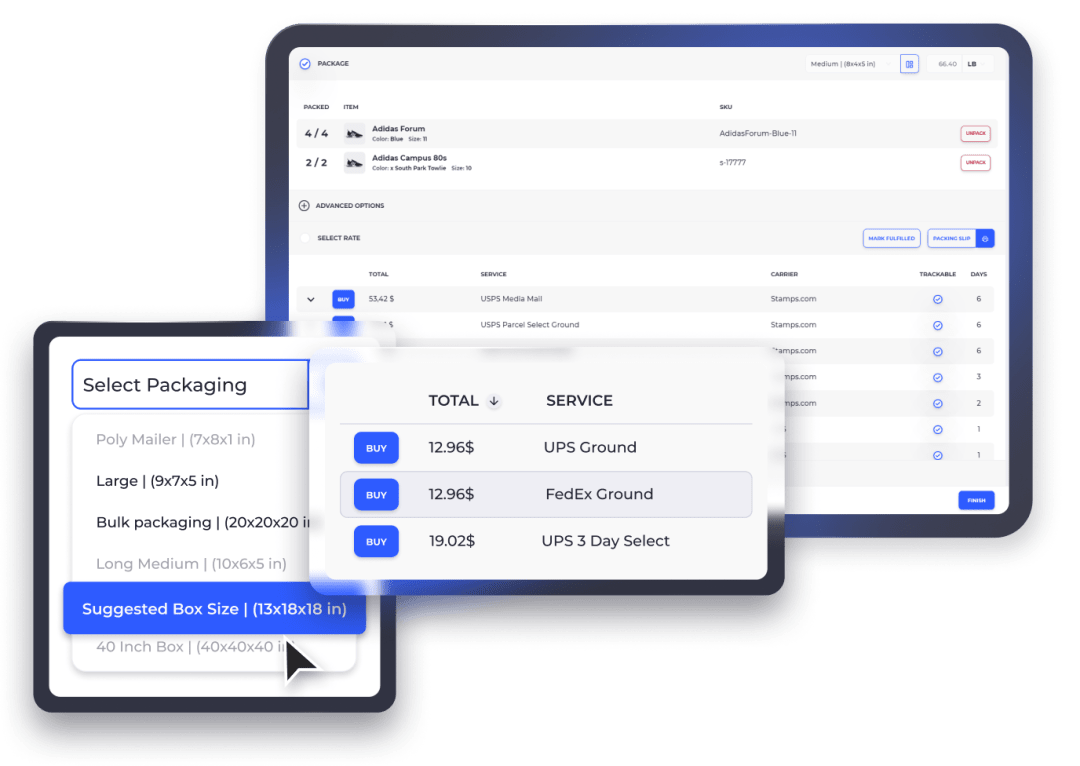
Keep inventory and fulfillment updates connected to Shopify, compare shipping rates, and print labels in the same workflow.
Moving on from Stocky? Shopify retired Stocky on August 31, 2026. If your team also needs bin-level inventory and guided warehouse work, explore how SKUSavvy fits alongside Shopify.
One workspace for your warehouse floor
3D / 2D warehouse map
Bin-level inventory on the layout so the floor matches the system.
Directed put-away + pick routing
Put-away and picks follow the map instead of tribal knowledge.
Scan-to-pick / pack
Batch pick and pick-to-tote with configurable scan checks.
Two-way Shopify sync
Connect Shopify products, orders, and locations with warehouse inventory and fulfillment updates.
POs, receiving, put-away
Vendor purchase orders through receive into bin homes.
Transfers and bin moves
Warehouse transfer orders and bin-to-bin moves on the same map.
Lots / expiry on receive
Receive with lots; picks can prefer FEFO when you need it.
Labels + rate shop in-WMS
Compare available carrier rates and print shipping labels during packing.
Unlimited seats
Bring the whole team into the same workspace. Pricing is based on order volume.
See pricingMobile PWA
Use the browser-based app on phones, tablets, and computers for receiving, picking, and packing.
SavvyBot + reorder signals
Use SavvyBot for in-app help and purchase forecasts to plan replenishment from demand and lead times.
Cycle counts + inventory history
Assign inventory counts and review quantity changes to investigate discrepancies across your warehouse.
A Shopify Plus warehouse management system for growing operations
As order volume grows, location-level stock counts are only part of the picture. Your team also needs to know which bin holds an item, what is waiting to be received, and which orders are ready to pick. SKUSavvy connects Shopify Plus inventory management to the physical work inside your warehouse.
Connect multiple Shopify stores and warehouse locations
Bring connected storefronts into a shared warehouse workspace. Map Shopify locations to the warehouses that hold and fulfill your stock, and review inventory by product, location, and bin. Warehouse transfers support the picking and receiving work when stock moves between sites.
Shopify Plus expansion stores keep separate store data by default. Connect each store and check product matching and location mappings as part of setup; sharing a Shopify organization alone does not synchronize inventory.
Turn order volume into organized fulfillment
Group orders into picking batches, follow routes through your warehouse layout, and use barcode checks to verify the items being handled. Pick-to-tote workflows help keep orders separated as staff collect stock for multiple shipments.
Continue from picking into packing, carrier-rate comparison, and label printing. Connected Shopify fulfillment records keep warehouse shipments tied to the orders they came from. Test split shipments and order changes during setup so the team understands the complete flow.
Inventory control beyond the Shopify storefront
Receiving, purchase orders, and replenishment
Keep the inbound side of the warehouse connected to the outbound workload. Receive purchase orders, check quantities, and put stock into bin locations your pickers can find. Purchase forecasts use demand and lead times to help plan what to buy next.
Set minimum and maximum stock values before using replenishment forecasts. Review the suggested purchases against supplier lead times and current stock, then use warehouse transfers or bin moves to put inventory where the team needs it.
Cycle counts, lots, and quantity history
Assign cycle counts to check system quantities against the stock on your shelves. Review inventory movements when a discrepancy appears, rather than relying on a spreadsheet that only shows the latest balance.
For products that need traceability, capture lot and expiry information in the warehouse workflow. Configure the appropriate stock-selection rules and train receivers and pickers on the required checks. Keeping that detail at the bin level supports more consistent receiving and fulfillment.
How the warehouse tools fit together
Choose around the work your team needs to do. Shopify manages commerce; shipping platforms support fulfillment; SKUSavvy brings visual bin management, guided warehouse work, and shipping into one workflow.
| Capability | Shopify Admin | ShipStation | SKUSavvy |
|---|---|---|---|
Products and sales | Catalog, checkout, and orders | Imports orders for fulfillment | Connects Shopify orders to warehouse work |
Inventory visibility | Stock by Shopify location | Inventory and storage locations | Bin-level stock on a 2D / 3D warehouse map |
Receiving and put-away | Purchase orders and receiving | Inventory tools vary by plan | Purchase orders, receiving, and directed put-away |
Picking and packing | Manage order fulfillment | Batch picking, totes, and scan verification | Layout-aware routes, batch picking, and scan checks |
Multiple locations | Manage Shopify locations | Manage inventory warehouses | Warehouse transfers, bin moves, and receiving |
Shipping | Shopify shipping tools | Rate comparison and labels | Rate comparison and labels within packing |
Pricing | Based on your Shopify plan | Based on plan and selected add-ons | Order-volume pricing with unlimited seats |
ShipStation features depend on the plan and inventory add-ons selected. Compare the workflows you need before choosing your stack.
 |  |  |  |
A Shopify-ready WMS for merchants with a warehouse floor
Connect your Shopify storefronts and warehouse locations in one place. Give receiving, picking, and packing teams a shared view of inventory and orders.

Visual Bin Locations
Turning your warehouse into a visual 3D map on SKUSavvy makes it super quick to find inventory and for new employees to understand pick locations or put-away spots with no prior understanding of your warehouse layout.
Streamlined Multi-Location
Whether you run a single warehouse or a mix of warehouses, stores, and pop-up shops SKUSavvy provides the capability to route across locations, split orders accurately, and transfer inventory between locations with ease.
Accurate Inventory Sync
Track inventory by bin across warehouse locations and keep stock updates connected to Shopify. Use low-stock information to plan replenishment.
The Easy Way to Run Your Warehouse
Handle inventory and fulfillment in one workspace, from the first receipt to the shipping label. Keep the team working from the same stock and order information.
No Limits
Add your team, catalog, vendors, and warehouse locations as your operation grows. Order-volume pricing includes unlimited team members.
Mobile WMS
Manage your entire warehouse from any mobile device with the full platform available on all devices. SKUSavvy makes it easy to handle complex tasks such as inventory replenishment, fulfillment, transfers, and check-in right from your phone.
Powerful Shopify Sync
Connect products, orders, customers, inventory, and fulfillment updates between Shopify and SKUSavvy. Review integration activity when a record needs attention.
Beautiful Interface
Give staff a consistent workspace for receiving, inventory, picking, and packing, with warehouse maps to help them find the right location.
ENHANCED
Warehouse Management Features for Shopify Plus
Advanced Inventory Control
High-Volume Order Processing
Real-time Inventory Data

Automated Stock Replenishment
Set up par levels for your inventory and SKUSavvy will determine repurchase quantity based on key factors

Global Inventory
View your inventory across multiple stores or locations and see exactly which bins a product is in on a visual map

Visual Batch Pick & Fulfillment
The most efficient order batching with pick paths optimized to reduce travel distance while maximizing orders picked
Multi-Store
Connect multiple Shopify Plus stores into one SKUSavvy account to deal with orders and updates in aggregate
Barcode Management
Import your product barcodes and natively scan any barcode type across hardware or camera scanners
Custom Label Builder
Build your own barcodes for products, shipping labels, bins and more directly within the platform
Order Routing
Adopt the routing rules that works best for your store to intelligently match orders with inventory
Automated Bin Replenishment
Setup bin to bin stock transfers for holding stock vs. pick stock and let the system schedule movements
Audit Logs
Every movement within your warehouse is tracked so you can narrow down by movement type, employee, date range, product, order and more
Cycle Count
Keep your inventory counts accurate and easily assign recurring counts on your top moving items
Transfer Workflows
Create and enable staff to move inventory from one location to another with picking and check-in on either side
FASTER PICKING
Optimized Pick Routing
Layout-aware pick routing helps your team find the right bins and reduce unnecessary travel. Barcode checks help new and seasonal staff verify each pick.
Go to less bins while picking more orders with optimized batch picking
Set a starting point and let SKUSavvy plan a route to minimize distance travelled
Empower employees with 3D navigation along an automated pick path


ACCURATE INVENTORY
Real-Time Inventory Controls
Central to the WMS is keeping your inventory count accurate and readily updated across channels.
End-to-end inventory control and audit logs across your network
Inventory updates connected to your Shopify store
Easy cycle counts to keep your system and physical inventories aligned
DATA INFORMED DECISIONS
Visibility Where You Need It
Actionable data throughout all key areas of the WMS so you can drill into inventory, streamline fulfillment, or rebalance stock quickly.
View your complete inventory catalog across locations, bins, order allocations
Provide your staff with the tools to efficiently address inventory and order errors
Filter and sort warehouse data to make it useful in any way your team sees fit

Get Started With the Best WMS for Shopify
Open your account today. Your first 30 days are free, and no credit card is required.
Explore the Platform

Plan your Shopify Plus WMS implementation
Start with a representative warehouse workflow before expanding to every store and location. A clear setup makes it easier to validate the inventory connection and train the team.
1. Map stores, products, and locations
List the Shopify stores you will connect and the locations each one uses. Review SKU and barcode consistency, decide where each product is stocked, and confirm the warehouse responsible for fulfillment.
2. Build the warehouse workflow
Create the warehouse layout, shelves, and bins. Label the locations, check opening quantities, and agree on receiving, put-away, picking, and packing procedures with the people doing the work.
3. Verify orders from receipt to shipment
Run representative orders through the full process: import, allocation, picking, packing, labels, and fulfillment updates. Include a partial shipment, a stock transfer, and a return before broadening the rollout.
Shopify Plus WMS questions
What is a Shopify WMS?
Software that runs the physical warehouse for a Shopify merchant: bin homes, put-away, pick paths, pack, and often labels, while Shopify remains the sales and catalog source of truth. SKUSavvy is a mobile-first WMS (PWA) with two-way Shopify sync.
Do I need Shopify Plus for SKUSavvy?
No. Plus is not required. The product is for Shopify merchants who fulfill at least some of their own stock.
How is a WMS different from Shopify Admin inventory after Stocky?
Shopify tracks stock by location. SKUSavvy adds bin-level visibility, directed put-away, layout-aware pick routes, and barcode checks for the physical warehouse workflow.
How does SKUSavvy integrate with Shopify?
Connect Shopify products, orders, and locations with warehouse inventory and fulfillment updates.
How much does a Shopify WMS cost?
Pricing is based on monthly order volume, with unlimited team members. Use the pricing calculator for your volume and start with a 30-day free trial.
Calculate your pricingCan my team work from a phone or tablet?
Yes. Open the SKUSavvy web app on a phone, tablet, or computer to use the warehouse workflows on the floor.
Start your trialHow does the visual warehouse map help?
See shelves and bin locations in context so staff can find stock, follow pick routes, and understand put-away locations.
Can SKUSavvy handle returns?
Receive returned items, restock inventory where appropriate, and review the quantity history for the resulting stock movements.
Does Shopify Plus include a warehouse management system?
Shopify Plus includes commerce and location-level inventory capabilities. SKUSavvy adds the warehouse workflow: visual bin locations, directed put-away, layout-aware picking, barcode checks, packing, and shipping. Choose based on the work your team needs to perform inside the warehouse.
Can I connect more than one Shopify Plus store?
SKUSavvy supports connecting multiple Shopify stores. Each connection needs its own product and location setup. Review how matching products map to inventory before enabling the warehouse workflow across your storefronts.
Explore the Shopify integrationCan a WMS help with peak-season fulfillment?
Batch picking, visual pick routes, and barcode checks give staff a repeatable process as order volume changes. Prepare bin locations, replenishment, packing stations, and training before a peak period; results depend on the warehouse setup and workload.
How do I compare Shopify Plus WMS software?
Compare the complete workflow: store connections, inventory by bin, receiving, transfers, cycle counts, picking, packing, shipping, and integration options. Test with your own order patterns and include order volume, postage, and any optional services when estimating cost.
Estimate your WMS costKeep exploring Shopify warehouse operations
Stocky alternative
Plan warehouse operations after Stocky with bin-level inventory and guided workflows.
Read